The QTextTableFormat class provides formatting information for tables in a QTextDocument . 更多...
继承 QTextFrameFormat .
The QTextTableFormat class provides formatting information for tables in a QTextDocument .
A table is a group of cells ordered into rows and columns. Each table contains at least one row and one column. Each cell contains a block. Tables in rich text documents are formatted using the properties defined in this class.
Tables are horizontally justified within their parent frame according to the table's alignment. This can be read with the alignment () function and set with setAlignment ().
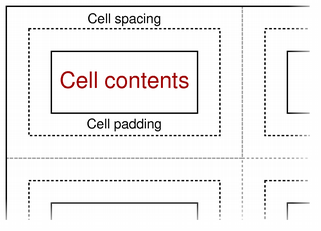
Cells within the table are separated by cell spacing. The number of pixels between cells is set with setCellSpacing () 和 read with cellSpacing (). The contents of each cell is surrounded by cell padding. The number of pixels between each cell edge and its contents is set with setCellPadding () 和 read with cellPadding ().
The table's background color can be read with the background () function, and can be 指定采用 setBackground ()。 background color of each cell can be set independently, and will control the color of the cell within the padded area.
The table format also provides a way to constrain the widths of the columns in the table. Columns can be assigned a fixed width, a variable width, or a percentage of the available width (see QTextLength ). The columns () function returns the number of columns with constraints, and the columnWidthConstraints () function returns the constraints defined for the table. These quantities can also be set by calling setColumnWidthConstraints () with a vector containing new constraints. If no constraints are required, clearColumnWidthConstraints () can be used to remove them.
Constructs a new table format object.
Returns the table's alignment.
另请参阅 setAlignment ().
Returns the table's cell padding. This describes the distance between the border of a cell and its contents.
另请参阅 setCellPadding ().
Returns the table's cell spacing. This describes the distance between adjacent cells.
另请参阅 setCellSpacing ().
Clears the column width constraints for the table.
另请参阅 columnWidthConstraints () and setColumnWidthConstraints ().
Returns the number of columns specified by the table format.
Returns a list of constraints used by this table format to control the appearance of columns in a table.
另请参阅 setColumnWidthConstraints ().
Returns the number of rows in the table that define the header.
该函数在 Qt 4.2 引入。
另请参阅 setHeaderRowCount ().
Returns true if this table format is valid; otherwise returns false.
Sets the table's alignment .
另请参阅 alignment ().
Sets the cell padding for the table. This determines the distance between the border of a cell and its contents.
另请参阅 cellPadding ().
Sets the cell spacing for the table. This determines the distance between adjacent cells.
另请参阅 cellSpacing ().
Sets the column width constraints for the table.
另请参阅 columnWidthConstraints () and clearColumnWidthConstraints ().
Declares the first count rows of the table as table header. The table header rows get repeated when a table is broken across a page boundary.
该函数在 Qt 4.2 引入。
另请参阅 headerRowCount ().
