The QtNetwork module provides classes that allow you to write TCP/IP and UDP clients and servers. 更多...
The QtNetwork module offers classes that allow you to write TCP/IP clients and servers.
The network module provides classes to make network programming easier and portable. It offers both high-level classes such as QHttp and QFtp that implement specific application-level protocols, and lower-level classes such as QTcpSocket , QTcpServer ,和 QUdpSocket .
To import the module use, for example, the following statement:
from PyQt4 import QtNetwork
话题:
HTTP (Hypertext Transfer Protocol) is an application-level network protocol used mainly for downloading HTML and XML files, but it is also used as a high-level transport protocol for many other types of data, from images and movies to purchase orders and banking transactions. In contrast, FTP (File Transfer Protocol) is a protocol used almost exclusively for browsing remote directories and for transferring files.
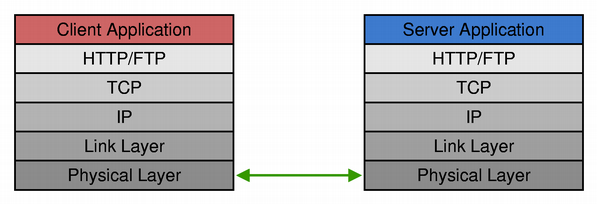
HTTP is a simpler protocol than FTP in many ways. It uses only one network connection, while FTP uses two (one for sending commands, and one for transferring data). HTTP is a stateless protocol; requests and responses are always self-contained. The FTP protocol has a state and requires the client to send several commands before a file transfer takes place.
In practice, HTTP clients often use separate connections for separate requests, whereas FTP clients establish one connection and keep it open throughout the session.
QHttp and QFtp classes provide client-side support for HTTP and FTP. Since the two protocols are used to solve the same problems, the QHttp and QFtp classes have many features in common:
There are two main ways of using QHttp and QFtp . The most common approach is to keep track of the command IDs and follow the execution of every command by connecting to the appropriate signals. The other approach is to schedule all commands at once and only connect to the done() signal, which is emitted when all scheduled commands have been executed. The first approach requires more work, but it gives you more control over the execution of individual commands and allows you to initiate new commands based on the result of a previous command. It also enables you to provide detailed feedback to the user.
HTTP and FTP examples illustrate how to write an HTTP and an FTP client.
Writing your own HTTP or FTP server is possible using the lower-level classes QTcpSocket and QTcpServer .
TCP (传输控制协议) 是用于大多数 Internet 协议 (包括 HTTP 和 FTP) 的低级数据传输网络协议。它是可靠的、面向流的、面向连接的传输协议。它尤其适合于连续数据传输。

QTcpSocket 类为 TCP 提供接口。可以使用 QTcpSocket 以实现标准网络协议 (譬如:POP3、SMTP 和 NNTP) 及自定义协议。
必须建立到远程主机和端口的 TCP 连接,在开始传输任何数据之前。一旦建立连接,对等方的 IP 地址和端口就是可用的透过 QTcpSocket.peerAddress () 和 QTcpSocket.peerPort ()。在任何时候,对等方都可以关闭连接,然后数据传输将立即停止。
QTcpSocket 异步工作并发射信号以报告状态改变和错误,就像 QHttp and QFtp 。它依赖事件循环来检测传入数据并自动刷新传出数据。可以把数据写入套接字使用 QTcpSocket.write (),和读取数据使用 QTcpSocket.read (). QTcpSocket 表示 2 个独立数据流:一个用于读取,一个用于写入。
Since QTcpSocket 继承 QIODevice ,可以使用它采用 QTextStream and QDataStream 。当读取自 QTcpSocket ,必须确保有足够的可用数据通过调用 QTcpSocket.bytesAvailable () 事先。
若需要处理传入的 TCP 连接 (如:在服务器应用程序中),使用 QTcpServer 类。调用 QTcpServer.listen () 去设置服务器,并连接到 QTcpServer.newConnection () 信号,对每个连接客户端发射一次。在槽中,调用 QTcpServer.nextPendingConnection () 以接受连接并使用返回的 QTcpSocket 来与客户端通信。
尽管其大多数函数是异步工作的,它是可能的使用 QTcpSocket 同步 (即:阻塞)。要获得阻塞行为,调用 QTcpSocket 的 waitFor...() 函数;它们挂起调用线程直到信号被发射为止。例如,先调用非阻塞 QTcpSocket.connectToHost () 函数,调用 QTcpSocket.waitForConnected () 以阻塞线程直到 connected() 信号已被发射。
同步套接字常导致代码具有更简单的控制流。waitFor...() 方式的主要缺点是当 waitFor...() 函数阻塞时事件不会被处理。若用于 GUI 线程,这可能冻结应用程序的用户界面。由于此原因,推荐只在非 GUI 线程中使用同步套接字。当同步使用时, QTcpSocket 不要求事件循环。
Fortune 客户端 and Fortune 服务器 范例展示如何使用 QTcpSocket and QTcpServer 编写 TCP 客户端-服务器应用程序。另请参阅 阻塞 Fortune 客户端 范例了解如何使用同步 QTcpSocket 在单独线程 (不使用事件循环),和 线程化 Fortune 服务器 范例了解每个活动客户端采用一线程的多线程 TCP 服务器。
UDP (用户数据报协议) 是轻量、不可靠、面向数据报的无连接协议。可以使用它,当可靠性不重要时。例如,报告每天时间的服务器可以选择 UDP。若丢失每天时间的数据报,客户端可以简单生成另一请求。

QUdpSocket 类允许您发送和接收 UDP 数据报。它继承 QAbstractSocket ,因此,它共享了大部分的 QTcpSocket 接口。主要差异是 QUdpSocket 以数据报的形式传输数据,而不是连续数据流。简而言之,数据报是限制大小的数据包 (通常小于 512 字节),包含数据报发送器和接收器的 IP 地址和端口,除要传输的数据外。
QUdpSocket 支持 IPv4 广播。广播经常被用于实现网络探索协议 (譬如:查找网络中哪台主机拥有最多的空闲硬盘空间)。一台主机向所有其它主机接收的网络广播数据报。每台收到请求的主机然后按其当前空闲磁盘空间的数量发送回复。始发者等待直到收到来自所有主机的回复,然后可以选择拥有最多空闲空间的服务器来存储数据。要广播数据报,把它简单发送到特殊地址 QHostAddress.Broadcast (255.255.255.255),或本地网络的广播地址。
QUdpSocket.bind () 准备套接字为接受传入数据报,就像 QTcpServer.listen () 对于 TCP 服务器。每当一个或多个数据报到达时, QUdpSocket 发射 readyRead() 信号。调用 QUdpSocket.readDatagram () 以读取数据报。
广播发送器 and 广播接收器 范例展示如何使用 Qt 编写 UDP 发送器和 UDP 接收器。
在建立网络连接之前, QTcpSocket and QUdpSocket 履行名称查找,把要连接的主机名转换成 IP 地址。通常使用 DNS (域名服务) 协议履行此操作。
QHostInfo 提供静态函数,允许您自己履行这样的查找。通过调用 QHostInfo.lookupHost () 采用主机名, QObject 指针及槽签名, QHostInfo 将履行名称查找并在结果就绪时援引给定槽。实际查找是在单独线程中完成的,利用操作系统自己的名称查找履行方法。
QHostInfo 还提供静态函数称为 QHostInfo.fromName () 以主机名作为自变量并返回结果。在此情况下,名称查找在如调用者相同的线程中履行。此重载对于非 GUI 应用程序或在单独的非 GUI 线程中履行名称查找很有用。(在 GUI 线程中调用此函数可能导致用户界面被冻结,当函数履行查找时还会阻塞。)
