QActionGroup 类把动作分组在一起。 更多...
继承 QObject .
QActionGroup 类把动作分组在一起。
In some situations it is useful to group QAction objects together. For example, if you have a Left Align action, a Right Align action, a Justify action, and a Center action, only one of these actions should be active at any one time. One simple way of achieving this is to group the actions together in an action group.
Here's a example (from the 菜单 范例):
     alignmentGroup = new QActionGroup(this);
     alignmentGroup->addAction(leftAlignAct);
     alignmentGroup->addAction(rightAlignAct);
     alignmentGroup->addAction(justifyAct);
     alignmentGroup->addAction(centerAct);
     leftAlignAct->setChecked(true);
Here we create a new action group. Since the action group is exclusive by default, only one of the actions in the group is checked at any one time.
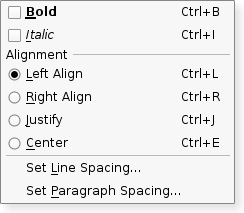
A QActionGroup emits an triggered () signal when one of its actions is chosen. Each action in an action group emits its triggered () signal as usual.
As stated above, an action group is exclusive by default; it ensures that only one checkable action is active at any one time. If you want to group checkable actions without making them exclusive, you can turn of exclusiveness by calling setExclusive(false).
Actions can be added to an action group using addAction (), but it is usually more convenient to specify a group when creating actions; this ensures that actions are automatically created with a parent. Actions can be visually separated from each other by adding a separator action to the group; create an action and use QAction 's setSeparator() function to make it considered a separator. Action groups are added to widgets with the QWidget.addActions () 函数。
parent argument, if not None, causes self to be owned by Qt instead of PyQt.
Constructs an action group for the parent 对象。
The action group is exclusive by default. Call setExclusive(false) to make the action group non-exclusive.
Returns the list of this groups's actions. This may be empty.
a argument has it's ownership transferred to Qt.
添加 action to this group, and returns it.
Normally an action is added to a group by creating it with the group as its parent, so this function is not usually used.
另请参阅 QAction.setActionGroup ().
Creates and returns an action with text . The newly created action is a child of this action group.
Normally an action is added to a group by creating it with the group as parent, so this function is not usually used.
另请参阅 QAction.setActionGroup ().
Creates and returns an action with text 和 icon . The newly created action is a child of this action group.
Normally an action is added to a group by creating it with the group as its parent, so this function is not usually used.
另请参阅 QAction.setActionGroup ().
Returns the currently checked action in the group, or 0 if none are checked.
a argument
移除 action from this group. The action will have no parent as a result.
另请参阅 QAction.setActionGroup ().
This method is also a Qt slot with the C++ signature void setDisabled(bool) .
这是方便函数,为 enabled property, that is useful for signals--slots connections. If b 为 true action group is disabled; otherwise it is enabled.
This method is also a Qt slot with the C++ signature void setEnabled(bool) .
This method is also a Qt slot with the C++ signature void setExclusive(bool) .
This method is also a Qt slot with the C++ signature void setVisible(bool) .
This is the default overload of this signal.
This signal is emitted when the given action 在 action group is highlighted by the user; for example, when the user pauses with the cursor over a menu option, toolbar button, or presses an action's shortcut key combination.
另请参阅 QAction.activate ().
This is the default overload of this signal.
This is the default overload of this signal.
This signal is emitted when the given action 在 action group is activated by the user; for example, when the user clicks a menu option, toolbar button, or presses an action's shortcut key combination.
Connect to this signal for command actions.
另请参阅 QAction.activate ().
