The QDesktopWidget class provides access to screen information on multi-head systems. 更多...
继承 QWidget .
The QDesktopWidget class provides access to screen information on multi-head systems.
Systems with more than one graphics card and monitor can manage the physical screen space available either as multiple desktops, or as a large virtual desktop.
This class provides information about the user's desktop, such as its total size, number of screens, the geometry of each screen, and whether they are configured as separate desktops or a single virtual desktop.
Widgets provided by Qt use this class to place tooltips, menus and dialog boxes on the correct screen for their parent or application widgets. Applications can use this class to obtain information that can be used to save window positions, or to place child widgets and dialogs on one particular screen.
QApplication.desktop () function is used to get an instance of QDesktopWidget.
Widget 的 screenGeometry () function provides information about the geometry of the available screens with. The number of screens available is returned by screenCount ,和 screenCountChanged () signal is emitted when screens are added or removed. The screen number that a particular point or widget is located in is returned by screenNumber ().
要获得特定屏幕的尺度,调用 screenGeometry () function. On some desktop environments, not all of the screen is available for applications to use; for example, an application dock or menu bar may take up some space. Use the availableGeometry () function to obtain the available area for applications.
QDesktopWidget 还继承 QWidget 特性, width () 和 height (), which specify the size of the desktop. However, for desktops with multiple screens, the size of the desktop is the union of all the screen sizes, so width () 和 height () 应该 not be used for computing the size of a widget to be placed on one of the screens.
On systems that are configured to use the available screens as a single, large virtual desktop, the virtualDesktop property will be set to true. In this case, the widget's size is usually the size of the bounding rectangle of all the screens.
For an application, the screen where the main widget resides is the primary screen. This is stored in the primaryScreen property. All windows opened in the context of the application should be constrained to the boundaries of the primary screen; for example, it would be inconvenient if a dialog box popped up on a different screen, or split over two screens.
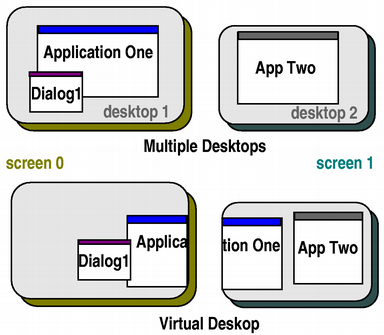
In the illustration above, Application One's primary screen is screen 0, and App Two's primary screen is screen 1.
Returns the available geometry of the screen with index screen . What is available will be subrect of screenGeometry () based on what the platform decides is available (for example excludes the dock and menu bar on Mac OS X, or the task bar on Windows). The default screen is used if screen is -1.
注意: In Symbian devices the available geometry reported by QDesktopWidget 不是 guaranteed to be correct at the time the geometry change resize event is passed to widgets. The correct way to listen for available geometry changes is to connect to the workAreaResized () signal of QDesktopWidget .
另请参阅 screenNumber () 和 screenGeometry ().
这是重载函数。
返回屏幕的可用几何体,其包含 widget .
另请参阅 screenGeometry ().
这是重载函数。
返回屏幕的可用几何体,其包含 p .
另请参阅 screenGeometry ().
重实现自 QWidget.resizeEvent ().
Returns a widget that represents the screen with index screen (a value of -1 means the default screen).
If the system uses a virtual desktop, the returned widget will have the geometry of the entire virtual desktop; i.e., bounding every screen .
另请参阅 primaryScreen , screenCount ,和 virtualDesktop .
Returns the geometry of the screen with index screen 。 default screen is used if screen is -1.
注意: In Symbian devices the screen geometry reported by QDesktopWidget is not guaranteed to be correct at the time the geometry change resize event is passed to widgets. The correct way to listen for screen geometry changes is to connect to the resized () signal of QDesktopWidget .
另请参阅 screenNumber ().
这是重载函数。
返回屏幕的几何体,其包含 widget .
这是重载函数。
返回屏幕的几何体,其包含 p .
Returns the index of the screen that contains the largest part of widget ,或 -1 若 Widget 不在屏幕上。
另请参阅 primaryScreen .
这是重载函数。
Returns the index of the screen that contains the point , or the screen which is the shortest distance from the point .
另请参阅 primaryScreen .
This is the default overload of this signal.
This signal is emitted when the size of screen 改变。
This is the default overload of this signal.
This signal is emitted when the number of screens changes to newCount .
该函数在 Qt 4.6 引入。
另请参阅 screenCount .
This is the default overload of this signal.
This signal is emitted when the work area available on screen 改变。
