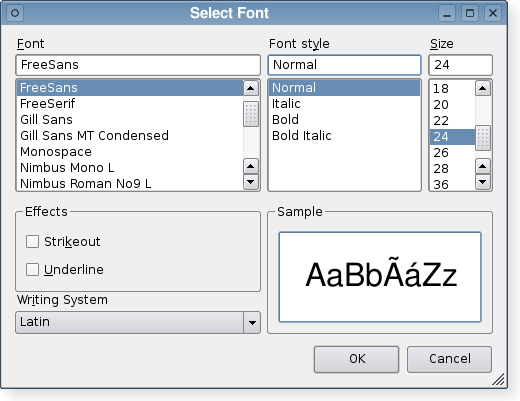
The QFontDialog class provides a dialog widget for selecting a font. 更多...
继承 QDialog .
The QFontDialog class provides a dialog widget for selecting a font.
字体对话框的创建是透过某一静态 getFont () 函数。
范例:
 bool ok;
 QFont font = QFontDialog.getFont(
                 &ok, QFont("Helvetica [Cronyx]", 10), this);
 if (ok) {
     // the user clicked OK and font is set to the font the user selected
 } else {
     // the user canceled the dialog; font is set to the initial
     // value, in this case Helvetica [Cronyx], 10
 }
The dialog can also be used to set a widget's font directly:
myWidget.setFont(QFontDialog.getFont(0, myWidget.font()));
If the user clicks OK the font they chose will be used for myWidget, and if they click Cancel the original font is used.
This enum specifies various options that affect the look and feel of a font dialog.
| 常量 | 值 | 描述 |
|---|---|---|
| QFontDialog.NoButtons | 0x00000001 | Don't display OK and Cancel buttons. (Useful for "live dialogs".) |
| QFontDialog.DontUseNativeDialog | 0x00000002 | Use Qt's standard font dialog on the Mac instead of Apple's native font panel. (Currently, the native dialog is never used, but this is likely to change in future Qt releases.) |
该枚举在 Qt 4.5 引入或被修改。
The FontDialogOptions type is a typedef for QFlags <FontDialogOption>. It stores an OR combination of FontDialogOption values.
另请参阅 options , setOption (),和 testOption ().
parent argument, if not None, causes self to be owned by Qt instead of PyQt.
Constructs a standard font dialog.
使用 setCurrentFont () 去设置 initial font attributes.
parent parameter is passed to the QDialog 构造函数。
该函数在 Qt 4.5 引入。
另请参阅 getFont ().
parent argument, if not None, causes self to be owned by Qt instead of PyQt.
Constructs a standard font dialog with the given parent and specified initial font.
该函数在 Qt 4.5 引入。
重实现自 QWidget.changeEvent ().
重实现自 QDialog.done ().
关闭对话框并将其结果代码设为 result 。若 this dialog is shown with exec_ (), done() causes the local event loop to finish, and exec_ () to return result .
另请参阅 QDialog.done ().
执行模态字体对话框并返回字体。
If the user clicks OK , the selected font is returned. If the user clicks Cancel , initial font is returned.
The dialog is constructed with the given parent 和 options specified in options . title is shown as the window title of the dialog and initial is the initially selected font. If the ok parameter is not-null, the value it refers to is set to true if the user clicks OK , and set to false if the user clicks Cancel .
范例:
 bool ok;
 QFont font = QFontDialog.getFont(&ok, QFont("Times", 12), this);
 if (ok) {
     // font is set to the font the user selected
 } else {
     // the user canceled the dialog; font is set to the initial
     // value, in this case Times, 12.
 }
The dialog can also be used to set a widget's font directly:
myWidget.setFont(QFontDialog.getFont(0, myWidget.font()));
In this example, if the user clicks OK the font they chose will be used, and if they click Cancel the original font is used.
警告: Do not delete parent during the execution of the dialog. If you want to do this, you should create the dialog yourself using one of the QFontDialog 构造函数。
Call getFont( ok , initial , parent ) 代替。
警告: Do not delete parent during the execution of the dialog. If you want to do this, you should create the dialog yourself using one of the QFontDialog 构造函数。
name 参数被忽略。
该函数在 Qt 4.5 引入。
Call getFont( ok , parent ) instead.
警告: Do not delete parent during the execution of the dialog. If you want to do this, you should create the dialog yourself using one of the QFontDialog 构造函数。
name 参数被忽略。
这是重载函数。
该函数在 Qt 4.5 引入。
这是重载函数。
打开对话框并连接其 fontSelected () 信号到 slot specified by receiver and member .
The signal will be disconnected from the slot when the dialog is closed.
该函数在 Qt 4.5 引入。
Returns the font that the user selected by clicking the OK or equivalent button.
注意: This font is not always the same as the font held by the currentFont property since the user can choose different fonts before finally selecting the one to use.
设置给定 option to be enabled if on is true; otherwise, clears the given option .
另请参阅 options and testOption ().
重实现自 QWidget.setVisible ().
Returns true if the given option is enabled; otherwise, returns false.
另请参阅 options and setOption ().
This is the default overload of this signal.
This signal is emitted when the current font is changed. The new font is specified in font .
The signal is emitted while a user is selecting a font. Ultimately, the chosen font may differ from the font currently selected.
该函数在 Qt 4.5 引入。
另请参阅 currentFont , fontSelected (),和 selectedFont ().
This is the default overload of this signal.
This signal is emitted when a font has been selected. The selected font is specified in font .
The signal is only emitted when a user has chosen the final font to be used. It is not emitted while the user is changing the current font in the font dialog.
该函数在 Qt 4.5 引入。
另请参阅 selectedFont (), currentFontChanged (),和 currentFont .
