The QFormLayout class manages forms of input widgets and their associated labels. 更多...
继承 QLayout .
The QFormLayout class manages forms of input widgets and their associated labels.
QFormLayout is a convenience layout class that lays out its children in a two-column form. The left column consists of labels and the right column consists of "field" widgets (line editors, spin boxes, etc.).
Traditionally, such two-column form layouts were achieved using QGridLayout . QFormLayout is a higher-level alternative that provides the following advantages:
例如, Mac OS X Aqua and KDE guidelines specify that the labels should be right-aligned, whereas Windows and GNOME applications normally use left-alignment.
For devices with small displays, QFormLayout can be set to wrap long rows , or even to wrap all rows .
addRow () overload that 接受 QString 和 QWidget * creates a QLabel behind the scenes and automatically set up its buddy. We can then write code like this:
 QFormLayout *formLayout = new QFormLayout;
 formLayout->addRow(tr("&Name:"), nameLineEdit);
 formLayout->addRow(tr("&Email:"), emailLineEdit);
 formLayout->addRow(tr("&Age:"), ageSpinBox);
 setLayout(formLayout);
Compare this with the following code, written using QGridLayout :
 nameLabel = new QLabel(tr("&Name:"));
 nameLabel->setBuddy(nameLineEdit);
 emailLabel = new QLabel(tr("&Name:"));
 emailLabel->setBuddy(emailLineEdit);
 ageLabel = new QLabel(tr("&Name:"));
 ageLabel->setBuddy(ageSpinBox);
 QGridLayout *gridLayout = new QGridLayout;
 gridLayout->addWidget(nameLabel, 0, 0);
 gridLayout->addWidget(nameLineEdit, 0, 1);
 gridLayout->addWidget(emailLabel, 1, 0);
 gridLayout->addWidget(emailLineEdit, 1, 1);
 gridLayout->addWidget(ageLabel, 2, 0);
 gridLayout->addWidget(ageSpinBox, 2, 1);
 setLayout(gridLayout);
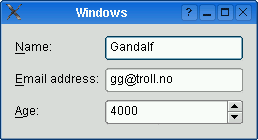
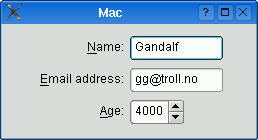
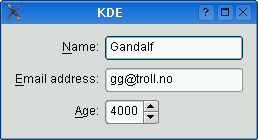
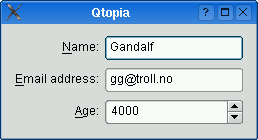
The table below shows the default appearance in different styles.
| QCommonStyle derived styles (except QPlastiqueStyle ) | QMacStyle | QPlastiqueStyle | Qt Extended styles |
|---|---|---|---|
|
|
|
|
| Traditional style used for Windows, GNOME, and earlier versions of KDE. Labels are left aligned, and expanding fields grow to fill the available space. (This normally corresponds to what we would get using a two-column QGridLayout .) | Style based on the Mac OS X Aqua guidelines. Labels are right-aligned, the fields don't grow beyond their size hint, and the form is horizontally centered. | Recommended style for KDE applications . Similar to MacStyle, except that the form is left-aligned and all fields grow to fill the available space. | Default style for Qt Extended styles. Labels are right-aligned, expanding fields grow to fill the available space, and row wrapping is enabled for long lines. |
The form styles can be also be overridden individually by calling setLabelAlignment (), setFormAlignment (), setFieldGrowthPolicy (), and setRowWrapPolicy (). For example, to simulate the form layout appearance of QMacStyle on all platforms, but with left-aligned labels, you could write:
 formLayout->setRowWrapPolicy(QFormLayout.DontWrapRows);
 formLayout->setFieldGrowthPolicy(QFormLayout.FieldsStayAtSizeHint);
 formLayout->setFormAlignment(Qt.AlignHCenter | Qt.AlignTop);
 formLayout->setLabelAlignment(Qt.AlignLeft);
This enum specifies the different policies that can be used to control the way in which the form's fields grow.
| 常量 | 值 | 描述 |
|---|---|---|
| QFormLayout.FieldsStayAtSizeHint | 0 | The fields never grow beyond their effective size hint . This is the default for QMacStyle . |
| QFormLayout.ExpandingFieldsGrow | 1 | Fields with an horizontal size policy of Expanding or MinimumExpanding will grow to fill the available space. The other fields will not grow beyond their effective size hint. This is the default policy for Plastique. |
| QFormLayout.AllNonFixedFieldsGrow | 2 | All fields with a size policy that allows them to grow will grow to fill the available space. This is the default policy for most styles. |
另请参阅 fieldGrowthPolicy .
This enum specifies the types of widgets (or other layout items) that may appear in a row.
| 常量 | 值 | 描述 |
|---|---|---|
| QFormLayout.LabelRole | 0 | A label widget. |
| QFormLayout.FieldRole | 1 | A field widget. |
| QFormLayout.SpanningRole | 2 | A widget that spans label and field columns. |
另请参阅 itemAt () and getItemPosition ().
This enum specifies the different policies that can be used to control the way in which the form's rows wrap.
| 常量 | 值 | 描述 |
|---|---|---|
| QFormLayout.DontWrapRows | 0 | Fields are always laid out next to their label. This is the default policy for all styles except Qt Extended styles and QS60Style . |
| QFormLayout.WrapLongRows | 1 | Labels are given enough horizontal space to fit the widest label, and the rest of the space is given to the fields. If the minimum size of a field pair is wider than the available space, the field is wrapped to the next line. This is the default policy for Qt Extended styles and and QS60Style . |
| QFormLayout.WrapAllRows | 2 | Fields are always laid out below their label. |
另请参阅 rowWrapPolicy .
parent argument, if not None, causes self to be owned by Qt instead of PyQt.
Constructs a new form layout with the given parent 小部件。
另请参阅 QWidget.setLayout ().
item argument has it's ownership transferred to Qt.
重实现自 QLayout.addItem ().
label argument has it's ownership transferred to Qt.
field argument has it's ownership transferred to Qt.
Adds a new row to the bottom of this form layout, with the given label and field .
另请参阅 insertRow ().
label argument has it's ownership transferred to Qt.
field argument has it's ownership transferred to Qt.
这是重载函数。
field argument has it's ownership transferred to Qt.
这是重载函数。
This overload automatically creates a QLabel behind the scenes with labelText as its text. The field is set as the new QLabel 's buddy .
field argument has it's ownership transferred to Qt.
这是重载函数。
This overload automatically creates a QLabel behind the scenes with labelText as its text.
widget argument has it's ownership transferred to Qt.
这是重载函数。
Adds the specified widget at the end of this form layout. widget spans both columns.
layout argument has it's ownership transferred to Qt.
这是重载函数。
Adds the specified layout at the end of this form layout. layout spans both columns.
重实现自 QLayout.count ().
重实现自 QLayoutItem.expandingDirections ().
Retrieves the row and role (column) of the item at the specified index 。若 index is out of bounds, * rowPtr is set to -1; otherwise the row is stored in * rowPtr 和 role is stored in * rolePtr .
另请参阅 itemAt (), count (), getLayoutPosition (),和 getWidgetPosition ().
Retrieves the row and role (column) of the specified child layout 。若 layout is not in the form layout, * rowPtr is set to -1; otherwise the row is stored in * rowPtr and the role is stored in * rolePtr .
Retrieves the row and role (column) of the specified widget in the layout. If widget is not in the layout, * rowPtr is set to -1; otherwise the row is stored in * rowPtr and the role is stored in * rolePtr .
另请参阅 getItemPosition () 和 itemAt ().
重实现自 QLayoutItem.hasHeightForWidth ().
重实现自 QLayoutItem.heightForWidth ().
label argument has it's ownership transferred to Qt.
field argument has it's ownership transferred to Qt.
Inserts a new row at position row in this form layout, with the given label and field 。若 row is out of bounds, the new row is added at the end.
另请参阅 addRow ().
label argument has it's ownership transferred to Qt.
field argument has it's ownership transferred to Qt.
这是重载函数。
field argument has it's ownership transferred to Qt.
这是重载函数。
This overload automatically creates a QLabel behind the scenes with labelText as its text. The field is set as the new QLabel 's buddy .
field argument has it's ownership transferred to Qt.
这是重载函数。
This overload automatically creates a QLabel behind the scenes with labelText as its text.
widget argument has it's ownership transferred to Qt.
这是重载函数。
Inserts the specified widget 在位置 row in this form layout. The widget spans both columns. If row is out of bounds, the widget is added at the end.
layout argument has it's ownership transferred to Qt.
这是重载函数。
Inserts the specified layout 在位置 row in this form layout. The layout spans both columns. If row is out of bounds, the widget is added at the end.
重实现自 QLayoutItem.invalidate ().
Returns the layout item in the given row 采用 specified role (column). Returns 0 if there is no such 项。
另请参阅 QLayout.itemAt () 和 setItem ().
重实现自 QLayout.itemAt ().
Returns the label associated with the given field .
另请参阅 itemAt ().
这是重载函数。
重实现自 QLayoutItem.minimumSize ().
Returns the number of rows in the form.
另请参阅 QLayout.count ().
重实现自 QLayoutItem.setGeometry ().
item argument has it's ownership transferred to Qt.
设置项在给定 row 为给定 role to item , extending the layout with empty rows if necessary.
If the cell is already occupied, the item is not inserted and an error message is sent to the console. The item spans both columns.
警告: Do not use this function to add child layouts or child widget items. Use setLayout () 或 setWidget () 代替。
另请参阅 setLayout ().
layout argument has it's ownership transferred to Qt.
Sets the sub-layout in the given row 为给定 role to layout , extending the form layout with empty rows if necessary.
If the cell is already occupied, the layout 不是 inserted and an error message is sent to the console.
注意: For most applications, addRow () 或 insertRow () should be used instead of setLayout().
另请参阅 setWidget ().
This function sets both the vertical and horizontal spacing to spacing .
另请参阅 spacing (), setVerticalSpacing (), and setHorizontalSpacing ().
widget argument has it's ownership transferred to Qt.
Sets the widget in the given row 为给定 role to widget , extending the layout with empty rows 若有必要。
If the cell is already occupied, the widget 不是 inserted and an error message is sent to the console.
注意: For most applications, addRow () 或 insertRow () should be used instead of setWidget().
另请参阅 setLayout ().
重实现自 QLayoutItem.sizeHint ().
If the vertical spacing is equal to the horizontal spacing, this function returns that value; otherwise it returns -1.
另请参阅 setSpacing (), verticalSpacing (),和 horizontalSpacing ().
QLayoutItem result
重实现自 QLayout.takeAt ().
