The QMenu class provides a menu widget for use in menu bars, context menus, and other popup menus. 更多...
继承 QWidget .
The QMenu class provides a menu widget for use in menu bars, context menus, and other popup menus.
A menu widget is a selection menu. It can be either a pull-down menu in a menu bar or a standalone context menu. Pull-down menus are shown by the menu bar when the user clicks on the respective item or presses the specified shortcut key. Use QMenuBar.addMenu () to insert a menu into a menu bar. Context menus are usually invoked by some special keyboard key or by right-clicking. They can be executed either asynchronously with popup () 或 synchronously with exec_ (). Menus can also be invoked in response to button presses; these are just like context menus except for how they are invoked.
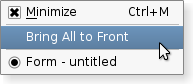
|
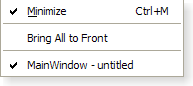
|
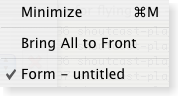
|
Fig. A menu shown in Plastique widget style , Windows XP widget style ,和 Macintosh widget style .
A menu consists of a list of action items. Actions are added 采用 addAction (), addActions () 和 insertAction () functions. An action is represented vertically and rendered by QStyle . In addition, actions can have a text label, an optional icon drawn on the very left side, and shortcut key sequence such as "Ctrl+X".
The existing actions held by a menu can be found with actions ().
There are four kinds of action items: separators, actions that show a submenu, widgets, and actions that perform an action. Separators are inserted with addSeparator (), submenus with addMenu (), and all other items are considered action items.
When inserting action items you usually specify a receiver and a slot. The receiver will be notifed whenever the item is triggered() . In addition, QMenu provides two signals, activated () 和 highlighted (), which signal the QAction that was triggered from the menu.
清零菜单采用 clear () 和 remove individual action items with removeAction ().
A QMenu can also provide a tear-off menu. A tear-off menu is a top-level window that contains a copy of the menu. This makes it possible for the user to "tear off" frequently used menus and position them in a convenient place on the screen. If you want this functionality for a particular menu, insert a tear-off handle with setTearOffEnabled (). When using tear-off menus, bear in mind that the concept isn't typically used on Microsoft Windows so some users may not be familiar with it. Consider using a QToolBar 代替。
Widgets can be inserted into menus with the QWidgetAction class. Instances of this class are used to hold widgets, and are inserted into menus with the addAction () overload that 接受 QAction .
Conversely, actions can be added to widgets with the addAction (), addActions () 和 insertAction () 函数。
警告: 要使 QMenu 在屏幕上可见, exec_ () 或 popup () 应该被使用而非 show ().
If a menu is integrated into the native menubar on Windows Mobile we do not support the signals: aboutToHide (), aboutToShow () and hovered (). It is not possible to display an icon in a native menu on Windows Mobile.
QMenu can be inserted only once in a menu/menubar. Subsequent insertions will have no effect or will result in a disabled menu 项。
见 菜单 example for an example of how to use QMenuBar and QMenu in your application.
重要继承函数: addAction (), removeAction (), clear (), addSeparator (),和 addMenu ().
parent argument, if not None, causes self to be owned by Qt instead of PyQt.
构造菜单采用父级 parent .
Although a popup menu is always a top-level widget, if a parent is passed the popup menu will be deleted when that parent is destroyed (as with any other QObject ).
parent argument, if not None, causes self to be owned by Qt instead of PyQt.
构造菜单采用 title 和 parent .
Although a popup menu is always a top-level widget, if a parent is passed the popup menu will be deleted when that parent is destroyed (as with any other QObject ).
另请参阅 title .
返回项在 pt ; returns 0 if there is no item there.
重实现自 QWidget.actionEvent ().
返回几何体对于动作 act .
Returns the currently highlighted action, or 0 if no action is currently highlighted.
另请参阅 setActiveAction ().
这是重载函数。
此方便函数创建新动作,采用 text . The function adds the newly created action to the menu's list of actions, and returns it.
另请参阅 QWidget.addAction ().
这是重载函数。
This convenience function creates a new action with an icon 和一些 text . The function adds the newly created action to the menu's list of actions, and returns it.
另请参阅 QWidget.addAction ().
这是重载函数。
This convenience function creates a new action with the text text and an optional shortcut shortcut 。动作的 triggered() signal is connected to the receiver 's member slot. The function adds the newly created action to the menu's list of actions and returns it.
另请参阅 QWidget.addAction ().
这是重载函数。
This convenience function creates a new action with an icon 和一些 text and an optional shortcut shortcut 。动作的 triggered() signal is connected to the member slot of the receiver object. The function adds the newly created action to the menu's list of actions, and returns it.
另请参阅 QWidget.addAction ().
这是重载函数。
追加动作 action to the menu's list of actions.
另请参阅 QMenuBar.addAction () 和 QWidget.addAction ().
This convenience function adds menu as a submenu to this menu. It returns menu 's menuAction (). This menu does not take ownership of menu .
另请参阅 QWidget.addAction () 和 QMenu.menuAction ().
追加新 QMenu with title to the menu. The menu takes ownership of the menu. Returns the new 菜单。
另请参阅 QWidget.addAction () 和 QMenu.menuAction ().
追加新 QMenu with icon and title to the menu. The menu takes ownership of the menu. Returns the new menu.
另请参阅 QWidget.addAction () 和 QMenu.menuAction ().
This convenience function creates a new separator action, i.e. an action with QAction.isSeparator () returning true, and adds the new action to this menu's list of actions. It returns the newly created action.
另请参阅 QWidget.addAction ().
重实现自 QWidget.changeEvent ().
Removes all the menu's actions. Actions owned by the menu and not shown in any other widget are deleted.
另请参阅 removeAction ().
If a menu does not fit on the screen it lays itself out so that it does fit. It is style dependent what layout means (for example, on Windows it will use multiple columns).
This functions returns the number of columns necessary.
返回当前默认操作。
另请参阅 setDefaultAction ().
重实现自 QWidget.enterEvent ().
重实现自 QObject.event ().
同步执行此菜单。
这相当于 exec(pos()) .
这返回被触发 QAction in either the popup menu or one of its submenus, or 0 if no item was triggered (normally because the user pressed Esc).
In most situations you'll want to specify the position yourself, for example, the current mouse position:
exec(QCursor.pos());
或对齐 Widget:
exec(somewidget.mapToGlobal(QPoint(0,0)));
或反应 QMouseEvent *e:
exec(e->globalPos());
这是重载函数。
同步执行此菜单。
弹出菜单以便动作 action will be at the specified global position p . To translate a widget's local coordinates into global coordinates, use QWidget.mapToGlobal ().
这返回被触发 QAction in either the popup menu or one of its submenus, or 0 if no item was triggered (normally because the user pressed Esc).
Note that all signals are emitted as usual. If you connect a QAction to a slot and call the menu's exec_ (), you get the result both via the signal-slot connection and in the return value of exec_ ().
Common usage is to position the menu at the current mouse position:
exec_(QCursor.pos());
或对齐 Widget:
exec_(somewidget.mapToGlobal(QPoint(0, 0)));
或反应 QMouseEvent *e:
exec_(e->globalPos());
When positioning a menu with exec_ () 或 popup (), bear in mind that you cannot rely on the menu's current size (). For performance reasons, the menu adapts its size only when necessary. So in many cases, the size before and after the show is different. Instead, use sizeHint () which calculates the proper size depending on the menu's current contents.
另请参阅 popup () 和 QWidget.mapToGlobal ().
这是重载函数。
同步执行菜单。
The menu's actions are specified by the list of actions . The menu will pop up so that the specified action, at , appears at global position pos 。若 at 不是 specified then the menu appears at position pos . parent is the menu's parent widget; specifying the parent will provide context when pos alone is not enough to decide where the menu should go (e.g., with multiple desktops or when the parent is embedded in QGraphicsView ).
函数返回被触发 QAction in either the popup menu or one of its submenus, or 0 if no item was triggered (normally because the user pressed Esc).
这相当于:
 QMenu menu;
 QAction *at = actions[0]; // Assumes actions is not empty
 foreach (QAction *a, actions)
     menu.addAction(a);
 menu.exec_(pos, at);
另请参阅 popup () 和 QWidget.mapToGlobal ().
这是重载函数。
同步执行菜单。
The menu's actions are specified by the list of actions . The menu will pop up so that the specified action, at , appears at global position pos 。若 at 不是 specified then the menu appears at position pos .
函数返回被触发 QAction in either the popup menu or one of its submenus, or 0 if no item was triggered (normally because the user pressed Esc).
这相当于:
 QMenu menu;
 QAction *at = actions[0]; // Assumes actions is not empty
 foreach (QAction *a, actions)
     menu.addAction(a);
 menu.exec_(pos, at);
另请参阅 popup () 和 QWidget.mapToGlobal ().
重实现自 QWidget.focusNextPrevChild ().
重实现自 QWidget.hideEvent ().
This function will forcibly hide the torn off menu making it disappear from the users desktop.
另请参阅 isTearOffMenuVisible () 和 isTearOffEnabled ().
初始化 option with the values from this menu and information from action . This method is useful for subclasses when they need a QStyleOptionMenuItem , but don't want to fill in all the information themselves.
另请参阅 QStyleOption.initFrom () 和 QMenuBar.initStyleOption ().
此方便函数插入 menu 前于动作 before 并返回菜单 menuAction ().
另请参阅 QWidget.insertAction () 和 addMenu ().
This convenience function creates a new separator action, i.e. an action with QAction.isSeparator () returning true. The function inserts the newly created action into this menu's list of actions before action before 并返回 it.
另请参阅 QWidget.insertAction () 和 addSeparator ().
Returns true if there are no visible actions inserted into the menu, false otherwise.
该函数在 Qt 4.2 引入。
另请参阅 QWidget.actions ().
When a menu is torn off a second menu is shown to display the menu contents in a new window. When the menu is in this mode and the menu is visible returns true; otherwise false.
另请参阅 hideTearOffMenu () 和 isTearOffEnabled ().
重实现自 QWidget.keyPressEvent ().
重实现自 QWidget.leaveEvent ().
返回与此菜单关联的动作。
重实现自 QWidget.mouseMoveEvent ().
重实现自 QWidget.mousePressEvent ().
重实现自 QWidget.mouseReleaseEvent ().
重实现自 QWidget.paintEvent ().
Displays the menu so that the action atAction will be at the specified global position p . To translate a widget's local coordinates into global coordinates, use QWidget.mapToGlobal ().
When positioning a menu with exec_ () or popup(), bear in mind that you cannot rely on the menu's current size (). For performance reasons, the menu adapts its size only when necessary, so in many cases, the size before and after the show is different. Instead, use sizeHint () which calculates the proper size depending on the menu's current contents.
另请参阅 QWidget.mapToGlobal () 和 exec_ ().
把目前突显动作设为 act .
另请参阅 activeAction ().
This sets the default action to act . The default action may have a visual cue, depending on the current QStyle . A default action usually indicates what will happen by default when a drop occurs.
另请参阅 defaultAction ().
重实现自 QWidget.sizeHint ().
重实现自 QObject.timerEvent ().
重实现自 QWidget.wheelEvent ().
This is the default overload of this signal.
This signal is emitted just before the menu is hidden from the user.
该函数在 Qt 4.2 引入。
另请参阅 aboutToShow () 和 hide ().
This is the default overload of this signal.
This signal is emitted just before the menu is shown to the user.
另请参阅 aboutToHide () 和 show ().
This is the default overload of this signal.
此信号被发射当突显菜单动作时; action is the action that caused the signal to be emitted.
这经常被用于更新状态信息。
另请参阅 triggered () and QAction.hovered ().
This is the default overload of this signal.
This signal is emitted when an action in this menu is triggered.
action is the action that caused the signal to be emitted.
Normally, you connect each menu action's triggered() signal to its own custom slot, but sometimes you will want to connect several actions to a single slot, for example, when you have a group of closely related actions, such as "left justify", "center", "right justify".
注意: This signal is emitted for the main parent menu in a hierarchy. Hence, only the parent menu needs to be connected to a slot; sub-menus need not be connected.
另请参阅 hovered () 和 QAction.triggered ().
