The QRectF class defines a rectangle in the plane using floating point precision. 更多...
This class can be pickled.
The QRectF class defines a rectangle in the plane using floating point precision.
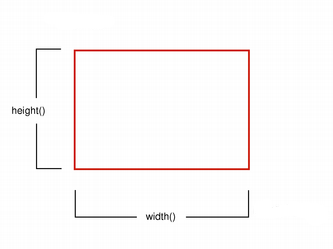
A rectangle is normally expressed as an upper-left corner and a size. The size (width and height) of a QRectF is always equivalent to the mathematical rectangle that forms the basis for its rendering.
A QRectF can be constructed with a set of left, top, width and height integers, or from a QPoint 和 QSize . The following code creates two identical rectangles.
 QRectF r1(100, 200, 11, 16);
 QRectF r2(QPoint(100, 200), QSize(11, 16));
There is also a third constructor creating a QRectF from a QRect , and a corresponding toRect () 函数返回 QRect object based on the values of this rectangle (note that the coordinates in the returned rectangle are rounded to the nearest integer).
The QRectF class provides a collection of functions that return the various rectangle coordinates, and enable manipulation of these. QRectF also provide functions to move the rectangle relative to the various coordinates. In addition there is a moveTo () function that moves the rectangle, leaving its top left corner at the given coordinates. Alternatively, the translate () function moves the rectangle the given offset relative to the current position, and the translated () 函数返回 translated copy of this rectangle.
size () function returns the rectange's dimensions as a QSize 。 dimensions can also be retrieved separately using the width () 和 height () functions. To manipulate the dimensions use the setSize (), setWidth () 或 setHeight () functions. Alternatively, the size can be changed by applying either of the functions setting the rectangle coordinates, for example, setBottom () 或 setRight ().
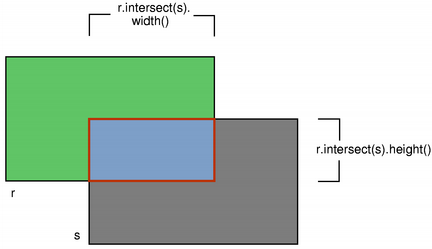
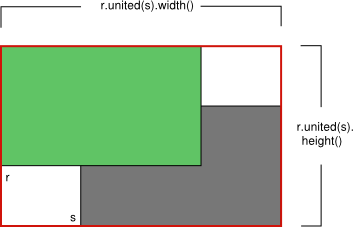
contains () function tells whether a given point is inside the rectangle or not, and the intersects () 函数返回 true if this rectangle intersects with a given rectangle (otherwise false). The QRectF class also provides the intersected () function which returns the intersection rectangle, and the united () function which returns the rectangle that encloses the given rectangle and this:
|
|
| intersected () | united () |
isEmpty () 函数返回 true if the rectangle's width or height is less than, or equal to, 0. Note that an empty rectangle is not valid: The isValid () function returns true if both width and height is larger than 0. A null rectangle ( isNull () == true) on the other hand, has both width and height set to 0.
Note that due to the way QRect and QRectF are defined, an empty QRectF is defined in essentially the same way as QRect .
Finally, QRectF objects can be streamed as well as compared.
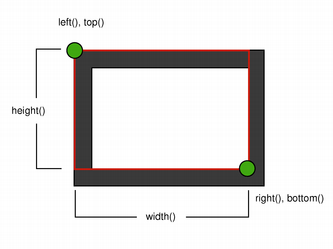
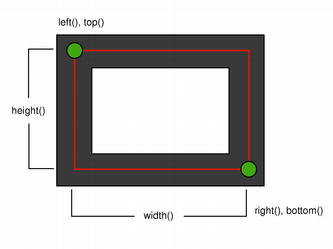
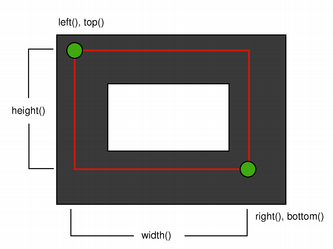
当使用 anti-aliased painter, the boundary line of a QRectF will be rendered symmetrically on both sides of the mathematical rectangle's boundary line. But when using an aliased painter (the default) other rules apply.
Then, when rendering with a one pixel wide pen the QRectF's boundary line will be rendered to the right and below the mathematical rectangle's boundary line.
When rendering with a two pixels wide pen the boundary line will be split in the middle by the mathematical rectangle. This will be the case whenever the pen is set to an even number of pixels, while rendering with a pen with an odd number of pixels, the spare pixel will be rendered to the right and below the mathematical rectangle as in the one pixel case.
|
|
| Logical representation | One pixel wide pen |
|
|
| Two pixel wide pen | Three pixel wide pen |
The QRectF class provides a collection of functions that return the various rectangle coordinates, and enable manipulation of these. QRectF also provide functions to move the rectangle relative to the various coordinates.
For example: the bottom (), setBottom () 和 moveBottom () functions: bottom () returns the y-coordinate of the rectangle's bottom edge, setBottom () sets the bottom edge of the rectangle to the given y coordinate (it may change the height, but will never change the rectangle's top edge) and moveBottom () moves the entire rectangle vertically, leaving the rectangle's bottom edge at the given y coordinate and its size unchanged.
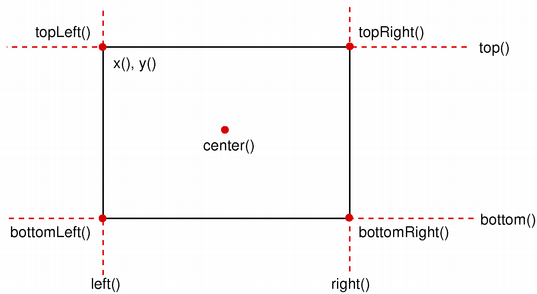
It is also possible to add offsets to this rectangle's coordinates using the adjust () function, as well as retrieve a new rectangle based on adjustments of the original one using the adjusted () function. If either of the width and height is negative, use the normalized () function to retrieve a rectangle where the corners are swapped.
In addition, QRectF provides the getCoords () function which extracts the position of the rectangle's top-left and bottom-right corner, and the getRect () function which extracts the rectangle's top-left corner, width and height. Use the setCoords () 和 setRect () function to manipulate the rectangle's coordinates and dimensions in one go.
构造 null 矩形。
另请参阅 isNull ().
构造矩形采用给定 topLeft corner and the given size .
另请参阅 setTopLeft () 和 setSize ().
构造矩形采用给定 topLeft and bottomRight 角。
该函数在 Qt 4.3 引入。
另请参阅 setTopLeft () 和 setBottomRight ().
构造矩形采用 ( x , y ) as its top-left 角和给定 width and height .
另请参阅 setRect ().
构造 QRectF rectangle from the given QRect rectangle .
另请参阅 toRect ().
添加 dx1 , dy1 , dx2 and dy2 respectively to the existing coordinates of the rectangle.
另请参阅 adjusted () and setRect ().
返回新的矩形采用 dx1 , dy1 , dx2 and dy2 added respectively to the existing coordinates of this rectangle.
另请参阅 adjust ().
返回矩形底部边缘的 y 坐标。
另请参阅 setBottom (), bottomLeft (),和 bottomRight ().
Returns the position of the rectangle's bottom-left corner.
另请参阅 setBottomLeft (), bottom (),和 left ().
返回矩形右下角的位置。
另请参阅 setBottomRight (), bottom (),和 right ().
返回矩形的中心点。
另请参阅 moveCenter ().
Returns true if the given point is inside or on the edge of the rectangle; otherwise returns false.
另请参阅 intersects ().
这是重载函数。
Returns true if the point ( x , y ) is inside or on the edge of the rectangle; otherwise returns false.
这是重载函数。
Returns true if the given rectangle is inside this rectangle; otherwise returns false.
Extracts the position of the rectangle's top-left corner to * x1 and * y1 , and the position of the bottom-right corner to * x2 and * y2 .
另请参阅 setCoords () and getRect ().
Extracts the position of the rectangle's top-left corner to * x and * y , and its dimensions to * width and * height .
另请参阅 setRect () 和 getCoords ().
返回矩形的高度。
另请参阅 setHeight (), width (),和 size ().
Returns the intersection of this rectangle and the given rectangle 。注意 r.intersected(s) is equivalent to r & s .
该函数在 Qt 4.2 引入。
另请参阅 intersects (), united (),和 operator&= ().
Returns true if this rectangle intersects with the given rectangle (i.e. there is a non-empty area of overlap between them), otherwise returns false.
The intersection rectangle can be retrieved using the intersected () 函数。
另请参阅 contains ().
Returns true if the rectangle is empty, otherwise returns false.
An empty rectangle has width () <= 0 or height () <= 0. An empty rectangle is not valid (i.e., isEmpty() == ! isValid ()).
使用 normalized () function to retrieve a rectangle where the corners are swapped.
另请参阅 isNull (), isValid (),和 normalized ().
Returns true if the rectangle is a null rectangle, otherwise returns false.
A null rectangle has both the width and the height set to 0. A null rectangle is also empty, and hence not valid.
Returns true if the rectangle is valid, otherwise returns false.
A valid rectangle has a width () > 0 and height () > 0. Note that non-trivial operations like intersections are not defined for invalid rectangles. A valid rectangle is not empty (i.e., isValid() == ! isEmpty ()).
另请参阅 isNull (), isEmpty (),和 normalized ().
Returns the x-coordinate of the rectangle's left edge. 相当于 x ().
另请参阅 setLeft (), topLeft (),和 bottomLeft ().
Moves the rectangle vertically, leaving the rectangle's bottom edge at the given y coordinate. The rectangle's size is unchanged.
另请参阅 bottom (), setBottom (),和 moveTop ().
Moves the rectangle, leaving the bottom-left corner at the given position 。矩形大小不变。
另请参阅 setBottomLeft (), moveBottom (),和 moveLeft ().
Moves the rectangle, leaving the bottom-right corner at the given position 。矩形大小不变。
另请参阅 setBottomRight (), moveBottom (),和 moveRight ().
移动矩形,使中心点位于给定 position 。矩形大小不变。
另请参阅 center ().
Moves the rectangle horizontally, leaving the rectangle's left edge at the given x coordinate. The rectangle's size is unchanged.
另请参阅 left (), setLeft (),和 moveRight ().
Moves the rectangle horizontally, leaving the rectangle's right edge at the given x coordinate. The rectangle's size is unchanged.
另请参阅 right (), setRight (),和 moveLeft ().
Moves the rectangle, leaving the top-left corner at the given position ( x , y ). The rectangle's size is unchanged.
另请参阅 translate () and moveTopLeft ().
这是重载函数。
Moves the rectangle, leaving the top-left corner at the given position .
Moves the rectangle vertically, leaving the rectangle's top line at the given y coordinate. The rectangle's size is unchanged.
另请参阅 top (), setTop (),和 moveBottom ().
Moves the rectangle, leaving the top-left corner at the given position 。矩形大小不变。
另请参阅 setTopLeft (), moveTop (),和 moveLeft ().
Moves the rectangle, leaving the top-right corner at the given position 。矩形大小不变。
另请参阅 setTopRight (), moveTop (),和 moveRight ().
Returns a normalized rectangle; i.e., a rectangle that has a non-negative width and height.
若 width () < 0 the function swaps the left and right corners, and it swaps the top and bottom corners if height () < 0.
Returns the x-coordinate of the rectangle's right edge.
另请参阅 setRight (), topRight (),和 bottomRight ().
Sets the bottom edge of the rectangle to the given y coordinate. May change the height, but will never change the top edge of the rectangle.
另请参阅 bottom () 和 moveBottom ().
Set the bottom-left corner of the rectangle to the given position . May change the size, but will never change the top-right corner of the rectangle.
另请参阅 bottomLeft () 和 moveBottomLeft ().
Set the bottom-right corner of the rectangle to the given position . May change the size, but will never change the top-left corner of the rectangle.
另请参阅 bottomRight () 和 moveBottomRight ().
Sets the coordinates of the rectangle's top-left corner to ( x1 , y1 ), and the coordinates of its bottom-right corner to ( x2 , y2 ).
另请参阅 getCoords () and setRect ().
Sets the height of the rectangle to the given height 。 bottom edge is changed, but not the top one.
Sets the left edge of the rectangle to the given x coordinate. May change the width, but will never change the right edge of the rectangle.
相当于 setX ().
Sets the coordinates of the rectangle's top-left corner to ( x , y ), and its size to the given width and height .
另请参阅 getRect () 和 setCoords ().
Sets the right edge of the rectangle to the given x coordinate. May change the width, but will never change the left edge of the rectangle.
Sets the size of the rectangle to the given size 。 top-left corner is not moved.
另请参阅 size (), setWidth (),和 setHeight ().
Sets the top edge of the rectangle to the given y coordinate. May change the height, but will never change the bottom edge of the rectangle.
相当于 setY ().
Set the top-left corner of the rectangle to the given position . May change the size, but will never change the bottom-right corner of the rectangle.
另请参阅 topLeft () 和 moveTopLeft ().
Set the top-right corner of the rectangle to the given position . May change the size, but will never change the bottom-left corner of the rectangle.
另请参阅 topRight () and moveTopRight ().
Sets the width of the rectangle to the given width 。 right edge is changed, but not the left one.
Sets the left edge of the rectangle to the given x coordinate. May change the width, but will never change the right edge of the rectangle.
相当于 setLeft ().
另请参阅 x (), setY (),和 setTopLeft ().
Sets the top edge of the rectangle to the given y coordinate. May change the height, but will never change the bottom edge of the rectangle.
相当于 setTop ().
另请参阅 y (), setX (),和 setTopLeft ().
Returns the size of the rectangle.
另请参阅 setSize (), width (),和 height ().
返回 QRect based on the values of this rectangle that is the smallest possible integer rectangle that completely contains this rectangle.
该函数在 Qt 4.3 引入。
另请参阅 toRect ().
Returns the y-coordinate of the rectangle's top edge. Equivalent to y ().
另请参阅 setTop (), topLeft (),和 topRight ().
Returns the position of the rectangle's top-left corner.
另请参阅 setTopLeft (), top (),和 left ().
Returns the position of the rectangle's top-right corner.
另请参阅 setTopRight (), top (),和 right ().
返回 QRect based on the values of this rectangle. Note that the coordinates in the returned rectangle are rounded to the nearest integer.
另请参阅 QRectF () 和 toAlignedRect ().
Moves the rectangle dx along the x-axis and dy along the y-axis, relative to the current position. Positive values move the rectangle to the right and downwards.
另请参阅 moveTopLeft (), moveTo (),和 translated ().
这是重载函数。
Moves the rectangle offset . x() along the x axis and offset . y() along the y axis, relative to the current position.
Returns a copy of the rectangle that is translated dx along the x axis and dy along the y axis, relative to the current position. Positive values move the rectangle to the right and down.
另请参阅 translate ().
这是重载函数。
Returns a copy of the rectangle that is translated offset . x() along the x axis and offset . y() along the y axis, relative to the current position.
Returns the bounding rectangle of this rectangle and the given rectangle .
该函数在 Qt 4.2 引入。
另请参阅 intersected ().
Returns the width of the rectangle.
另请参阅 setWidth (), height (),和 size ().
Returns the x-coordinate of the rectangle's left edge. 相当于 left ().
另请参阅 setX (), y (),和 topLeft ().
Returns the y-coordinate of the rectangle's top edge. Equivalent to top ().
另请参阅 setY (), x (),和 topLeft ().
