The QDockWidget class provides a widget that can be docked inside a QMainWindow or floated as a top-level window on the desktop. 更多...
继承 QWidget .
The QDockWidget class provides a widget that can be docked inside a QMainWindow or floated as a top-level window on the desktop.
QDockWidget provides the concept of dock widgets, also know as tool palettes or utility windows. Dock windows are secondary windows placed in the dock widget area around the central widget 在 QMainWindow .
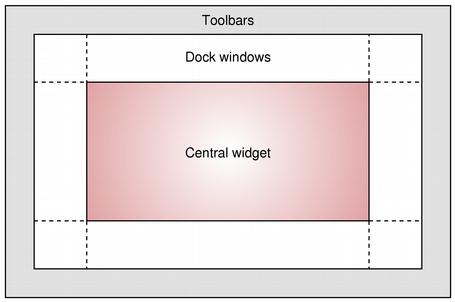
Dock windows can be moved inside their current area, moved into new areas and floated (e.g., undocked) by the end-user. The QDockWidget API allows the programmer to restrict the dock widgets ability to move, float and close, as well as the areas in which they can be placed.
A QDockWidget consists of a title bar and the content area. The title bar displays the dock widgets 窗口标题 , float button and a close button. Depending on the state of the QDockWidget, the float and close buttons may be either disabled or not shown at all.
The visual appearance of the title bar and buttons is dependent 在 style in use.
A QDockWidget acts as a wrapper for its child widget, set with setWidget (). Custom size hints, minimum and maximum sizes and size policies should be implemented in the child widget. QDockWidget will respect them, adjusting its own constraints to include the frame and title. Size constraints should not be set on the QDockWidget itself, because they change depending on whether it is docked; a docked QDockWidget has no frame and a smaller title bar.
| 常量 | 值 | 描述 |
|---|---|---|
| QDockWidget.DockWidgetClosable | 0x01 | The dock widget can be closed. On some systems the dock widget always has a close button when it's floating (for example on MacOS 10.5). |
| QDockWidget.DockWidgetMovable | 0x02 | The dock widget can be moved between docks by the user. |
| QDockWidget.DockWidgetFloatable | 0x04 | The dock widget can be detached from the main window, and floated as an independent window. |
| QDockWidget.DockWidgetVerticalTitleBar | 0x08 | The dock widget displays a vertical title bar on its left side. This can be used to increase the amount of vertical space in a QMainWindow . |
| QDockWidget.AllDockWidgetFeatures | DockWidgetClosable | DockWidgetMovable | DockWidgetFloatable | (Deprecated) The dock widget can be closed, moved, and floated. Since new features might be added in future releases, the look and behavior of dock widgets might change if you use this flag. Please specify individual flags instead. |
| QDockWidget.NoDockWidgetFeatures | 0x00 | The dock widget cannot be closed, moved, or floated. |
DockWidgetFeatures 类型是 typedef 对于 QFlags <DockWidgetFeature>. It stores an OR combination of DockWidgetFeature values.
parent argument, if not None, causes self to be owned by Qt instead of PyQt.
构造 QDockWidget with parent parent 和窗口标志 flags . The dock widget will be placed in the left dock widget area.
窗口标题被设为 title . This title is used when the QDockWidget is docked and undocked. It is also used in the context menu provided by QMainWindow .
另请参阅 setWindowTitle ().
parent argument, if not None, causes self to be owned by Qt instead of PyQt.
构造 QDockWidget with parent parent 和窗口标志 flags . The dock widget will be placed in the left dock widget area.
重实现自 QWidget.changeEvent ().
重实现自 QWidget.closeEvent ().
重实现自 QObject.event ().
初始化 option 采用值来自此 QDockWidget . This method is useful for subclasses when they need a QStyleOptionDockWidget , but don't want to fill in all the information themselves.
另请参阅 QStyleOption.initFrom ().
Returns true if this dock widget can be placed in the given area ;否则返回 false。
重实现自 QWidget.paintEvent ().
widget argument has it's ownership transferred to Qt.
Sets an arbitrary widget as the dock widget's title bar. 若 widget is 0, any custom title bar widget previously set on the dock widget is removed, but not deleted, and the default title bar will be used instead.
If a title bar widget is set, QDockWidget will not use native window decorations when it is floated.
Here are some tips for implementing custom title bars:
 QDockWidget *dockWidget = qobject_cast<QDockWidget*>(parentWidget());
 if (dockWidget->features() & QDockWidget.DockWidgetVerticalTitleBar) {
     // I need to be vertical
 } else {
     // I need to be horizontal
 }
使用 qobject_cast () 作为 shown above, the title bar widget has full access to its parent QDockWidget . Hence it can perform such operations as docking and hiding in response to user actions.
该函数在 Qt 4.3 引入。
另请参阅 titleBarWidget () 和 DockWidgetVerticalTitleBar .
widget argument has it's ownership transferred to Qt.
Sets the widget for the dock widget to widget .
If the dock widget is visible when widget is added, you must show() it explicitly.
Note that you must add the layout of the widget before you call this function; if not, the widget will not be visible.
另请参阅 widget ().
Returns the custom title bar widget set on the QDockWidget , or 0 if no custom title bar has been set.
该函数在 Qt 4.3 引入。
另请参阅 setTitleBarWidget ().
Returns a checkable action that can be used to show or close this dock widget.
The action's text is set to the dock widget's window title.
另请参阅 QAction.text and QWidget.windowTitle .
Returns the widget for the dock widget. This function returns zero if the widget has not been set.
另请参阅 setWidget ().
This is the default overload of this signal.
此信号被发射当 allowedAreas property 改变。 allowedAreas parameter gives the new value of the property.
This is the default overload of this signal.
This signal is emitted when the dock widget is moved to another dock area , or is moved to a different location in its current dock area. This happens when the dock widget is moved programmatically or is dragged to a new location by the user.
该函数在 Qt 4.3 引入。
This is the default overload of this signal.
此信号被发射当 features 特性改变。 features parameter gives the new value of the property.
This is the default overload of this signal.
此信号被发射当 floating 特性改变。 topLevel parameter is true if the dock widget is now floating; otherwise it is false.
另请参阅 isWindow ().
This is the default overload of this signal.
This signal is emitted when the dock widget becomes visible (or invisible). This happens when the widget is hidden or shown, as well as when it is docked in a tabbed dock area and its tab becomes selected or unselected.
该函数在 Qt 4.3 引入。
