QMainWindow 类提供主应用程序窗口。 更多...
继承 QWidget .
QMainWindow 类提供主应用程序窗口。
A main window provides a framework for building an application's user interface. Qt has QMainWindow and its 相关类 for main window management. QMainWindow has its own layout to which you can add QToolBar s, QDockWidget s, a QMenuBar ,和 QStatusBar . The layout has a center area that can be occupied by any kind of widget. You can see an image of the layout below.
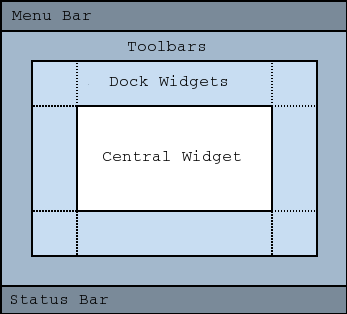
注意: Creating a main window without a central widget is not supported. You must have a central widget even if it is just a placeholder.
A central widget will typically be a standard Qt widget such as a QTextEdit 或 QGraphicsView . Custom widgets can also be used for advanced applications. You set the central widget with setCentralWidget() .
Main windows have either a single (SDI) or multiple (MDI) document interface. You create MDI applications in Qt by using a QMdiArea 作为中心 Widget。
We will now examine each of the other widgets that can be added to a main window. We give examples on how to create and add them.
Qt 实现菜单在 QMenu and QMainWindow keeps them in a QMenuBar . QAction s are added to the menus, which display them as menu items.
可以把新菜单添加到主窗口的菜单栏通过调用 menuBar() ,其返回 QMenuBar for the window, and then add a menu with QMenuBar.addMenu ().
QMainWindow comes with a default menu bar, but you can also set one yourself with setMenuBar() . If you wish to implement a custom menu bar (i.e., not use the QMenuBar Widget),可以设置它采用 setMenuWidget() .
以下是如何创建菜单的范例:
 void MainWindow.createMenus()
 {
     fileMenu = menuBar()->addMenu(tr("&File"));
     fileMenu->addAction(newAct);
     fileMenu->addAction(openAct);
     fileMenu->addAction(saveAct);
createPopupMenu() function creates popup menus when the main window receives context menu events. The default implementation generates a menu with the checkable actions from the dock widgets and toolbars. You can reimplement createPopupMenu() 为自定义菜单。
工具栏的实现在 QToolBar class. You add a toolbar to a main window with addToolBar() .
You control the initial position of toolbars by assigning them to a specific Qt.ToolBarArea . You can split an area by inserting a toolbar break - think of this as a line break in text editing - with addToolBarBreak() or insertToolBarBreak() . You can also restrict placement by the user with QToolBar.setAllowedAreas () and QToolBar.setMovable ().
可以检索工具栏图标的尺寸采用 iconSize() . The sizes are platform dependent; you can set a fixed size with setIconSize() . You can alter the appearance of all tool buttons in the toolbars with setToolButtonStyle() .
以下是创建工具栏的范例:
 void MainWindow.createToolBars()
 {
     fileToolBar = addToolBar(tr("File"));
     fileToolBar->addAction(newAct);
停放 Widget 的实现在 QDockWidget class. A dock widget is a window that can be docked into the main window. You add dock widgets to a main window with addDockWidget() .
There are four dock widget areas as given by the Qt.DockWidgetArea enum: left, right, top, and bottom. You can specify which dock widget area that should occupy the corners where the areas overlap with setCorner() . By default each area can only contain one row (vertical or horizontal) of dock widgets, but if you enable nesting with setDockNestingEnabled() , dock widgets can be added in either direction.
Two dock widgets may also be stacked on top of each other. A QTabBar is then used to select which of the widgets that should be displayed.
We give an example of how to create and add dock widgets to a main window:
     QDockWidget *dockWidget = new QDockWidget(tr("Dock Widget"), this);
     dockWidget->setAllowedAreas(Qt.LeftDockWidgetArea |
                                 Qt.RightDockWidgetArea);
     dockWidget->setWidget(dockWidgetContents);
     addDockWidget(Qt.LeftDockWidgetArea, dockWidget);
可以设置状态栏采用 setStatusBar() , but one is created the first time statusBar() (which returns the main window's status bar) is called. See QStatusBar for information on how to use it.
QMainWindow 可以存储其布局的状态采用 saveState() ;稍后,可以检索它采用 restoreState() . It is the position and size (relative to the size of the main window) of the toolbars and dock widgets that are stored.
This enum contains flags that specify the docking behavior of QMainWindow .
| 常量 | 值 | 描述 |
|---|---|---|
| QMainWindow.AnimatedDocks | 0x01 | 等同于 animated 特性。 |
| QMainWindow.AllowNestedDocks | 0x02 | 等同于 dockNestingEnabled 特性。 |
| QMainWindow.AllowTabbedDocks | 0x04 | The user can drop one dock widget "on top" of another. The two widgets are stacked and a tab bar appears for selecting which one is visible. |
| QMainWindow.ForceTabbedDocks | 0x08 | Each dock area contains a single stack of tabbed dock widgets. In other words, dock widgets cannot be placed next to each other in a dock area. If this option is set, AllowNestedDocks has no effect. |
| QMainWindow.VerticalTabs | 0x10 | The two vertical dock areas on the sides of the main window show their tabs vertically. If this option is not set, all dock areas show their tabs at the bottom. Implies AllowTabbedDocks. See also setTabPosition (). |
These options only control how dock widgets may be dropped in a QMainWindow . They do not re-arrange the dock widgets to conform with the specified options. For this reason they should be set before any dock widgets are added to the main window. Exceptions to this are the AnimatedDocks and VerticalTabs options, which may be set at any time.
该枚举在 Qt 4.3 引入或被修改。
The DockOptions type is a typedef for QFlags <DockOption>. It stores an OR combination of DockOption values.
parent argument, if not None, causes self to be owned by Qt instead of PyQt.
构造 QMainWindow 采用 given parent and the specified widget flags .
QMainWindow sets the Qt.Window flag itself, and will hence always be created as a top-level widget.
dockwidget argument has it's ownership transferred to Qt.
添加给定 dockwidget 到指定 area .
dockwidget argument has it's ownership transferred to Qt.
添加 dockwidget 进给定 area 在 direction specified by the orientation .
toolbar argument has it's ownership transferred to Qt.
添加 toolbar into the specified area in this main window. The toolbar is placed at the end of the current tool bar block (i.e. line). If the main window already manages toolbar then it will only move the toolbar to area .
另请参阅 insertToolBar (), addToolBarBreak (),和 insertToolBarBreak ().
toolbar argument has it's ownership transferred to Qt.
这是重载函数。
Equivalent of calling addToolBar( Qt.TopToolBarArea , toolbar )
这是重载函数。
创建 QToolBar object, setting its window title to title , and inserts it into the top toolbar area.
另请参阅 setWindowTitle ().
Adds a toolbar break to the given area after all the other objects that are present.
Returns the central widget for the main window. This function returns zero if the central widget has not been set.
另请参阅 setCentralWidget ().
重实现自 QWidget.contextMenuEvent ().
Returns the dock widget area that occupies the specified corner .
另请参阅 setCorner ().
Returns a popup menu containing checkable entries for the toolbars and dock widgets present in the main window. If there are no toolbars and dock widgets present, this function returns a null pointer.
By default, this function is called by the main window when the user activates a context menu, typically by right-clicking on a toolbar or a dock widget.
If you want to create a custom popup menu, reimplement this function and return a newly-created popup menu. Ownership of the popup menu is transferred to the caller.
另请参阅 addDockWidget (), addToolBar (),和 menuBar ().
返回 Qt.DockWidgetArea for dockwidget 。若 dockwidget has not been added to the main window, this function returns Qt.NoDockWidgetArea .
另请参阅 addDockWidget (), splitDockWidget (),和 Qt.DockWidgetArea .
重实现自 QObject.event ().
toolbar argument has it's ownership transferred to Qt.
插入 toolbar into the area occupied by the before toolbar so that it appears before it. For example, in normal left-to-right layout operation, this means that toolbar will appear to the left of the toolbar specified by before in a horizontal toolbar area.
另请参阅 insertToolBarBreak (), addToolBar (),和 addToolBarBreak ().
Inserts a toolbar break before the toolbar specified by before .
Returns the menu bar for the main window. This function creates and returns an empty menu bar if the menu bar does not exist.
If you want all windows in a Mac application to share one menu bar, don't use this function to create it, because the menu bar created here will have this QMainWindow as its parent. Instead, you must create a menu bar that does not have a parent, which you can then share among all the Mac windows. Create a parent-less menu bar this way:
QMenuBar *menuBar = new QMenuBar(0);
另请参阅 setMenuBar ().
Returns the menu bar for the main window. This function returns null if a menu bar hasn't been constructed yet.
该函数在 Qt 4.2 引入。
另请参阅 setMenuWidget ().
dockwidget argument
移除 dockwidget from the main window layout and hides it. Note that the dockwidget is not deleted.
移除 toolbar from the main window layout and hides it. Note that the toolbar is not deleted.
Removes a toolbar break previously inserted before the toolbar 指定通过 before .
Restores the state of dockwidget if it is created after the call to restoreState (). Returns true if the state was restored; otherwise returns false.
另请参阅 restoreState () 和 saveState ().
Restores the state of this mainwindow's toolbars and dockwidgets. The version number is compared with that stored in state . If they do not match, the mainwindow's state is left unchanged, and this function returns false ; otherwise, the state is restored, and this function returns true .
要还原保存几何体使用 QSettings ,可以使用的代码像这样:
 void MainWindow.readSettings()
 {
     QSettings settings("MyCompany", "MyApp");
     restoreGeometry(settings.value("myWidget/geometry").toByteArray());
     restoreState(settings.value("myWidget/windowState").toByteArray());
 }
另请参阅 saveState (), QWidget.saveGeometry (), QWidget.restoreGeometry (),和 restoreDockWidget ().
Saves the current state of this mainwindow's toolbars and dockwidgets. The version number is stored as part of the data.
objectName property is used to identify each QToolBar and QDockWidget . You should make sure that this property is unique for each QToolBar and QDockWidget you add to the QMainWindow
To restore the saved state, pass the return value and version number to restoreState ().
To save the geometry when the window closes, you can implement a close event like this:
 void MyMainWindow.closeEvent(QCloseEvent *event)
 {
     QSettings settings("MyCompany", "MyApp");
     settings.setValue("geometry", saveGeometry());
     settings.setValue("windowState", saveState());
     QMainWindow.closeEvent(event);
 }
另请参阅 restoreState (), QWidget.saveGeometry (),和 QWidget.restoreGeometry ().
This method is also a Qt slot with the C++ signature void setAnimated(bool) .
widget argument has it's ownership transferred to Qt.
设置给定 widget to be the main window's central 小部件。
注意: QMainWindow takes ownership 的 widget pointer and deletes it at the appropriate time.
另请参阅 centralWidget ().
Sets the given dock widget area to occupy the specified corner .
另请参阅 corner ().
This method is also a Qt slot with the C++ signature void setDockNestingEnabled(bool) .
menubar argument has it's ownership transferred to Qt.
把主窗口菜单栏设为 menuBar .
注意: QMainWindow takes ownership 的 menuBar pointer and deletes it at the appropriate time.
另请参阅 menuBar ().
menubar argument has it's ownership transferred to Qt.
把主窗口菜单栏设为 menuBar .
QMainWindow takes ownership of the menuBar pointer and deletes it at the appropriate time.
该函数在 Qt 4.2 引入。
另请参阅 menuWidget ().
statusbar argument has it's ownership transferred to Qt.
把主窗口状态栏设为 statusbar .
Setting the status bar to 0 will remove it from the main window. 注意: QMainWindow takes ownership of the statusbar pointer and deletes it at the appropriate time.
另请参阅 statusBar ().
Sets the tab position for the given dock widget areas to the specified tabPosition . By default, all dock areas show their tabs at the bottom.
注意: VerticalTabs dock option overrides the tab positions set by this method.
该函数在 Qt 4.5 引入。
另请参阅 tabPosition () 和 setTabShape ().
dockwidget argument has it's ownership transferred to Qt.
Splits the space covered by the first dock widget into two parts, moves the first dock widget into the first part, and moves the second dock widget into the second part.
orientation specifies how the space is divided: A Qt.Horizontal split places the second dock widget to the right of the first; a Qt.Vertical split places the second dock widget below the first.
注意 : if first is currently in a tabbed docked area, second will be added as a new tab, not as a neighbor of first . This is because a single tab can contain only one dock widget.
注意 : The Qt.LayoutDirection influences the order of the dock widgets in the two parts of the divided area. When right-to-left layout direction is enabled, the placing of the dock widgets will be reversed.
另请参阅 tabifyDockWidget (), addDockWidget (),和 removeDockWidget ().
Returns the status bar for the main window. This function creates and returns an empty status bar if the status bar does not exist.
另请参阅 setStatusBar ().
Returns the dock widgets that are tabified together with dockwidget .
该函数在 Qt 4.5 引入。
另请参阅 tabifyDockWidget ().
移动 second dock widget on top of first dock widget, creating a tabbed docked area in the main window.
另请参阅 tabifiedDockWidgets ().
返回选项卡位置为 area .
注意: VerticalTabs dock option overrides the tab positions returned by this function.
该函数在 Qt 4.5 引入。
另请参阅 setTabPosition () 和 tabShape ().
返回 Qt.ToolBarArea for toolbar . 若 toolbar has not been added to the main window, this function returns Qt.NoToolBarArea .
另请参阅 addToolBar (), addToolBarBreak (),和 Qt.ToolBarArea .
Returns whether there is a toolbar break before the toolbar .
另请参阅 addToolBarBreak () 和 insertToolBarBreak ().
This is the default overload of this signal.
This signal is emitted when the size of the icons used in the window is changed. The new icon size is passed in iconSize .
You can connect this signal to other components to help maintain a consistent appearance for your application.
另请参阅 setIconSize ().
This is the default overload of this signal.
This signal is emitted when the style used for tool buttons in the window is changed. The new style is passed in toolButtonStyle .
You can connect this signal to other components to help maintain a consistent appearance for your application.
另请参阅 setToolButtonStyle ().
