The QGraphicsBlurEffect class provides a blur effect. 更多...
继承 QGraphicsEffect .
The QGraphicsBlurEffect class provides a blur effect.
A blur effect blurs the source. This effect is useful for reducing details, such as when the source loses focus and you want to draw attention to other elements. The level of detail can be modified using the setBlurRadius () function. Use setBlurHints () 到 choose the blur hints.
By default, the blur radius is 5 pixels. The blur radius is specified in device coordinates.
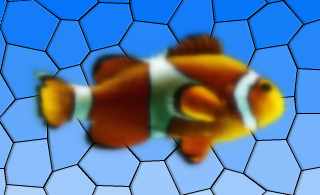
This enum describes the possible hints that can be used to control how blur effects are applied. The hints might not have an effect in all the paint engines.
| 常量 | 值 | 描述 |
|---|---|---|
| QGraphicsBlurEffect.PerformanceHint | 0x00 | Indicates that rendering performance is the most important factor, at the potential cost of lower quality. |
| QGraphicsBlurEffect.QualityHint | 0x01 | Indicates that rendering quality is the most important factor, at the potential cost of lower performance. |
| QGraphicsBlurEffect.AnimationHint | 0x02 | Indicates that the blur radius is going to be animated, hinting that the implementation can keep a cache of blurred verisons of the source. Do not use this hint if the source is going to be dynamically changing. |
该枚举在 Qt 4.6 引入或被修改。
The BlurHints type is a typedef for QFlags <BlurHint>. It stores an OR combination of BlurHint values.
另请参阅 blurHints () 和 setBlurHints ().
parent argument, if not None, causes self to be owned by Qt instead of PyQt.
构造新 QGraphicsBlurEffect instance. The parent 参数会被传递给 QGraphicsEffect 的构造函数。
重实现自 QGraphicsEffect.boundingRectFor ().
重实现自 QGraphicsEffect.draw ().
This method is also a Qt slot with the C++ signature void setBlurHints(QGraphicsBlurEffect::BlurHints) .
This method is also a Qt slot with the C++ signature void setBlurRadius(qreal) .
This is the default overload of this signal.
This signal is emitted whenever the effect's blur hints changes. hints parameter holds the effect's new blur hints.
This is the default overload of this signal.
This signal is emitted whenever the effect's blur radius 改变。 radius parameter holds the effect's new blur radius.
