The QImage class provides a hardware-independent image representation that allows direct access to the pixel data, and can be used as a paint device. 更多...
继承 QPaintDevice .
The QImage class provides a hardware-independent image representation that allows direct access to the pixel data, and can be used as a paint device.
Qt 为处理图像数据提供了 4 个类:QImage、 QPixmap , QBitmap and QPicture . QImage is designed and optimized for I/O, and for direct pixel access and manipulation, while QPixmap is designed and optimized for showing images on screen. QBitmap is only a convenience class that inherits QPixmap , ensuring a depth of 1. Finally, the QPicture class is a paint device that records and replays QPainter 命令。
由于 QImage 是 QPaintDevice 子类, QPainter can be used to draw directly onto images. When using QPainter on a QImage, the painting can be performed in another thread than the current GUI thread.
QImage 类支持几种图像格式,描述通过 Format enum. These include monochrome, 8-bit, 32-bit and alpha-blended images which are available in all versions of Qt 4.x.
QImage provides a collection of functions that can be used to obtain a variety of information about the image. There are also several functions that enables transformation of the image.
QImage objects can be passed around by value since the QImage class uses implicit data sharing 。QImage 对象还可以被流化和比较。
注意: If you would like to load QImage objects in a static build of Qt, refer to the 插件 HowTo .
警告: 在 QImage 上描绘采用格式 QImage.Format_Indexed8 不是 supported.
QImage provides several ways of loading an image file: The file can be loaded when constructing the QImage object, or by using the load () 或 loadFromData () functions later on. QImage also provides the static fromData () function, constructing a QImage from the given data. When loading an image, the file name can either refer to an actual file on disk or to one of the application's embedded resources. See Qt 资源系统 overview for details on how to embed images and other resource files in the application's executable.
只需调用 save () function to save a QImage object.
The complete list of supported file formats are available through the QImageReader.supportedImageFormats () and QImageWriter.supportedImageFormats () functions. New file formats can be added as plugins. By default, Qt supports the following formats:
| Format | 描述 | Qt 支持 |
|---|---|---|
| BMP | Windows 位图 | 读/写 |
| GIF | Graphic Interchange Format (图形互换格式) 可选 | Read |
| JPG | Joint Photographic Experts Group (联合摄影专家组) | 读/写 |
| JPEG | Joint Photographic Experts Group (联合摄影专家组) | 读/写 |
| PNG | Portable Network Graphics (便携式网络图形) | 读/写 |
| PBM | Portable Bitmap (便携式位图) | Read |
| PGM | Portable Graymap (便携式灰度图) | Read |
| PPM | Portable Pixmap (便携式像素图) | 读/写 |
| TIFF | 标签化图像文件格式 | 读/写 |
| XBM | X11 Bitmap (X11 位图) | 读/写 |
| XPM | X11 Pixmap (X11 像素图) | 读/写 |
QImage provides a collection of functions that can be used to obtain a variety of information about the image:
| 可用函数 | |
|---|---|
| Geometry |
size
(),
width
(),
height
(),
dotsPerMeterX
(),和
dotsPerMeterY
() functions provide
information about the image size and aspect ratio.
rect () function returns the image's enclosing rectangle. The valid () function tells if a given pair of coordinates is within this rectangle. The offset () function returns the number of pixels by which the image is intended to be offset by when positioned relative to other images, which also can be manipulated 使用 setOffset () 函数。 |
| Colors |
The color of a pixel can be retrieved by passing its
coordinates to the
pixel
()
function. The
pixel
() function
returns the color as a
QRgb
value indepedent of the image's format.
In case of monochrome and 8-bit images, the colorCount () 和 colorTable () functions provide information about the color components used to store the image data: The colorTable () function returns the image's entire color table. To obtain a single entry, use the pixelIndex () function to retrieve the pixel index for a given pair of coordinates, then use the color () function to retrieve the color. Note that if you create an 8-bit image manually, you have to set a valid color table on the image as well. hasAlphaChannel () function tells if the image's format respects the alpha channel, or not. The allGray () 和 isGrayscale () functions tell whether an image's colors are all shades of gray. |
| 文本 | text () function returns the image text associated with the given text key. An image's text keys can be retrieved using the textKeys () function. Use the setText () function to alter an image's text. |
| 低级信息 |
depth
() 函数返回
the depth of the image. The supported depths are 1 (monochrome), 8,
16, 24 and 32 bits. The
bitPlaneCount
() function tells how
many of those bits that are used. For more information see the
图像格式
章节。
format (), bytesPerLine (),和 byteCount () functions provide low-level information about the data stored in the image. cacheKey () function returns a number that uniquely identifies the contents of this QImage object. |
The functions used to manipulate an image's pixels depend on the image format. The reason is that monochrome and 8-bit images are index-based and use a color lookup table, while 32-bit images store ARGB values directly. For more information on image formats, see the 图像格式 章节。
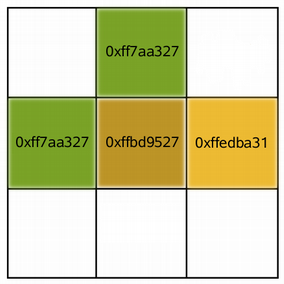
若是 32 位图像, setPixel () function can be used to alter the color of the pixel at the given coordinates to any other color specified as an ARGB quadruplet. To make a suitable QRgb value, use the qRgb () (adding a default alpha component to the given RGB values, i.e. creating an opaque color) or qRgba () 函数。例如:
| 32 位 | |
|---|---|
|
QImage image(3, 3, QImage.Format_RGB32); QRgb value; value = qRgb(189, 149, 39); // 0xffbd9527 image.setPixel(1, 1, value); value = qRgb(122, 163, 39); // 0xff7aa327 image.setPixel(0, 1, value); image.setPixel(1, 0, value); value = qRgb(237, 187, 51); // 0xffedba31 image.setPixel(2, 1, value); |
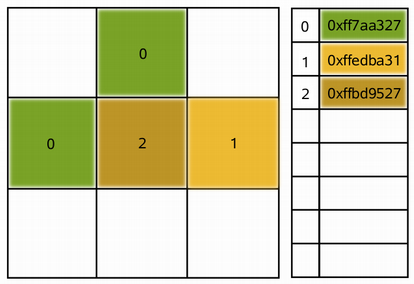
In case of a 8-bit and monchrome images, the pixel value is only an index from the image's color table. So the setPixel () function can only be used to alter the color of the pixel at the given coordinates to a predefined color from the image's color table, i.e. it can only change the pixel's index value. To alter or add a color to an image's color table, use the setColor () 函数。
An entry in the color table is an ARGB quadruplet encoded as an QRgb 值。使用 qRgb () 和 qRgba () functions to make a suitable QRgb value for use with the setColor () function. For example:
| 8 位 | |
|---|---|
|
QImage image(3, 3, QImage.Format_Indexed8); QRgb value; value = qRgb(122, 163, 39); // 0xff7aa327 image.setColor(0, value); value = qRgb(237, 187, 51); // 0xffedba31 image.setColor(1, value); value = qRgb(189, 149, 39); // 0xffbd9527 image.setColor(2, value); image.setPixel(0, 1, 0); image.setPixel(1, 0, 0); image.setPixel(1, 1, 2); image.setPixel(2, 1, 1); |
QImage 还提供 scanLine () function which returns a pointer to the pixel data at the scanline with the given index, and the bits () function which returns a pointer to the first pixel data (this is equivalent to scanLine(0) ).
Each pixel stored in a QImage is represented by an integer. The size of the integer varies depending on the format. QImage supports several image formats described by the Format 枚举。
Monochrome images are stored using 1-bit indexes into a color table with at most two colors. There are two different types of monochrome images: big endian (MSB first) or little endian (LSB first) bit order.
8-bit images are stored using 8-bit indexes into a color table, i.e. they have a single byte per pixel. The color table is a QVector < QRgb >, and the QRgb typedef is equivalent to an unsigned int containing an ARGB quadruplet on the format 0xAARRGGBB.
32-bit images have no color table; instead, each pixel contains an QRgb value. There are three different types of 32-bit images storing RGB (i.e. 0xffRRGGBB), ARGB and premultiplied ARGB values respectively. In the premultiplied format the red, green, and blue channels are multiplied by the alpha component divided by 255.
An image's format can be retrieved using the format () function. Use the convertToFormat () functions to convert an image into another format. The allGray () 和 isGrayscale () functions tell whether a color image can safely be converted to a grayscale image.
QImage supports a number of functions for creating a new image that is a transformed version of the original: The createAlphaMask () function builds and returns a 1-bpp mask from the alpha buffer in this image, and the createHeuristicMask () function creates and returns a 1-bpp heuristic mask for this image. The latter function works by selecting a color from one of the corners, then chipping away pixels of that color starting at all the edges.
mirrored () function returns a mirror of the image in the desired direction, the scaled () returns a copy of the image scaled to a rectangle of the desired measures, and the rgbSwapped () function constructs a BGR image from a RGB image.
scaledToWidth () 和 scaledToHeight () functions return scaled copies of the image.
transformed () function returns a copy of the image that is transformed with the given transformation matrix and transformation mode: Internally, the transformation matrix is adjusted to compensate for unwanted translation, i.e. transformed () returns the smallest image containing all transformed points of the original image. The static trueMatrix () function returns the actual matrix used for transforming the image.
There are also functions for changing attributes of an image in-place:
| 函数 | 描述 |
|---|---|
| setDotsPerMeterX () | Defines the aspect ratio by setting the number of pixels that fit horizontally in a physical meter. |
| setDotsPerMeterY () | Defines the aspect ratio by setting the number of pixels that fit vertically in a physical meter. |
| fill () | Fills the entire image with the given pixel value. |
| invertPixels () | Inverts all pixel values in the image using the given InvertMode 值。 |
| setColorTable () | Sets the color table used to translate color indexes. Only monochrome and 8-bit formats. |
| setColorCount () | Resizes the color table. Only monochrome and 8-bit formats. |
For smooth scaling, the transformed () functions use code based on smooth scaling algorithm by Daniel M. Duley.
Copyright (C) 2004, 2005 Daniel M. Duley
Redistribution and use in source and binary forms, with or without modification, are permitted provided that the following conditions are met:
1. Redistributions of source code must retain the above copyright notice, this list of conditions and the following disclaimer. 2. Redistributions in binary form must reproduce the above copyright notice, this list of conditions and the following disclaimer in the documentation and/or other materials provided with the distribution.
THIS SOFTWARE IS PROVIDED BY THE AUTHOR ``AS IS'' AND ANY EXPRESS OR IMPLIED WARRANTIES, INCLUDING, BUT NOT LIMITED TO, THE IMPLIED WARRANTIES OF MERCHANTABILITY AND FITNESS FOR A PARTICULAR PURPOSE ARE DISCLAIMED. IN NO EVENT SHALL THE AUTHOR BE LIABLE FOR ANY DIRECT, INDIRECT, INCIDENTAL, SPECIAL, EXEMPLARY, OR CONSEQUENTIAL DAMAGES (INCLUDING, BUT NOT LIMITED TO, PROCUREMENT OF SUBSTITUTE GOODS OR SERVICES; LOSS OF USE, DATA, OR PROFITS; OR BUSINESS INTERRUPTION) HOWEVER CAUSED AND ON ANY THEORY OF LIABILITY, WHETHER IN CONTRACT, STRICT LIABILITY, OR TORT (INCLUDING NEGLIGENCE OR OTHERWISE) ARISING IN ANY WAY OUT OF THE USE OF THIS SOFTWARE, EVEN IF ADVISED OF THE POSSIBILITY OF SUCH DAMAGE.
The following image formats are available in Qt. Values greater than QImage.Format_RGB16 were added in Qt 4.4. See the notes after the table.
| 常量 | 值 | 描述 |
|---|---|---|
| QImage.Format_Invalid | 0 | 图像无效。 |
| QImage.Format_Mono | 1 | The image is stored using 1-bit per pixel. Bytes are packed with the most significant bit (MSB) first. |
| QImage.Format_MonoLSB | 2 | The image is stored using 1-bit per pixel. Bytes are packed with the less significant bit (LSB) first. |
| QImage.Format_Indexed8 | 3 | The image is stored using 8-bit indexes into a colormap. |
| QImage.Format_RGB32 | 4 | The image is stored using a 32-bit RGB format (0xffRRGGBB). |
| QImage.Format_ARGB32 | 5 | The image is stored using a 32-bit ARGB format (0xAARRGGBB). |
| QImage.Format_ARGB32_Premultiplied | 6 | The image is stored using a premultiplied 32-bit ARGB format (0xAARRGGBB), i.e. the red, green, and blue channels are multiplied by the alpha component divided by 255. (If RR, GG, or BB has a higher value than the alpha channel, the results are undefined.) Certain operations (such as image composition using alpha blending) are faster using premultiplied ARGB32 than with plain ARGB32. |
| QImage.Format_RGB16 | 7 | The image is stored using a 16-bit RGB format (5-6-5). |
| QImage.Format_ARGB8565_Premultiplied | 8 | The image is stored using a premultiplied 24-bit ARGB format (8-5-6-5). |
| QImage.Format_RGB666 | 9 | The image is stored using a 24-bit RGB format (6-6-6). The unused most significant bits is always zero. |
| QImage.Format_ARGB6666_Premultiplied | 10 | The image is stored using a premultiplied 24-bit ARGB format (6-6-6-6). |
| QImage.Format_RGB555 | 11 | The image is stored using a 16-bit RGB format (5-5-5). The unused most significant bit is always zero. |
| QImage.Format_ARGB8555_Premultiplied | 12 | The image is stored using a premultiplied 24-bit ARGB format (8-5-5-5). |
| QImage.Format_RGB888 | 13 | The image is stored using a 24-bit RGB format (8-8-8). |
| QImage.Format_RGB444 | 14 | The image is stored using a 16-bit RGB format (4-4-4). The unused bits are always zero. |
| QImage.Format_ARGB4444_Premultiplied | 15 | The image is stored using a premultiplied 16-bit ARGB format (4-4-4-4). |
注意: 绘制进 QImage with QImage.Format_Indexed8 is not supported.
注意: Do not render into ARGB32 images using QPainter . Using QImage.Format_ARGB32_Premultiplied is significantly faster.
另请参阅 format () 和 convertToFormat ().
This enum type is used to describe how pixel values should be inverted in the invertPixels () 函数。
| 常量 | 值 | 描述 |
|---|---|---|
| QImage.InvertRgb | 0 | Invert only the RGB values and leave the alpha channel unchanged. |
| QImage.InvertRgba | 1 | Invert all channels, including the alpha channel. |
另请参阅 invertPixels ().
构造空图像。
另请参阅 isNull ().
构造图像采用给定 size and format .
A null image is returned if memory cannot be allocated.
警告: This will create a QImage with uninitialized data. Call fill () to fill the image with an appropriate pixel value before drawing onto it with QPainter .
构造图像采用给定 width , height and format .
A null image will be returned if memory cannot be allocated.
警告: This will create a QImage with uninitialized data. Call fill () to fill the image with an appropriate pixel value before drawing onto it with QPainter .
构造图像采用给定 width , height and format , that uses an existing memory buffer, data 。 width and height must be specified in pixels, data must be 32-bit aligned, and each scanline of data in the image must also be 32-bit aligned.
The buffer must remain valid throughout the life of the QImage . The image does not delete the buffer at destruction.
若 format is an indexed color format, the image color table is initially empty and must be sufficiently expanded with setColorCount () 或 setColorTable () before the image is used.
构造图像采用给定 width , height and format , that uses an existing read-only memory buffer, data 。 width and height must be specified in pixels, data must be 32-bit aligned, and each scanline of data in the image must also be 32-bit aligned.
The buffer must remain valid throughout the life of the QImage and all copies that have not been modified or otherwise detached from the original buffer. The image does not delete the buffer at destruction.
若 format is an indexed color format, the image color table is initially empty and must be sufficiently expanded with setColorCount () 或 setColorTable () before the image is used.
Unlike the similar QImage 构造函数 that takes a non-const data buffer, this version will never alter the contents of the buffer. For example, calling QImage.bits () will return a deep copy of the image, rather than the buffer passed to the constructor. This allows for the efficiency of constructing a QImage from raw data, without the possibility of the raw data being changed.
构造图像采用给定 width , height and format , that uses an existing memory buffer, data 。 width and height must be specified in pixels. bytesPerLine specifies the number of bytes per line (stride).
The buffer must remain valid throughout the life of the QImage . The image does not delete the buffer at destruction.
若 format is an indexed color format, the image color table is initially empty and must be sufficiently expanded with setColorCount () 或 setColorTable () before the image is used.
构造图像采用给定 width , height and format , that uses an existing memory buffer, data 。 width and height must be specified in pixels. bytesPerLine specifies the number of bytes per line (stride).
The buffer must remain valid throughout the life of the QImage . The image does not delete the buffer at destruction.
若 format is an indexed color format, the image color table is initially empty and must be sufficiently expanded with setColorCount () 或 setColorTable () before the image is used.
Unlike the similar QImage 构造函数 that takes a non-const data buffer, this version will never alter the contents of the buffer. For example, calling QImage.bits () will return a deep copy of the image, rather than the buffer passed to the constructor. This allows for the efficiency of constructing a QImage from raw data, without the possibility of the raw data being changed.
构造图像从给定 xpm 图像。
Make sure that the image is a valid XPM image. Errors are silently ignored.
Note that it's possible to squeeze the XPM variable a little bit by using an unusual declaration:
 static const char * const start_xpm[] = {
     "16 15 8 1",
     "a c #cec6bd",
 ....
The extra const makes the entire definition read-only, which is slightly more efficient (e.g., when the code is in a shared library) and able to be stored in ROM with the 应用程序。
Constructs an image and tries to load the image from the file with the given fileName .
加载器试图读取图像使用指定 format 。若 format is not specified (which is the default), the loader probes the file for a header to guess the file format.
If the loading of the image failed, this object is a null 图像。
The file name can either refer to an actual file on disk or to one of the application's embedded resources. See the 资源系统 overview for details on how to embed images and other resource files in the application's 可执行文件。
另请参阅 isNull () 和 Reading and Writing Image Files .
Constructs an image and tries to load the image from the file with the given fileName .
加载器试图读取图像使用指定 format 。若 format is not specified (which is the default), the loader probes the file for a header to guess the file format.
If the loading of the image failed, this object is a null 图像。
The file name can either refer to an actual file on disk or to one of the application's embedded resources. See the 资源系统 overview for details on how to embed images and other resource files in the application's 可执行文件。
You can disable this constructor by defining QT_NO_CAST_FROM_ASCII when you compile your applications. This can be useful, for example, if you want to ensure that all user-visible strings go through QObject.tr ().
另请参阅 QString.fromAscii (), isNull (),和 Reading and Writing Image Files .
构造浅拷贝为给定 image .
有关浅拷贝的更多信息,见 Implicit Data Sharing 文档编制。
另请参阅 copy ().
Returns true if all the colors in the image are shades of gray (i.e. their red, green and blue components are equal); otherwise false.
Note that this function is slow for images without color table.
另请参阅 isGrayscale ().
返回图像位平面数。
The number of bit planes is the number of bits of color and transparency information for each pixel. This is different from (i.e. smaller than) the depth when the image format contains unused bits.
该函数在 Qt 4.7 引入。
另请参阅 depth (), format (),和 图像格式 .
返回第一像素数据指针。这相当于 scanLine(0).
注意: QImage 使用 implicit data sharing . This function performs a deep copy of the shared pixel data, thus ensuring that this QImage is the only one using the current return value.
另请参阅 scanLine (), byteCount (),和 constBits ().
Returns the number of bytes occupied by the image data.
该函数在 Qt 4.6 引入。
另请参阅 bytesPerLine (), bits (),和 图像信息 .
返回每图像扫描线的字节数。
这相当于 byteCount () / height ().
另请参阅 scanLine ().
Returns a number that identifies the contents of this QImage object. Distinct QImage objects can only have the same key if they refer to the same contents.
键将改变当变更图像时。
Returns the color in the color table at index i 。 first color is at index 0.
The colors in an image's color table are specified as ARGB quadruplets ( QRgb ). Use the qAlpha (), qRed (), qGreen (),和 qBlue () functions to get the color value components.
另请参阅 setColor (), pixelIndex (),和 像素操纵 .
返回图像的颜色表大小。
Notice that colorCount() returns 0 for 32-bpp images because these images do not use color tables, but instead encode pixel values as ARGB quadruplets.
该函数在 Qt 4.6 引入。
另请参阅 setColorCount () 和 图像信息 .
Returns a list of the colors contained in the image's color table, or an empty list if the image does not have a color table
另请参阅 setColorTable (), colorCount (),和 color ().
返回第一像素数据指针。
注意: QImage 使用 implicit data sharing , but this function does not perform a deep copy of the shared pixel data, because the returned data is const.
该函数在 Qt 4.7 引入。
另请参阅 bits () 和 constScanLine ().
Returns a pointer to the pixel data at the scanline with index i . The first scanline is at index 0.
The scanline data is aligned on a 32-bit boundary.
注意: QImage 使用 implicit data sharing , but this function does not perform a deep copy of the shared pixel data, because the returned data is const.
该函数在 Qt 4.7 引入。
另请参阅 scanLine () and constBits ().
返回图像副本按给定 format .
指定图像转换 flags control how the image data is handled during the conversion process.
另请参阅 Image Format .
这是重载函数。
Returns a copy of the image converted to the given format , using the specified colorTable .
Conversion from 32 bit to 8 bit indexed is a slow operation and will use a straightforward nearest color approach, with no dithering.
将图像的子区域作为新图像返回。
The returned image is copied from the position ( rectangle .x(), rectangle .y()) in this image, and will always have the size of the given rectangle .
In areas beyond this image, pixels are set to 0. For 32-bit RGB images, this means black; for 32-bit ARGB images, this means transparent black; for 8-bit images, this means the color with index 0 in the color table which can be anything; for 1-bit images, this means Qt.color0 .
若给定 rectangle is a null rectangle the entire image is copied.
另请参阅 QImage ().
Builds and returns a 1-bpp mask from the alpha buffer in this image. Returns a null image if the image's format is QImage.Format_RGB32 .
flags 自变量是按位 OR 的 Qt.ImageConversionFlags , and controls the conversion process. Passing 0 for flags sets all the default options.
The returned image has little-endian bit order (i.e. the image's format is QImage.Format_MonoLSB ), which you can convert to big-endian ( QImage.Format_Mono ) using the convertToFormat () 函数。
另请参阅 createHeuristicMask () 和 Image 变换 .
Creates and returns a 1-bpp heuristic mask for this image.
The function works by selecting a color from one of the corners, then chipping away pixels of that color starting at all the edges. The four corners vote for which color is to be masked away. In case of a draw (this generally means that this function is not applicable to the image), the result is arbitrary.
The returned image has little-endian bit order (i.e. the image's format is QImage.Format_MonoLSB ), which you can convert to big-endian ( QImage.Format_Mono ) using the convertToFormat () 函数。
若 clipTight is true (the default) the mask is just large enough to cover the pixels; otherwise, the mask is larger than the data pixels.
Note that this function disregards the alpha buffer.
另请参阅 createAlphaMask () 和 图像变换 .
Creates and returns a mask for this image based on the given color value. If the mode is MaskInColor (the default value), all pixels matching color will be opaque pixels in the mask. If mode is MaskOutColor, all pixels matching the given color will be transparent.
另请参阅 createAlphaMask () 和 createHeuristicMask ().
返回图像的深度。
The image depth is the number of bits used to store a single pixel, also called bits per pixel (bpp).
The supported depths are 1, 8, 16, 24 and 32.
另请参阅 bitPlaneCount (), convertToFormat (), 图像格式 ,和 图像信息 .
Returns the number of pixels that fit horizontally in a physical meter. Together with dotsPerMeterY (), this number defines the intended scale and aspect ratio of the image.
另请参阅 setDotsPerMeterX () 和 图像信息 .
Returns the number of pixels that fit vertically in a physical meter. Together with dotsPerMeterX (), this number defines the intended scale and aspect ratio of the image.
另请参阅 setDotsPerMeterY () 和 图像信息 .
填充整个图像采用给定 pixelValue .
If the depth of this image is 1, only the lowest bit is used. If you say fill(0), fill(2), etc., the image is filled with 0s. If you say fill(1), fill(3), etc., the image is filled with 1s. If the depth is 8, the lowest 8 bits are used and if the depth is 16 the lowest 16 bits are used.
注意: QImage.pixel () 返回 the color of the pixel at the given coordinates while QColor.pixel () 返回 the pixel value of the underlying window system (essentially an index value), so normally you will want to use QImage.pixel () to use a color from an existing image or QColor.rgb () 到 use a specific color.
这是重载函数。
填充图像采用给定 color , described as a standard global color.
该函数在 Qt 4.8 引入。
这是重载函数。
填充整个图像采用给定 color .
If the depth of the image is 1, the image will be filled with 1 if color 等于 Qt.color1 ; it will otherwise be filled with 0.
If the depth of the image is 8, the image will be filled with the index corresponding the color in the color table if present; it will otherwise be filled with 0.
该函数在 Qt 4.8 引入。
返回图像格式。
另请参阅 Image 格式 .
构造 QImage from the first size bytes of the given binary data . The loader attempts to read the image using the specified format 。若 format is not specified (which is the default), the loader probes the file for a header to guess the file format. binary data . The loader attempts to read the image, either using the optional image format specified or by determining the image format from the data.
若 format is not specified (which is the default), the loader probes the file for a header to determine the file format. 若 format is specified, it must be one of the values returned by QImageReader.supportedImageFormats ().
If the loading of the image fails, the image returned will be a null image.
另请参阅 load (), save (),和 Reading and Writing Image Files .
这是重载函数。
加载图像从给定 QByteArray data .
Returns true if the image has a format that respects the alpha channel, otherwise returns false.
另请参阅 Image Information .
返回图像的高度。
另请参阅 Image Information .
反转图像所有像素值。
The given invert mode only have a meaning when the image's depth is 32. The default mode is InvertRgb , which leaves the alpha channel unchanged. If the mode is InvertRgba , the alpha bits are also inverted.
Inverting an 8-bit image means to replace all pixels using color index i with a pixel using color index 255 minus i . The same is the case for a 1-bit image. Note that the color table is not 改变。
另请参阅 图像变换 .
对于 32 位图像,此函数相当于 allGray ().
For 8-bpp images, this function returns true if color(i) is QRgb (i, i, i) for all indexes of the color table; otherwise returns false.
Returns true if it is a null image, otherwise returns false.
A null image has all parameters set to zero and no allocated data.
从文件加载图像采用给定 fileName . Returns true if the image was successfully loaded; otherwise returns false.
加载器试图读取图像使用指定 format , e.g., PNG or JPG. If format is not specified (which is the default), the loader probes the file for a header to guess the file format.
The file name can either refer to an actual file on disk or to one of the application's embedded resources. See the 资源系统 overview for details on how to embed images and other resource files in the application's 可执行文件。
另请参阅 Reading and Writing Image Files .
这是重载函数。
此函数读取 QImage 从 given device . This can, for example, be used to load an image directly into a QByteArray .
Loads an image from the first len bytes of the given binary data . Returns true if the image was successfully loaded; otherwise returns false.
加载器试图读取图像使用指定 format , e.g., PNG or JPG. If format is not specified (which is the default), the loader probes the file for a header to guess the file format.
另请参阅 Reading and Writing Image Files .
这是重载函数。
加载图像从给定 QByteArray data .
Returns a mirror of the image, mirrored in the horizontal and/or the vertical direction depending on whether horizontal and vertical are set to true or false.
注意:原始图像无变化。
另请参阅 图像变换 .
Returns the number of pixels by which the image is intended to be offset by when positioning relative to other images.
另请参阅 setOffset () and Image Information .
返回像素的颜色在给定 position .
若 position is not valid, the results are undefined.
警告: This function is expensive when used for massive pixel manipulations.
另请参阅 setPixel (), valid (),和 像素操纵 .
这是重载函数。
返回像素的颜色在坐标 ( x , y ).
返回像素索引在给定 position .
若 position is not valid, or if the image is not a paletted image ( depth () > 8), the results are undefined.
另请参阅 valid (), depth (),和 像素操纵 .
这是重载函数。
返回像素索引在 ( x , y ).
返回封闭矩形 (0, 0, width (), height ()) 为图像。
另请参阅 Image Information .
返回 QImage in which the values of the red and blue components of all pixels have been swapped, effectively converting an RGB image to an BGR image.
原始 QImage 不是 改变。
另请参阅 图像变换 .
保存图像到文件采用给定 fileName , using the given image file format and quality factor. 若 format is 0, QImage will attempt to guess the format by looking at fileName 's suffix.
quality factor must be in the range 0 to 100 or -1. Specify 0 to obtain small compressed files, 100 for large uncompressed files, and -1 (the default) to use the default settings.
Returns true if the image was successfully saved; otherwise returns false.
另请参阅 Reading and Writing Image Files .
这是重载函数。
此函数写入 QImage 到 given device .
例如,这可以用于将图像直接保存到 QByteArray :
         QImage image;
         QByteArray ba;
         QBuffer buffer(&ba);
         buffer.open(QIODevice.WriteOnly);
         image.save(&buffer, "PNG"); // writes image into ba in PNG format
Returns a copy of the image scaled to a rectangle defined by the given size according to the given aspectRatioMode and transformMode .
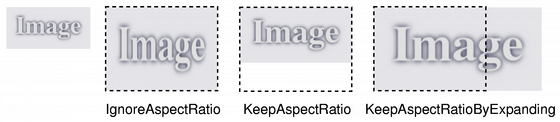
若给定 size is empty, this function returns a null 图像。
这是重载函数。
Returns a copy of the image scaled to a rectangle with the given width and height according to the given aspectRatioMode and transformMode .
若 width 或 height is zero or negative, this function returns a null image.
Returns a scaled copy of the image. The returned image is scaled 到给定 height using the specified transformation mode .
This function automatically calculates the width of the image so that the ratio of the image is preserved.
若给定 height is 0 or negative, a null image is returned.
另请参阅 图像变换 .
Returns a scaled copy of the image. The returned image is scaled 到给定 width using the specified transformation mode .
This function automatically calculates the height of the image so that its aspect ratio is preserved.
若给定 width is 0 or negative, a null image is returned.
另请参阅 图像变换 .
Returns a pointer to the pixel data at the scanline with index i . The first scanline is at index 0.
The scanline data is aligned on a 32-bit boundary.
警告: If you are accessing 32-bpp image data, cast the returned pointer to QRgb* ( QRgb has a 32-bit size) and use it to read/write the pixel value. You cannot use the uchar* pointer directly, because the pixel format depends on the byte order on the underlying platform. Use qRed (), qGreen (), qBlue (),和 qAlpha () to access the pixels.
另请参阅 bytesPerLine (), bits (), 像素操纵 ,和 constScanLine ().
设置颜色在给定 index in the color table, to the given to colorValue . The color value is an ARGB 四元组。
若 index is outside the current size of the color table, it is expanded with setColorCount ().
另请参阅 color (), colorCount (), setColorTable (),和 像素操纵 .
重置颜色表大小以包含 colorCount 条目。
If the color table is expanded, all the extra colors will be set to transparent (i.e qRgba(0, 0, 0, 0)).
When the image is used, the color table must be large enough to have entries for all the pixel/index values present in the image, otherwise the results are undefined.
该函数在 Qt 4.6 引入。
另请参阅 colorCount (), colorTable (), setColor (),和 图像变换 .
将用于翻译颜色索引的颜色表设为 QRgb 值,到指定 colors .
When the image is used, the color table must be large enough to have entries for all the pixel/index values present in the image, otherwise the results are undefined.
另请参阅 colorTable (), setColor (),和 图像变换 .
Sets the number of pixels that fit horizontally in a physical meter, to x .
Together with dotsPerMeterY (), this number defines the intended scale and aspect ratio of the image, and determines the scale at which QPainter will draw graphics on the image. It does not change the scale or aspect ratio of the image when it is rendered on other paint devices.
另请参阅 dotsPerMeterX () 和 图像信息 .
Sets the number of pixels that fit vertically in a physical meter, to y .
Together with dotsPerMeterX (), this number defines the intended scale and aspect ratio of the image, and determines the scale at which QPainter will draw graphics on the image. It does not change the scale or aspect ratio of the image when it is rendered on other paint devices.
另请参阅 dotsPerMeterY () 和 图像信息 .
Sets the number of pixels by which the image is intended to be offset by when positioning relative to other images, to offset .
设置像素索引或颜色在给定 position to index_or_rgb .
If the image's format is either monochrome or 8-bit, the given index_or_rgb value must be an index in the image's color table, otherwise the parameter must be a QRgb 值。
若 position is not a valid coordinate pair in the image, or if index_or_rgb >= colorCount () in the case of monochrome and 8-bit images, the result is undefined.
警告: This function is expensive due to the call of the internal detach() function called within; if performance is a concern, we recommend the use of scanLine() to access pixel data directly.
这是重载函数。
设置像素索引或颜色在 ( x , y ) 到 index_or_rgb .
将图像文本设为给定 text and associate it with the given key .
If you just want to store a single text block (i.e., a "comment" or just a description), you can either pass an empty key, or use a generic key like "Description".
图像文本被嵌入图像数据当调用 save () 或 QImageWriter.write ().
Not all image formats support embedded text. You can find out if a specific image or format supports embedding text by using QImageWriter.supportsOption (). We give an example:
         QImageWriter writer;
         writer.setFormat("png");
         if (writer.supportsOption(QImageIOHandler.Description))
             qDebug() << "Png supports embedded text";
可以使用 QImageWriter.supportedImageFormats () to find out which image formats are available to you.
返回图片大小,即其 width () 和 height ().
另请参阅 Image Information .
交换图像 other with this image. This operation is very fast and never fails.
该函数在 Qt 4.8 引入。
返回的图像文本关联给定 key 。若 the specified key is an empty string, the whole image text is returned, with each key-text pair separated by a newline.
另请参阅 setText () 和 textKeys ().
返回此图像的文本键。
You can use these keys with text () to list the image text for a certain key.
另请参阅 text ().
Returns a copy of the image that is transformed using the given transformation matrix and transformation mode .
The transformation matrix is internally adjusted to compensate for unwanted translation; i.e. the image produced is the smallest image that contains all the transformed points of the original image. Use the trueMatrix () function to retrieve the actual matrix used for transforming an image.
另请参阅 trueMatrix () 和 图像变换 .
Returns a copy of the image that is transformed using the given transformation matrix and transformation mode .
The transformation matrix is internally adjusted to compensate for unwanted translation; i.e. the image produced is the smallest image that contains all the transformed points of the original image. Use the trueMatrix () function to retrieve the actual matrix used for transforming an image.
Unlike the other overload, this function can be used to perform perspective transformations on images.
另请参阅 trueMatrix () 和 图像变换 .
Returns the actual matrix used for transforming an image with the given width , height and matrix .
When transforming an image using the transformed () function, the transformation matrix is internally adjusted to compensate for unwanted translation, i.e. transformed () returns the smallest image containing all transformed points of the original image. This function returns the modified matrix, which maps points correctly from the original image into the new image.
另请参阅 transformed () 和 图像变换 .
Returns the actual matrix used for transforming an image with the given width , height and matrix .
When transforming an image using the transformed () function, the transformation matrix is internally adjusted to compensate for unwanted translation, i.e. transformed () returns the smallest image containing all transformed points of the original image. This function returns the modified matrix, which maps points correctly from the original image into the new image.
Unlike the other overload, this function creates transformation matrices that can be used to perform perspective transformations on images.
另请参阅 transformed () 和 图像变换 .
返回 true 若 pos is a valid coordinate pair within the image; otherwise returns false.
另请参阅 rect () 和 QRect.contains ().
这是重载函数。
返回 true 若 QPoint ( x , y ) is a valid coordinate pair within the image; otherwise returns false.
返回图像宽度。
另请参阅 Image Information .
