The QMatrix class specifies 2D transformations of a coordinate system. 更多...
This class can be pickled.
The QMatrix class specifies 2D transformations of a coordinate system.
A matrix specifies how to translate, scale, shear or rotate the coordinate system, and is typically used when rendering graphics. QMatrix, in contrast to QTransform , does not allow perspective transformations. QTransform is the recommended transformation class in Qt.
A QMatrix object can be built using the setMatrix (), scale (), rotate (), translate () 和 shear () functions. Alternatively, it can be built by applying basic matrix operations . The matrix can also be defined when constructed, and it can be reset to the identity matrix (the default) using the reset () 函数。
The QMatrix class supports mapping of graphic primitives: A given point, line, polygon, region, or painter path can be mapped to the coordinate system defined by this matrix using the map () function. In case of a rectangle, its coordinates can be transformed using the mapRect () function. A rectangle can also be transformed into a polygon (mapped to the coordinate system defined by this matrix), using the mapToPolygon () 函数。
QMatrix provides the isIdentity () function which returns true if the matrix is the identity matrix, and the isInvertible () function which returns true if the matrix is non-singular (i.e. AB = BA = I). The inverted () function returns an inverted copy of this matrix if it is invertible (otherwise it returns the identity matrix). In addition, QMatrix provides the determinant () function returning the matrix's determinant.
Finally, the QMatrix class supports matrix multiplication, and objects of the class can be streamed as well as compared.
When rendering graphics, the matrix defines the transformations but the actual transformation is performed by the drawing routines in QPainter .
默认情况下, QPainter operates on the associated device's own coordinate system. The standard coordinate system of a QPaintDevice has its origin located at the top-left position. The x values increase to the right; y values increase downward. For a complete description, see the coordinate system 文档编制。
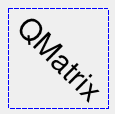
QPainter has functions to translate, scale, shear and rotate the coordinate system without using a QMatrix. For example:
|
void SimpleTransformation.paintEvent(QPaintEvent *) { QPainter painter(this); painter.setPen(QPen(Qt.blue, 1, Qt.DashLine)); painter.drawRect(0, 0, 100, 100); painter.rotate(45); painter.setFont(QFont("Helvetica", 24)); painter.setPen(QPen(Qt.black, 1)); painter.drawText(20, 10, "QMatrix"); } |
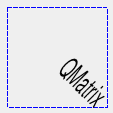
Although these functions are very convenient, it can be more efficient to build a QMatrix and call QPainter.setMatrix () if you want to perform more than a single transform operation. For example:
|
void CombinedTransformation.paintEvent(QPaintEvent *) { QPainter painter(this); painter.setPen(QPen(Qt.blue, 1, Qt.DashLine)); painter.drawRect(0, 0, 100, 100); QMatrix matrix; matrix.translate(50, 50); matrix.rotate(45); matrix.scale(0.5, 1.0); painter.setMatrix(matrix); painter.setFont(QFont("Helvetica", 24)); painter.setPen(QPen(Qt.black, 1)); painter.drawText(20, 10, "QMatrix"); } |
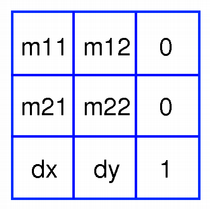
A QMatrix object contains a 3 x 3 matrix. The dx and dy elements specify horizontal and vertical translation. m11 and m22 elements specify horizontal and vertical scaling. And finally, the m21 and m12 elements specify horizontal and vertical shearing .
QMatrix transforms a point in the plane to another point using the following formulas:
 x' = m11*x + m21*y + dx
 y' = m22*y + m12*x + dy
The point (x, y) is the original point, and (x', y') is the transformed point. (x', y') 可以是 transformed back to (x, y) by performing the same operation 在 inverted () matrix.
The various matrix elements can be set when constructing the matrix, or by using the setMatrix () function later on. They can also be manipulated using the translate (), rotate (), scale () 和 shear () convenience functions, The currently set values can be retrieved using the m11 (), m12 (), m21 (), m22 (), dx () and dy () 函数。
Translation is the simplest transformation. Setting dx and dy will move the coordinate system dx units along the X axis and dy units along the Y axis. Scaling can be done by setting m11 and m22 。例如, setting m11 to 2 and m22 to 1.5 will double the height and increase the width by 50%. The identity matrix has m11 and m22 set to 1 (all others are set to 0) mapping a point to itself. Shearing is controlled by m12 and m21 . Setting these elements to values different from zero will twist the coordinate system. Rotation is achieved by carefully setting both the shearing factors and the scaling factors.
Here's the combined transformations example using basic matrix operations:
|
|
void BasicOperations.paintEvent(QPaintEvent *) { double pi = 3.14; double a = pi/180 * 45.0; double sina = sin(a); double cosa = cos(a); QMatrix translationMatrix(1, 0, 0, 1, 50.0, 50.0); QMatrix rotationMatrix(cosa, sina, -sina, cosa, 0, 0); QMatrix scalingMatrix(0.5, 0, 0, 1.0, 0, 0); QMatrix matrix; matrix = scalingMatrix * rotationMatrix * translationMatrix; QPainter painter(this); painter.setPen(QPen(Qt.blue, 1, Qt.DashLine)); painter.drawRect(0, 0, 100, 100); painter.setMatrix(matrix); painter.setFont(QFont("Helvetica", 24)); painter.setPen(QPen(Qt.black, 1)); painter.drawText(20, 10, "QMatrix"); } |
构造恒等矩阵。
All elements are set to zero except m11 and m22 (specifying the scale), which are set to 1.
另请参阅 reset ().
构造矩阵采用元素 m11 , m12 , m21 , m22 , dx and dy .
另请参阅 setMatrix ().
Returns the matrix's determinant.
该函数在 Qt 4.6 引入。
Returns the horizontal translation factor.
另请参阅 translate () and 基本矩阵运算 .
Returns the vertical translation factor.
另请参阅 translate () and 基本矩阵运算 .
Returns an inverted copy of this matrix.
If the matrix is singular (not invertible), the returned matrix is the identity matrix. If invertible is valid (i.e. not 0), its value is set to true if the matrix is invertible, otherwise it 被设为 false。
另请参阅 isInvertible ().
Returns true if the matrix is the identity matrix, otherwise returns false.
另请参阅 reset ().
Returns true if the matrix is invertible, otherwise returns false.
另请参阅 inverted ().
Returns the horizontal scaling factor.
Returns the vertical shearing factor.
Returns the horizontal shearing factor.
Returns the vertical scaling factor.
Maps the given coordinates x and y into the coordinate system defined by this matrix. The resulting values are put in * tx and * ty ,分别。
The coordinates are transformed using the following formulas:
 x' = m11*x + m21*y + dx
 y' = m22*y + m12*x + dy
The point (x, y) is the original point, and (x', y') is the transformed point.
另请参阅 基本矩阵运算 .
这是重载函数。
Maps the given coordinates x and y into the coordinate system defined by this matrix. The resulting values are put in * tx and * ty , respectively. Note that the transformed coordinates are rounded to the nearest integer.
这是重载函数。
创建和返回 QPointF object that is a copy of the given point , mapped into the coordinate system defined by this matrix.
这是重载函数。
创建和返回 QPoint object that is a copy of the given point , mapped into the coordinate system defined by this matrix. Note that the transformed coordinates are rounded to the nearest integer.
这是重载函数。
创建和返回 QLineF object that is a copy of the given line , mapped into the coordinate system defined by this matrix.
这是重载函数。
创建和返回 QLine object that is a copy of the given line , mapped into the coordinate system defined by this matrix. Note that the transformed coordinates are rounded to the nearest integer.
这是重载函数。
创建和返回 QPolygonF object that is a copy of the given polygon , mapped into the coordinate system defined by this matrix.
这是重载函数。
创建和返回 QPolygon object that is a copy of the given polygon , mapped into the coordinate system defined by this matrix. Note that the transformed coordinates are rounded to the nearest integer.
这是重载函数。
创建和返回 QRegion object that is a copy of the given region , mapped into the coordinate system defined by this matrix.
Calling this method can be rather expensive if rotations or shearing are used.
创建和返回 QRectF object that is a copy of the given rectangle , mapped into the coordinate system defined by this matrix.
The rectangle's coordinates are transformed using the following formulas:
 x' = m11*x + m21*y + dx
 y' = m22*y + m12*x + dy
If rotation or shearing has been specified, this function 返回 bounding rectangle. To retrieve the exact region the given rectangle maps to, use the mapToPolygon () function 代替。
另请参阅 mapToPolygon () 和 基本 Matrix Operations .
这是重载函数。
创建和返回 QRect object that is a copy of the given rectangle , mapped into the coordinate system defined by this matrix. Note that the transformed coordinates are rounded to the nearest integer.
创建和返回 QPolygon representation of the given rectangle , mapped into the coordinate system defined by this matrix.
The rectangle's coordinates are transformed using the following formulas:
 x' = m11*x + m21*y + dx
 y' = m22*y + m12*x + dy
Polygons and rectangles behave slightly differently when transformed (due to integer rounding), so matrix.map(QPolygon(rectangle)) is not always the same as matrix.mapToPolygon(rectangle) .
Resets the matrix to an identity matrix, i.e. all elements are set to zero, except m11 and m22 (specifying the scale) which are set to 1.
另请参阅 QMatrix (), isIdentity (),和 基本 Matrix Operations .
Rotates the coordinate system the given degrees counterclockwise.
Note that if you apply a QMatrix to a point defined in widget coordinates, the direction of the rotation will be clockwise because the y-axis points downwards.
Returns a reference to the matrix.
另请参阅 setMatrix ().
Scales the coordinate system by sx horizontally and sy vertically, and returns a reference to the matrix.
另请参阅 setMatrix ().
Sets the matrix elements to the specified values, m11 , m12 , m21 , m22 , dx and dy .
Note that this function replaces the previous values. QMatrix provide the translate (), rotate (), scale () 和 shear () convenience functions to manipulate the various matrix elements based on the currently defined coordinate system.
另请参阅 QMatrix ().
Shears the coordinate system by sh horizontally and sv vertically, and returns a reference to the matrix.
另请参阅 setMatrix ().
Moves the coordinate system dx along the x axis and dy along the y axis, and returns a reference to the matrix.
另请参阅 setMatrix ().
