The QMessageBox class provides a modal dialog for informing the user or for asking the user a question and receiving an answer. 更多...
继承 QDialog .
The QMessageBox class provides a modal dialog for informing the user or for asking the user a question and receiving an answer.
消息框显示首要 text to alert the user to a situation, an 情报文本 to further explain the alert or to ask the user a question, and an optional detailed text to provide even more data if the user requests it. A message box can also display an icon and 标准按钮 for accepting a user response.
Two APIs for using QMessageBox are provided, the property-based API, and the static functions. Calling one of the static functions is the simpler approach, but it is less flexible than using the property-based API, and the result is less informative. Using the property-based API is recommended.
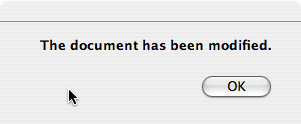
To use the property-based API, construct an instance of QMessageBox, set the desired properties, and call exec_ () to show the message. The simplest configuration is to set only the 消息文本 特性。
 QMessageBox msgBox;
 msgBox.setText("The document has been modified.");
 msgBox.exec_();
用户必须点击 OK button to dismiss the message box. The rest of the GUI is blocked until the message box is dismissed.
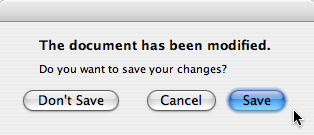
A better approach than just alerting the user to an event is to also ask the user what to do about it. Store the question in the informative text property, and set the 标准按钮 property to the set of buttons you want as the set of user responses. The buttons are specified by combining values from StandardButtons using the bitwise OR operator. The display order for the buttons is platform-dependent. For example, on Windows, Save is displayed to the left of Cancel , whereas on Mac OS, the order is reversed.
Mark one of your standard buttons to be your 默认按钮 .
 QMessageBox msgBox;
 msgBox.setText("The document has been modified.");
 msgBox.setInformativeText("Do you want to save your changes?");
 msgBox.setStandardButtons(QMessageBox.Save | QMessageBox.Discard | QMessageBox.Cancel);
 msgBox.setDefaultButton(QMessageBox.Save);
 int ret = msgBox.exec_();
This is the approach recommended in the Mac OS X Guidelines . Similar guidelines apply for the other platforms, but note the different ways the 情报文本 is handled for different platforms.
exec_ () slot returns the StandardButtons value of the button that was clicked.
 switch (ret) {
   case QMessageBox.Save:
       // Save was clicked
       break;
   case QMessageBox.Discard:
       // Don't Save was clicked
       break;
   case QMessageBox.Cancel:
       // Cancel was clicked
       break;
   default:
       // should never be reached
       break;
 }
To give the user more information to help him answer the question, set the 细节文本 property. If the 细节文本 property is set, the Show Details... button will be shown.
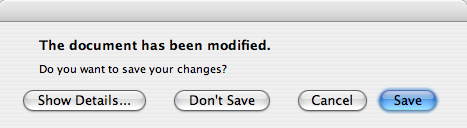
Clicking the Show Details... button displays the detailed text.
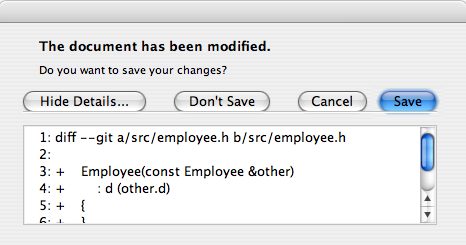
detailed text property is always interpreted as plain text. The main text and 情报文本 properties can be either plain text or rich text. These strings are interpreted according to the setting of the 文本格式 property. The default setting is auto-text .
Note that for some plain text strings containing XML meta-characters, the auto-text rich text detection test may fail causing your plain text string to be interpreted incorrectly as rich text. In these rare cases, use Qt.convertFromPlainText () 到 convert your plain text string to a visually equivalent rich text string, or set the text format property explicitly with setTextFormat ().
QMessageBox supports four predefined message severity levels, or message types, which really only differ in the predefined icon they each show. Specify one of the four predefined message types by setting the icon property to one of the predefined icons . The following rules are guidelines:
|
|
询问 | For asking a question during normal operations. |
|
|
Information | For reporting information about normal operations. |
|
|
警告 | For reporting non-critical errors. |
|
|
Critical | For reporting critical errors. |
预定义图标 are not defined by QMessageBox, but provided by the style. The default value is No Icon 。 message boxes are otherwise the same for all cases. When using a standard icon, use the one recommended in the table, or use the one recommended by the style guidelines for your platform. If none of the standard icons is right for your message box, you can use a custom icon by setting the icon pixmap property instead of setting the icon 特性。
In summary, to set an icon, use either setIcon () for one of the standard icons, or setIconPixmap () for a custom icon.
Building message boxes with the static functions API, although convenient, is less flexible than using the property-based API, because the static function signatures lack parameters for setting the informative text and detailed text properties. One work-around for this has been to use the title parameter as the message box main text and the text parameter as the message box informative text. Because this has the obvious drawback of making a less readable message box, platform guidelines do not recommend it. The Microsoft Windows User Interface Guidelines recommend using the 应用程序名称 作为 window's title , which means that if you have an informative text in addition to your main text, you must concatenate it to the text 参数。
Note that the static function signatures have changed with respect to their button parameters, which are now used to set the standard buttons 和 默认按钮 .
Static functions are available for creating information (), question (), warning (),和 critical () message boxes.
 int ret = QMessageBox.warning(this, tr("My Application"),
                                tr("The document has been modified.\n"
                                   "Do you want to save your changes?"),
                                QMessageBox.Save | QMessageBox.Discard
                                | QMessageBox.Cancel,
                                QMessageBox.Save);
标准对话框 example shows how to use QMessageBox and the other built-in Qt dialogs.
若 standard buttons are not flexible enough for your message box, you can 使用 addButton () overload that takes a text and a ButtonRoleto to add custom buttons. The ButtonRole is used by QMessageBox to determine the ordering of the buttons on screen (which varies according to the platform). You can test the value of clickedButton () after calling exec_ (). For example,
 QMessageBox msgBox;
 QPushButton *connectButton = msgBox.addButton(tr("Connect"), QMessageBox.ActionRole);
 QPushButton *abortButton = msgBox.addButton(QMessageBox.Abort);
 msgBox.exec_();
 if (msgBox.clickedButton() == connectButton) {
     // connect
 } else if (msgBox.clickedButton() == abortButton) {
     // abort
 }
The default button (i.e., the button activated when Enter is pressed) can be specified using setDefaultButton (). If a default button is not specified, QMessageBox tries to find one based on the button roles of the buttons used in the message box.
The escape button (the button activated when Esc is pressed) can be specified using setEscapeButton (). If an escape button is not specified, QMessageBox tries to find one using these rules:
When an escape button can't be determined using these rules, pressing Esc 不起作用。
This enum describes the roles that can be used to describe buttons in the button box. Combinations of these roles are as flags used to describe different aspects of their behavior.
| 常量 | 值 | 描述 |
|---|---|---|
| QMessageBox.InvalidRole | -1 | The button is invalid. |
| QMessageBox.AcceptRole | 0 | Clicking the button causes the dialog to be accepted (e.g. OK). |
| QMessageBox.RejectRole | 1 | Clicking the button causes the dialog to be rejected (e.g. Cancel). |
| QMessageBox.DestructiveRole | 2 | Clicking the button causes a destructive change (e.g. for Discarding Changes) and closes the dialog. |
| QMessageBox.ActionRole | 3 | Clicking the button causes changes to the elements within the dialog. |
| QMessageBox.HelpRole | 4 | The button can be clicked to request help. |
| QMessageBox.YesRole | 5 | The button is a "Yes"-like button. |
| QMessageBox.NoRole | 6 | The button is a "No"-like button. |
| QMessageBox.ApplyRole | 8 | The button applies current changes. |
| QMessageBox.ResetRole | 7 | The button resets the dialog's fields to default values. |
另请参阅 StandardButton .
This enum has the following values:
| 常量 | 值 | 描述 |
|---|---|---|
| QMessageBox.NoIcon | 0 | the message box does not have any icon. |
| QMessageBox.Question | 4 | an icon indicating that the message is asking a question. |
| QMessageBox.Information | 1 | an icon indicating that the message is nothing out of the ordinary. |
| QMessageBox.Warning | 2 | an icon indicating that the message is a warning, but can be dealt with. |
| QMessageBox.Critical | 3 | an icon indicating that the message represents a critical problem. |
These enums describe flags for standard buttons. Each button has a defined ButtonRole .
| 常量 | 值 | 描述 |
|---|---|---|
| QMessageBox.Ok | 0x00000400 | An "OK" button defined with the AcceptRole . |
| QMessageBox.Open | 0x00002000 | A "Open" button defined with the AcceptRole . |
| QMessageBox.Save | 0x00000800 | A "Save" button defined with the AcceptRole . |
| QMessageBox.Cancel | 0x00400000 | A "Cancel" button defined with the RejectRole . |
| QMessageBox.Close | 0x00200000 | A "Close" button defined with the RejectRole . |
| QMessageBox.Discard | 0x00800000 | A "Discard" or "Don't Save" button, depending on the platform, defined with the DestructiveRole . |
| QMessageBox.Apply | 0x02000000 | An "Apply" button defined with the ApplyRole . |
| QMessageBox.Reset | 0x04000000 | A "Reset" button defined with the ResetRole . |
| QMessageBox.RestoreDefaults | 0x08000000 | A "Restore Defaults" button defined with the ResetRole . |
| QMessageBox.Help | 0x01000000 | A "Help" button defined with the HelpRole . |
| QMessageBox.SaveAll | 0x00001000 | A "Save All" button defined with the AcceptRole . |
| QMessageBox.Yes | 0x00004000 | A "Yes" button defined with the YesRole . |
| QMessageBox.YesToAll | 0x00008000 | A "Yes to All" button defined with the YesRole . |
| QMessageBox.No | 0x00010000 | A "No" button defined with the NoRole . |
| QMessageBox.NoToAll | 0x00020000 | A "No to All" button defined with the NoRole . |
| QMessageBox.Abort | 0x00040000 | An "Abort" button defined with the RejectRole . |
| QMessageBox.Retry | 0x00080000 | A "Retry" button defined with the AcceptRole . |
| QMessageBox.Ignore | 0x00100000 | An "Ignore" button defined with the AcceptRole . |
| QMessageBox.NoButton | 0x00000000 | An invalid button. |
以下值已过时:
| 常量 | 值 | 描述 |
|---|---|---|
| QMessageBox.YesAll | YesToAll | 使用 YesToAll 代替。 |
| QMessageBox.NoAll | NoToAll | 使用 NoToAll 代替。 |
| QMessageBox.Default | 0x00000100 | 使用 defaultButton argument of information (), warning (), etc. instead, or call setDefaultButton (). |
| QMessageBox.Escape | 0x00000200 | 调用 setEscapeButton () 代替。 |
| QMessageBox.FlagMask | 0x00000300 | |
| QMessageBox.ButtonMask | ~FlagMask |
该枚举在 Qt 4.2 引入或被修改。
The StandardButtons type is a typedef for QFlags <StandardButton>. It stores an OR combination of StandardButton values.
另请参阅 ButtonRole and standardButtons .
parent argument, if not None, causes self to be owned by Qt instead of PyQt.
Constructs a message box with no text and no buttons. parent 会被传递给 QDialog 构造函数。
On Mac OS X, if you want your message box to appear as a Qt.Sheet of its parent , set the message box's window modality to Qt.WindowModal or use open (). Otherwise, the message box will be a standard dialog.
parent argument, if not None, causes self to be owned by Qt instead of PyQt.
Constructs a message box with the given icon , title , text , and standard buttons . Standard or custom buttons can be added at any time using addButton ()。 parent and f 自变量被传递给 QDialog 构造函数。
消息框是 应用程序模态 对话框。
On Mac OS X, if parent is not 0 and you want your message box to appear as a Qt.Sheet of that parent, set the message box's window modality to Qt.WindowModal (default). Otherwise, the message box will be a standard 对话框。
另请参阅 setWindowTitle (), setText (), setIcon (),和 setStandardButtons ().
parent argument, if not None, causes self to be owned by Qt instead of PyQt.
Displays a simple about box with title title 和文本 text . The about box's parent is parent .
about() looks for a suitable icon in four locations:
The about box has a single button labelled "OK". On Mac OS X, the about box is popped up as a modeless window; on other platforms, it is currently application modal.
另请参阅 QWidget.windowIcon () 和 QApplication.activeWindow ().
Displays a simple message box about Qt, with the given title and centered over parent (if parent is not 0). The message includes the version number of Qt being used by the application.
This is useful for inclusion in the Help menu of an application, as shown in the 菜单 范例。
QApplication provides this functionality as a slot.
On Mac OS X, the about box is popped up as a modeless window; on other platforms, it is currently application modal.
另请参阅 QApplication.aboutQt ().
button argument has it's ownership transferred to Qt.
添加给定 button to the message box with the specified role .
该函数在 Qt 4.2 引入。
另请参阅 removeButton (), button (),和 setStandardButtons ().
这是重载函数。
Creates a button with the given text , adds it to the message box for the specified role , and returns it.
该函数在 Qt 4.2 引入。
这是重载函数。
添加标准 button to the message box if it is valid to do so, and returns the push button.
该函数在 Qt 4.2 引入。
另请参阅 setStandardButtons ().
Returns a pointer corresponding to the standard button which , or 0 if the standard button doesn't exist in this message box.
该函数在 Qt 4.2 引入。
另请参阅 standardButtons and standardButton ().
Returns the button role for the specified button . This function returns InvalidRole if button is 0 or has not been added to the message box.
该函数在 Qt 4.5 引入。
另请参阅 buttons () and addButton ().
Returns a list of all the buttons that have been added to the message box.
该函数在 Qt 4.5 引入。
另请参阅 buttonRole (), addButton (),和 removeButton ().
重实现自 QWidget.changeEvent ().
Returns the button that was clicked by the user, or 0 if the user hit the Esc key and no Esc 按钮 was set.
若 exec_ () hasn't been called yet, returns 0.
范例:
 QMessageBox messageBox(this);
 QAbstractButton *disconnectButton =
       messageBox.addButton(tr("Disconnect"), QMessageBox.ActionRole);
 ...
 messageBox.exec_();
 if (messageBox.clickedButton() == disconnectButton) {
     ...
 }
该函数在 Qt 4.2 引入。
另请参阅 standardButton () 和 button ().
重实现自 QWidget.closeEvent ().
Opens a critical message box with the given title and text in front of the specified parent 小部件。
标准 buttons 被添加到消息框。 defaultButton specifies the button used when Enter is pressed. defaultButton must refer to a button that was given in buttons 。若 defaultButton is QMessageBox.NoButton , QMessageBox chooses a suitable default automatically.
Returns the identity of the standard button that was clicked. If Esc was pressed instead, the Esc 按钮 is returned.
消息框是 应用程序模态 对话框。
警告: Do not delete parent during the execution of the dialog. If you want to do this, you should create the dialog yourself using one of the QMessageBox 构造函数。
该函数在 Qt 4.2 引入。
另请参阅 question (), warning (),和 information ().
Returns the button that should be the message box's 默认按钮 . Returns 0 if no default button was set.
该函数在 Qt 4.2 引入。
另请参阅 setDefaultButton (), addButton (),和 QPushButton.setDefault ().
返回被激活按钮,当按下 Esc 键时。
默认情况下, QMessageBox attempts to automatically detect an escape button as follows:
When an escape button could not be automatically detected, pressing Esc 不起作用。
该函数在 Qt 4.2 引入。
另请参阅 setEscapeButton () 和 addButton ().
重实现自 QObject.event ().
打开信息消息框采用给定 title and text in front of the specified parent 小部件。
标准 buttons 被添加到消息框。 defaultButton specifies the button used when Enter is pressed. defaultButton must refer to a button that was given in buttons 。若 defaultButton is QMessageBox.NoButton , QMessageBox chooses a suitable default automatically.
Returns the identity of the standard button that was clicked. If Esc was pressed instead, the Esc 按钮 is returned.
消息框是 应用程序模态 对话框。
警告: Do not delete parent during the execution of the dialog. If you want to do this, you should create the dialog yourself using one of the QMessageBox 构造函数。
该函数在 Qt 4.2 引入。
另请参阅 question (), warning (),和 critical ().
重实现自 QWidget.keyPressEvent ().
这是重载函数。
打开对话框并连接其 finished () 或 buttonClicked () 信号到 slot specified by receiver and member 。若槽在 member has a pointer for its first parameter the connection is to buttonClicked (), otherwise the connection is to finished ().
The signal will be disconnected from the slot when the dialog is closed.
打开问题消息框采用给定 title and text in front of the specified parent 小部件。
标准 buttons 被添加到消息框。 defaultButton specifies the button used when Enter is pressed. defaultButton must refer to a button that was given in buttons 。若 defaultButton is QMessageBox.NoButton , QMessageBox chooses a suitable default automatically.
Returns the identity of the standard button that was clicked. If Esc was pressed instead, the Esc 按钮 is returned.
消息框是 应用程序模态 对话框。
警告: Do not delete parent during the execution of the dialog. If you want to do this, you should create the dialog yourself using one of the QMessageBox 构造函数。
该函数在 Qt 4.2 引入。
另请参阅 information (), warning (),和 critical ().
button argument
移除 button from the button box without deleting it.
该函数在 Qt 4.2 引入。
另请参阅 addButton () 和 setStandardButtons ().
重实现自 QWidget.resizeEvent ().
设置消息框的 默认按钮 to button .
该函数在 Qt 4.2 引入。
另请参阅 defaultButton (), addButton (),和 QPushButton.setDefault ().
设置消息框的 默认按钮 to button .
该函数在 Qt 4.3 引入。
另请参阅 addButton () 和 QPushButton.setDefault ().
Sets the button that gets activated when the Escape key is pressed to button .
该函数在 Qt 4.2 引入。
另请参阅 escapeButton (), addButton (),和 clickedButton ().
Sets the buttons that gets activated when the Escape key is pressed to button .
该函数在 Qt 4.3 引入。
另请参阅 addButton () 和 clickedButton ().
此函数投影 QWidget.setWindowModality ().
Sets the modality of the message box to windowModality .
On Mac OS X, if the modality is set to Qt.WindowModal and the message box has a parent, then the message box will be a Qt.Sheet , otherwise the message box will be a standard dialog.
该函数在 Qt 4.2 引入。
此函数投影 QWidget.setWindowTitle ().
Sets the title of the message box to title . On Mac OS X, the window title is ignored (as required by the Mac OS X Guidelines).
该函数在 Qt 4.2 引入。
重实现自 QWidget.showEvent ().
Returns the standard button enum value corresponding to the given button ,或 NoButton 若给定 button 不是标准按钮。
该函数在 Qt 4.2 引入。
另请参阅 button () and standardButtons ().
Opens a warning message box with the given title and text in front of the specified parent 小部件。
标准 buttons 被添加到消息框。 defaultButton specifies the button used when Enter is pressed. defaultButton must refer to a button that was given in buttons 。若 defaultButton is QMessageBox.NoButton , QMessageBox chooses a suitable default automatically.
Returns the identity of the standard button that was clicked. If Esc was pressed instead, the Esc 按钮 is returned.
消息框是 应用程序模态 对话框。
警告: Do not delete parent during the execution of the dialog. If you want to do this, you should create the dialog yourself using one of the QMessageBox 构造函数。
该函数在 Qt 4.2 引入。
另请参阅 question (), information (),和 critical ().
This is the default overload of this signal.
This signal is emitted whenever a button is clicked inside the QMessageBox . The button that was clicked in returned in button .



