QPushButton Widget 提供命令按钮。 更多...
继承 QAbstractButton .
Inherited by QCommandLinkButton .
QPushButton Widget 提供命令按钮。
The push button, or command button, is perhaps the most commonly used widget in any graphical user interface. Push (click) a button to command the computer to perform some action, or to answer a question. Typical buttons are OK, Apply, Cancel, Close, Yes, No and Help.
A command button is rectangular and typically displays a text label describing its action. A shortcut key can be specified by preceding the preferred character with an ampersand in the text. 例如:
QPushButton *button = new QPushButton("&Download", this);
在此范例中快捷方式是 Alt+D 。见 QShortcut documentation for details (to display an actual ampersand, use '&&').
Push buttons display a textual label, and optionally a small icon. These can be set using the constructors and changed later 使用 setText () 和 setIcon (). If the button is disabled the appearance of the text and icon will be manipulated with respect to the GUI style to make the button look "disabled".
按钮发射信号 clicked () when it is activated by the mouse, the Spacebar or by a keyboard shortcut. Connect to this signal to perform the button's action. Push buttons also provide less commonly used signals, for example, pressed () 和 released ().
Command buttons in dialogs are by default auto-default buttons, i.e. they become the default push button automatically when they receive the keyboard input focus. A default button is a push button that is activated when the user presses the Enter or Return key in a dialog. You can change this with setAutoDefault (). Note that auto-default buttons reserve a little extra space which is necessary to draw a default-button indicator. If you do not want this space around your buttons, call setAutoDefault(false).
Being so central, the button widget has grown to accommodate a great many variations in the past decade. The Microsoft style guide now shows about ten different states of Windows push buttons and the text implies that there are dozens more when all the combinations of features are taken into consideration.
最重要的模式 (或状态):
As a general rule, use a push button when the application or dialog window performs an action when the user clicks on it (such as Apply, Cancel, Close and Help) and when the widget is supposed to have a wide, rectangular shape with a text label. Small, typically square buttons that change the state of the window rather than performing an action (such as the buttons in the top-right corner of the QFileDialog ) are not command buttons, but tool buttons. Qt provides a special class ( QToolButton ) for these 按钮。
若需要触发行为 (见 setCheckable ()) or a button that auto-repeats the activation signal when being pushed down like the arrows in a scroll bar (see setAutoRepeat ()), a command button is probably not what you want. When in doubt, use a tool button.
A variation of a command button is a menu button. These provide not just one command, but several, since when they are clicked they pop up a menu of options. Use the method setMenu () to associate a popup menu with a push button.
其它种类的按钮:选项按钮 (见 QRadioButton ) 和复选框 (见 QCheckBox ).

|
A push button shown in the
Macintosh widget style
.
Note that when a button's width becomes smaller than 50 or its height becomes smaller than 30, the button's corners are changed from round to square. Use the setMinimumSize () function to prevent this behavior. |

|
A push button shown in the Windows XP widget style . |

|
A push button shown in the Plastique widget style . |
在 Qt 中, QAbstractButton base class provides most of the modes and other API, and QPushButton provides GUI logic. See QAbstractButton for more information about the API.
parent argument, if not None, causes self to be owned by Qt instead of PyQt.
构造按钮没有文本和 parent .
parent argument, if not None, causes self to be owned by Qt instead of PyQt.
构造按钮采用父级 parent 和 text text .
parent argument, if not None, causes self to be owned by Qt instead of PyQt.
构造按钮采用 icon 和 text , 和 parent .
注意:也可以传递 QPixmap object as an icon (thanks to the implicit type conversion provided by C++).
重实现自 QObject.event ().
重实现自 QWidget.focusInEvent ().
重实现自 QWidget.focusOutEvent ().
初始化 option 采用值来自此 QPushButton . This method is useful for subclasses when they need a QStyleOptionButton , but don't want to fill in all the information themselves.
另请参阅 QStyleOption.initFrom ().
重实现自 QWidget.keyPressEvent ().
Returns the button's associated popup menu or 0 if no popup menu has been set.
另请参阅 setMenu ().
重实现自 QWidget.minimumSizeHint ().
重实现自 QWidget.paintEvent ().
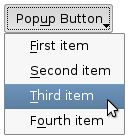
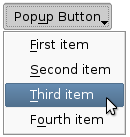
关联弹出菜单 menu with this push button. This turns the button into a menu button, which in some styles will produce a small triangle to the right of the button's text.
菜单的所有权 not transferred to the push button.
|
|
Push buttons with popup menus shown in the Plastique widget style (left) and Cleanlooks widget style (right). |
另请参阅 menu ().
This method is also a Qt slot with the C++ signature void showMenu() .
Shows (pops up) the associated popup menu. If there is no such menu, this function does nothing. This function does not return until the popup menu has been closed by the user.
重实现自 QWidget.sizeHint ().
