QPen 类定义如何以 QPainter should draw lines and outlines of shapes. 更多...
A QColor may be used whenever a QPen is expected.
QPen 类定义如何以 QPainter should draw lines and outlines of shapes.
A pen has a style (), width (), brush (), capStyle () 和 joinStyle ().
The pen style defines the line type. The brush is used to fill strokes generated with the pen. Use the QBrush class to specify fill styles. The cap style determines the line end caps that can be drawn using QPainter , while the join style describes how joins between two lines are drawn. The pen width can be specified in both integer ( width ()) and floating point ( widthF ()) precision. A line width of zero indicates a cosmetic pen. This means that the pen width is always drawn one pixel wide, independent of the transformation set on the painter.
The various settings can easily be modified using the corresponding setStyle (), setWidth (), setBrush (), setCapStyle () 和 setJoinStyle () functions (note that the painter's pen must be reset when altering the pen's properties).
例如:
 QPainter painter(this);
 QPen pen(Qt.green, 3, Qt.DashDotLine, Qt.RoundCap, Qt.RoundJoin);
 painter.setPen(pen);
which is equivalent to
 QPainter painter(this);
 QPen pen;  // creates a default pen
 pen.setStyle(Qt.DashDotLine);
 pen.setWidth(3);
 pen.setBrush(Qt.green);
 pen.setCapStyle(Qt.RoundCap);
 pen.setJoinStyle(Qt.RoundJoin);
 painter.setPen(pen);
The default pen is a solid black brush with 0 width, square cap style ( Qt.SquareCap ), and bevel join style ( Qt.BevelJoin ).
In addition QPen provides the color () 和 setColor () convenience functions to extract and set the color of the pen's brush, respectively. Pens may also be compared and streamed.
For more information about painting in general, see the 描绘系统 文档编制。
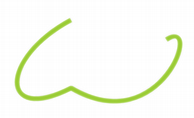
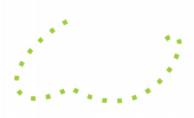
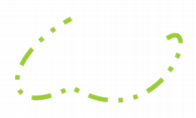
Qt provides several built-in styles represented by the Qt.PenStyle enum:
|

|
|
| Qt.SolidLine | Qt.DashLine | Qt.DotLine |

|
|

|
| Qt.DashDotLine | Qt.DashDotDotLine | Qt.CustomDashLine |
Simply use the setStyle () function to convert the pen style to either of the built-in styles, except the Qt.CustomDashLine style which we will come back to shortly. Setting the style to Qt.NoPen tells the painter to not draw lines or outlines. The default pen style is Qt.SolidLine .
Since Qt 4.1 it is also possible to specify a custom dash pattern using the setDashPattern () function which implicitly converts the style of the pen to Qt.CustomDashLine . The pattern argument, a QVector , must be specified as an even number of qreal entries where the entries 1, 3, 5... are the dashes and 2, 4, 6... are the spaces. For example, the custom pattern shown above is created using the following code:
 QPen pen;
 QVector<qreal> dashes;
 qreal space = 4;
 dashes << 1 << space << 3 << space << 9 << space
            << 27 << space << 9 << space;
 pen.setDashPattern(dashes);
Note that the dash pattern is specified in units of the pens width, e.g. a dash of length 5 in width 10 is 50 pixels long.
The currently set dash pattern can be retrieved using the dashPattern () function. Use the isSolid () function to determine whether the pen has a solid fill, or not.
The cap style defines how the end points of lines are drawn 使用 QPainter . The cap style only apply to wide lines, i.e. when the width is 1 or greater. The Qt.PenCapStyle enum provides the following styles:

|

|

|
| Qt.SquareCap | Qt.FlatCap | Qt.RoundCap |
Qt.SquareCap style is a square line end that covers the end point and extends beyond it by half the line width. The Qt.FlatCap style is a square line end that does not cover the end point of the line. And the Qt.RoundCap style is a rounded line end covering the end point.
默认为 Qt.SquareCap .
Whether or not end points are drawn when the pen width is 0 or 1 depends on the cap style. Using Qt.SquareCap or Qt.RoundCap they are drawn, using Qt.FlatCap they are not drawn.
The join style defines how joins between two connected lines can be drawn using QPainter . The join style only apply to wide lines, i.e. when the width is 1 or greater. The Qt.PenJoinStyle enum provides the following styles:
|
|
|
| Qt.BevelJoin | Qt.MiterJoin | Qt.RoundJoin |
Qt.BevelJoin style fills the triangular notch between the two lines. The Qt.MiterJoin style extends the lines to meet at an angle. And the Qt.RoundJoin style fills a circular arc between the two lines.
默认为 Qt.BevelJoin .
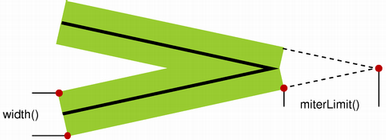
当 Qt.MiterJoin style is applied, it is possible to use the setMiterLimit () function to specify how far the miter join can extend from the join point. The miterLimit () is used to reduce artifacts between line joins where the lines are close to parallel.
miterLimit () must be specified in units of the pens width, e.g. a miter limit of 5 in width 10 is 50 pixels long. The default miter limit is 2, i.e. twice the pen width in pixels.
|
The Path Stroking
Demo
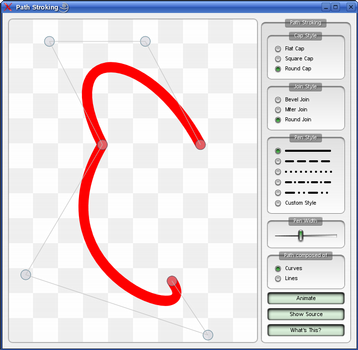
The Path Stroking demo shows Qt's built-in dash patterns and shows how custom patterns can be used to extend the range of available patterns. |
Constructs a default black solid line pen with 0 width.
Constructs a black pen with 0 width and the given style .
另请参阅 setStyle ().
Constructs a solid line pen with 0 width and the given color .
另请参阅 setBrush () 和 setColor ().
构造钢笔采用指定 brush , width , pen style , cap style and join style.
另请参阅 setBrush (), setWidth (), setStyle (), setCapStyle (),和 setJoinStyle ().
Constructs a pen that is a copy of the given pen .
Returns the brush used to fill strokes generated with this pen.
另请参阅 setBrush ().
返回钢笔帽样式。
另请参阅 setCapStyle () 和 Cap Style .
返回此钢笔的笔刷颜色。
返回钢笔的虚线偏移。
另请参阅 setDashOffset ().
返回此钢笔的虚线图案。
另请参阅 setDashPattern (), style (),和 isSolid ().
Returns true if the pen is cosmetic; otherwise returns false.
Cosmetic pens are used to draw strokes that have a constant width regardless of any transformations applied to the QPainter they are used with. Drawing a shape with a cosmetic pen ensures that its outline will have the same thickness at different scale factors.
A zero width pen is cosmetic by default; pens with a non-zero width are non-cosmetic.
另请参阅 setCosmetic () 和 widthF ().
Returns true if the pen has a solid fill, otherwise false.
另请参阅 style () 和 dashPattern ().
Returns the pen's join style.
另请参阅 setJoinStyle () 和 Join Style .
Returns the miter limit of the pen. The miter limit is only relevant when the join style is set to Qt.MiterJoin .
另请参阅 setMiterLimit () 和 Join Style .
Sets the brush used to fill strokes generated with this pen to the given brush .
Sets the pen's cap style to the given style 。默认 value is Qt.SquareCap .
另请参阅 capStyle () 和 Cap Style .
Sets the color of this pen's brush to the given color .
Sets this pen to cosmetic or non-cosmetic, depending on the value of cosmetic .
另请参阅 isCosmetic ().
Sets the dash offset (the starting point on the dash pattern) for this pen to the offset specified. The offset is measured in terms of the units used to specify the dash pattern.

|
For example, a pattern where each stroke is four units long,
followed by a gap of two units, will begin with the stroke when
drawn as a line.
However, if the dash offset is set to 4.0, any line drawn will begin with the gap. Values of the offset up to 4.0 will cause part of the stroke to be drawn first, and values of the offset between 4.0 and 6.0 will cause the line to begin with part of the gap. |
注意: This implicitly converts the style of the pen to Qt.CustomDashLine .
另请参阅 dashOffset ().
Sets the dash pattern for this pen to the given pattern . This implicitly converts the style of the pen to Qt.CustomDashLine .
The pattern must be specified as an even number of positive entries where the entries 1, 3, 5... are the dashes and 2, 4, 6... are the spaces. For example:
|
|
QPen pen; QVector<qreal> dashes; qreal space = 4; dashes << 1 << space << 3 << space << 9 << space << 27 << space << 9 << space; pen.setDashPattern(dashes); |
The dash pattern is specified in units of the pens width; e.g. a dash of length 5 in width 10 is 50 pixels long. Note that a pen with zero width is equivalent to a cosmetic pen with a width of 1 pixel.
Each dash is also subject to cap styles so a dash of 1 with square cap set will extend 0.5 pixels out in each direction resulting in a total width of 2.
Note that the default cap style is Qt.SquareCap , meaning that a square line end covers the end point and extends beyond it by half the line width.
另请参阅 setStyle (), dashPattern (), setCapStyle (),和 setCosmetic ().
Sets the pen's join style to the given style 。默认 value is Qt.BevelJoin .
另请参阅 joinStyle () and Join Style .
Sets the miter limit of this pen to the given limit .
The miter limit describes how far a miter join can extend from the join point. This is used to reduce artifacts between line joins where the lines are close to parallel.
This value does only have effect when the pen style is set to Qt.MiterJoin . The value is specified in units of the pen's width, e.g. a miter limit of 5 in width 10 is 50 pixels long. The default miter limit is 2, i.e. twice the pen width in pixels.
另请参阅 miterLimit (), setJoinStyle (),和 Join Style .
Sets the pen style to the given style .
见 Qt.PenStyle documentation for a list of the available styles. Since Qt 4.1 it is also possible to specify a custom dash pattern using the setDashPattern () function which implicitly converts the style of the pen to Qt.CustomDashLine .
注意: This function resets the dash offset to zero.
Sets the pen width to the given width in pixels with integer precision.
A line width of zero indicates a cosmetic pen. This means that the pen width is always drawn one pixel wide, independent of the transformation set on the painter.
Setting a pen width with a negative value is not supported.
另请参阅 setWidthF () and width ().
Sets the pen width to the given width in pixels with floating point precision.
A line width of zero indicates a cosmetic pen. This means that the pen width is always drawn one pixel wide, independent of the transformation on the painter.
Setting a pen width with a negative value is not supported.
返回钢笔样式。
另请参阅 setStyle () 和 Pen Style .
Swaps pen other with this pen. This operation is very fast and never fails.
该函数在 Qt 4.8 引入。
Returns the pen width with integer precision.
Returns the pen width with floating point precision.
另请参阅 setWidthF () and width ().
