QBrush 类定义形状的填充图案,绘制通过 QPainter . 更多...
A QColor 或 QGradient may be used whenever a QBrush is expected.
QBrush 类定义形状的填充图案,绘制通过 QPainter .
A brush has a style, a color, a gradient and a texture.
The brush style () defines the fill pattern using the Qt.BrushStyle enum. The default brush style is Qt.NoBrush (depending on how you construct a brush). This style tells the painter to not fill shapes. The standard style for filling is Qt.SolidPattern . The style can be set when the brush is created using the appropriate constructor, and in addition the setStyle () function provides means for altering the style once the brush is constructed.
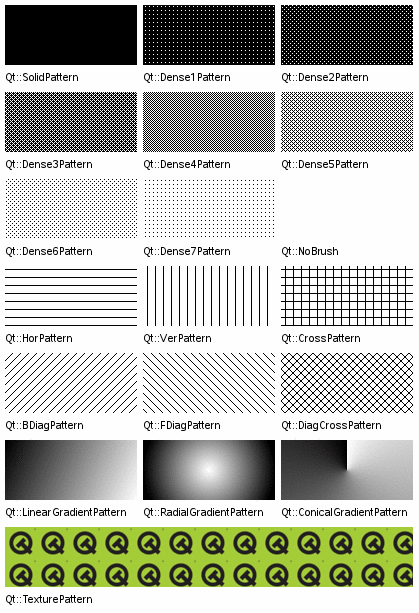
The brush color () defines the color of the fill pattern. The color can either be one of Qt's predefined colors, Qt.GlobalColor , or any other custom QColor . The currently set color can be retrieved and altered using the color () 和 setColor () 函数,分别。
gradient () defines the gradient fill used when the current style is either Qt.LinearGradientPattern , Qt.RadialGradientPattern or Qt.ConicalGradientPattern . Gradient brushes are created by giving a QGradient as a constructor argument when creating the QBrush. Qt provides three different gradients: QLinearGradient , QConicalGradient ,和 QRadialGradient - all of which inherit QGradient .
     QRadialGradient gradient(50, 50, 50, 50, 50);
     gradient.setColorAt(0, QColor.fromRgbF(0, 1, 0, 1));
     gradient.setColorAt(1, QColor.fromRgbF(0, 0, 0, 0));
     QBrush brush(gradient);
texture () defines the pixmap used when the current style is Qt.TexturePattern . You can create a brush with a texture by providing the pixmap when the brush is created or by using setTexture ().
Note that applying setTexture () makes style () == Qt.TexturePattern , regardless of previous style settings. Also, calling setColor () will not make a difference if the style is a gradient. The same is the case if the style is Qt.TexturePattern style unless the current texture is a QBitmap .
isOpaque () function returns true if the brush is fully opaque otherwise false. A brush is considered opaque if:
|
To specify the style and color of lines and outlines, use the
QPainter
's
pen
combined with
Qt.PenStyle
and
Qt.GlobalColor
:
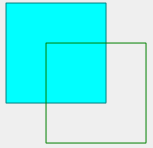
 QPainter painter(this);
 painter.setBrush(Qt.cyan);
 painter.setPen(Qt.darkCyan);
 painter.drawRect(0, 0, 100,100);
 painter.setBrush(Qt.NoBrush);
 painter.setPen(Qt.darkGreen);
 painter.drawRect(40, 40, 100, 100);
Note that, by default, QPainter renders the outline (using the currently set pen) when drawing shapes. Use painter.setPen(Qt.NoPen) to disable this behavior. |
For more information about painting in general, see the 描绘系统 .
Constructs a default black brush with the style Qt.NoBrush (i.e. this brush will not fill shapes).
Constructs a black brush with the given style .
另请参阅 setStyle ().
构造笔刷采用给定 color and style .
另请参阅 setColor () and setStyle ().
构造笔刷采用给定 color and style .
另请参阅 setColor () and setStyle ().
构造笔刷采用给定 color and the custom pattern stored in pixmap .
The style is set to Qt.TexturePattern . The color will only have an effect for QBitmaps.
另请参阅 setColor () and setPixmap ().
构造笔刷采用给定 color and the custom pattern stored in pixmap .
The style is set to Qt.TexturePattern . The color will only have an effect for QBitmaps.
另请参阅 setColor () and setPixmap ().
Constructs a brush with a black color and a texture set to the given pixmap . The style is set to Qt.TexturePattern .
另请参阅 setTexture ().
Constructs a brush with a black color and a texture set to the given image . The style is set to Qt.TexturePattern .
另请参阅 setTextureImage ().
构造副本为 other .
Constructs a brush based on the given gradient .
The brush style is set to the corresponding gradient style (either Qt.LinearGradientPattern , Qt.RadialGradientPattern or Qt.ConicalGradientPattern ).
Returns the brush color.
另请参阅 setColor ().
Returns the gradient describing this brush.
Returns true if the brush is fully opaque otherwise false. A brush is considered opaque if:
Returns the current transformation matrix for the brush.
该函数在 Qt 4.2 引入。
另请参阅 setMatrix ().
Sets the brush color to the given color .
Note that calling setColor() will not make a difference if the style is a gradient. The same is the case if the style is Qt.TexturePattern style unless the current texture is a QBitmap .
另请参阅 color ().
这是重载函数。
Sets the brush color to the given color .
集 matrix as an explicit transformation matrix on the current brush. The brush transformation matrix is merged with QPainter transformation matrix to produce the final result.
该函数在 Qt 4.2 引入。
另请参阅 matrix ().
Sets the brush style to style .
另请参阅 style ().
Sets the brush pixmap to pixmap . The style is set to Qt.TexturePattern .
The current brush color will only have an effect for monochrome pixmaps, i.e. for QPixmap.depth () == 1 ( QBitmaps ).
另请参阅 texture ().
Sets the brush image to image . The style is set to Qt.TexturePattern .
Note the current brush color will not have any affect on monochrome images, as opposed to calling setTexture () with a QBitmap . If you want to change the color of monochrome image brushes, either convert the image to QBitmap with QBitmap.fromImage() and set the resulting QBitmap as a texture, or change the entries in the color table for the image.
该函数在 Qt 4.2 引入。
另请参阅 textureImage () 和 setTexture ().
集 matrix as an explicit transformation matrix on the current brush. The brush transformation matrix is merged with QPainter transformation matrix to produce the final result.
该函数在 Qt 4.3 引入。
另请参阅 transform ().
Returns the brush style.
另请参阅 setStyle ().
Swaps brush other with this brush. This operation is very fast and never fails.
该函数在 Qt 4.8 引入。
Returns the custom brush pattern, or a null pixmap if no custom brush pattern has been set.
另请参阅 setTexture ().
Returns the custom brush pattern, or a null image if no custom brush pattern has been set.
If the texture was set as a QPixmap it will be converted to a QImage .
该函数在 Qt 4.2 引入。
另请参阅 setTextureImage ().
Returns the current transformation matrix for the brush.
该函数在 Qt 4.3 引入。
另请参阅 setTransform ().
