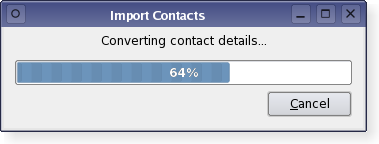
The QProgressDialog class provides feedback on the progress of a slow operation. 更多...
继承 QDialog .
The QProgressDialog class provides feedback on the progress of a slow operation.
A progress dialog is used to give the user an indication of how long an operation is going to take, and to demonstrate that the application has not frozen. It can also give the user an opportunity to abort the operation.
A common problem with progress dialogs is that it is difficult to know when to use them; operations take different amounts of time on different hardware. QProgressDialog offers a solution to this problem: it estimates the time the operation will take (based on time for steps), and only shows itself if that estimate is beyond minimumDuration () (4 seconds by default).
使用 setMinimum () and setMaximum () 或 the constructor to set the number of "steps" in the operation and call setValue () 作为 the operation progresses. The number of steps can be chosen arbitrarily. It can be the number of files copied, the number of bytes received, the number of iterations through the main loop of your algorithm, or some other suitable unit. Progress starts at the value set by setMinimum (), and the progress dialog shows that the operation has finished when you call setValue () with the value set by setMaximum () as its 自变量。
The dialog automatically resets and hides itself at the end of the operation. Use setAutoReset () 和 setAutoClose () 到 change this behavior. Note that if you set a new maximum (using setMaximum () 或 setRange ()) that equals your current value (), the dialog will not close regardless.
There are two ways of using QProgressDialog: modal and modeless.
Compared to a modeless QProgressDialog, a modal QProgressDialog is simpler to use for the programmer. Do the operation in a loop, call setValue () at intervals, and check for cancellation with wasCanceled (). For example:
     QProgressDialog progress("Copying files...", "Abort Copy", 0, numFiles, this);
     progress.setWindowModality(Qt.WindowModal);
     for (int i = 0; i < numFiles; i++) {
         progress.setValue(i);
         if (progress.wasCanceled())
             break;
         //... copy one file
     }
     progress.setValue(numFiles);
A modeless progress dialog is suitable for operations that take place in the background, where the user is able to interact with the application. Such operations are typically based on QTimer (或 QObject.timerEvent ()), QSocketNotifier ,或 QUrlOperator ; or performed in a separate thread. A QProgressBar in the status bar of your main window is often an alternative to a modeless progress dialog.
You need to have an event loop to be running, connect the canceled () signal to a slot that stops the operation, and call setValue () at intervals. For example:
 // Operation constructor
 Operation.Operation(QObject *parent)
     : QObject(parent), steps(0)
 {
     pd = new QProgressDialog("Operation in progress.", "Cancel", 0, 100);
     connect(pd, SIGNAL(canceled()), this, SLOT(cancel()));
     t = new QTimer(this);
     connect(t, SIGNAL(timeout()), this, SLOT(perform()));
     t->start(0);
 }
 void Operation.perform()
 {
     pd->setValue(steps);
     //... perform one percent of the operation
     steps++;
     if (steps > pd->maximum())
         t->stop();
 }
 void Operation.cancel()
 {
     t->stop();
     //... cleanup
 }
In both modes the progress dialog may be customized by replacing the child widgets with custom widgets by using setLabel (), setBar (),和 setCancelButton ()。 函数 setLabelText () 和 setCancelButtonText () set the texts shown.
parent argument, if not None, causes self to be owned by Qt instead of PyQt.
构造进度对话框。
默认设置:
parent argument is dialog's parent widget. The widget flags, f , are passed to the QDialog.QDialog () constructor.
另请参阅 setLabelText (), setCancelButtonText (), setCancelButton (), setMinimum (),和 setMaximum ().
parent argument, if not None, causes self to be owned by Qt instead of PyQt.
构造进度对话框。
labelText is the text used to remind the user what is progressing.
cancelButtonText is the text to display on the cancel button. If QString() is passed then no cancel button is shown.
minimum and maximum is the number of steps in the operation for which this progress dialog shows progress. For example, if the operation is to examine 50 files, this value minimum value would be 0, and the maximum would be 50. Before examining the first file, call setValue(0). As each file is processed call setValue(1), setValue(2), etc., finally calling setValue(50) after examining the last file.
parent argument is the dialog's parent widget. The parent, parent , and widget flags, f , are passed to the QDialog.QDialog () 构造函数。
另请参阅 setLabelText (), setLabel (), setCancelButtonText (), setCancelButton (), setMinimum (),和 setMaximum ().
This method is also a Qt slot with the C++ signature void cancel() .
重置进度对话框。 wasCanceled () becomes true until the progress dialog is reset. The progress dialog becomes hidden.
重实现自 QWidget.changeEvent ().
重实现自 QWidget.closeEvent ().
Shows the dialog if it is still hidden after the algorithm has been started and minimumDuration 毫秒已过去。
另请参阅 setMinimumDuration ().
这是重载函数。
打开对话框并连接其 accepted () signal to the slot specified by receiver and member .
The signal will be disconnected from the slot when the dialog is closed.
该函数在 Qt 4.5 引入。
This method is also a Qt slot with the C++ signature void reset() .
Resets the progress dialog. The progress dialog becomes hidden if autoClose () 是 true.
另请参阅 setAutoClose () 和 setAutoReset ().
重实现自 QWidget.resizeEvent ().
bar argument has it's ownership transferred to Qt.
将进度栏小部件设为 bar . The progress dialog resizes to fit. The progress dialog takes ownership of the progress bar which will be deleted when necessary, so do not use a progress bar allocated on the stack.
button argument has it's ownership transferred to Qt.
将取消按钮设为 Push Button (按钮) cancelButton . The progress dialog takes ownership of this button which will be deleted when necessary, so do not pass the address of an object that is on the stack, i.e. use new() to create the button. If 0 is passed then no cancel button will be shown.
另请参阅 setCancelButtonText ().
This method is also a Qt slot with the C++ signature void setCancelButtonText(const QString&) .
将取消按钮的文本设为 cancelButtonText 。若 text is set to QString() then it will cause the cancel button to be hidden and deleted.
另请参阅 setCancelButton ().
label argument has it's ownership transferred to Qt.
把标签设为 label . The progress dialog resizes to fit. The label becomes owned by the progress dialog and will be deleted when necessary, so do not pass the address of an object on the stack.
另请参阅 setLabelText ().
This method is also a Qt slot with the C++ signature void setLabelText(const QString&) .
This method is also a Qt slot with the C++ signature void setMaximum(int) .
This method is also a Qt slot with the C++ signature void setMinimum(int) .
This method is also a Qt slot with the C++ signature void setMinimumDuration(int) .
Sets the progress dialog's minimum and maximum values to minimum and maximum ,分别。
若 maximum 小于 minimum , minimum 变为唯一合法值。
If the current value falls outside the new range, the progress dialog is reset with reset ().
This method is also a Qt slot with the C++ signature void setValue(int) .
重实现自 QWidget.showEvent ().
重实现自 QWidget.sizeHint ().
Returns a size that fits the contents of the progress dialog. The progress dialog resizes itself as required, so you should not need to call this yourself.
This is the default overload of this signal.
This signal is emitted when the cancel button is clicked. It is connected to the cancel () slot by default.
另请参阅 wasCanceled ().
