The QSystemTrayIcon class provides an icon for an application in the system tray. 更多...
继承 QObject .
The QSystemTrayIcon class provides an icon for an application in the system tray.
Modern operating systems usually provide a special area on the desktop, called the 系统托盘 or 通知区域 , where long-running applications can display icons and short messages.
The QSystemTrayIcon class can be used on the following platforms:
To check whether a system tray is present on the user's desktop, call the QSystemTrayIcon.isSystemTrayAvailable () static function.
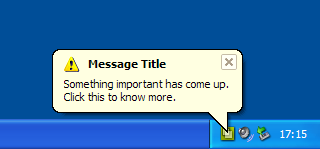
To add a system tray entry, create a QSystemTrayIcon object, call setContextMenu () 到 provide a context menu for the icon, and call show () to make it visible in the system tray. Status notification messages ("balloon messages") can be displayed at any time using showMessage ().
If the system tray is unavailable when a system tray icon is constructed, but becomes available later, QSystemTrayIcon will automatically add an entry for the application in the system tray if the icon is visible .
activated () signal is emitted when the user activates the icon.
Only on X11, when a tooltip is requested, the QSystemTrayIcon 接收 QHelpEvent of type QEvent.ToolTip . Additionally, the QSystemTrayIcon receives wheel events of type QEvent.Wheel . These are not supported on any other platform.
This enum describes the reason the system tray was activated.
| 常量 | 值 | 描述 |
|---|---|---|
| QSystemTrayIcon.Unknown | 0 | 未知原因 |
| QSystemTrayIcon.Context | 1 | The context menu for the system tray entry was requested |
| QSystemTrayIcon.DoubleClick | 2 | The system tray entry was double clicked |
| QSystemTrayIcon.Trigger | 3 | 系统托盘条目被点击 |
| QSystemTrayIcon.MiddleClick | 4 | The system tray entry was clicked with the middle mouse button |
另请参阅 activated ().
This enum describes the icon that is shown when a balloon message is displayed.
| 常量 | 值 | 描述 |
|---|---|---|
| QSystemTrayIcon.NoIcon | 0 | 没有展示图标。 |
| QSystemTrayIcon.Information | 1 | 展示信息图标。 |
| QSystemTrayIcon.Warning | 2 | 展示标准警告图标。 |
| QSystemTrayIcon.Critical | 3 | 展示严重警告图标。 |
另请参阅 QMessageBox .
parent argument, if not None, causes self to be owned by Qt instead of PyQt.
构造 QSystemTrayIcon 对象采用给定 parent .
图标最初是不可见的。
另请参阅 visible .
parent argument, if not None, causes self to be owned by Qt instead of PyQt.
构造 QSystemTrayIcon 对象采用给定 icon and parent .
图标最初是不可见的。
另请参阅 visible .
Returns the current context menu for the system tray entry.
另请参阅 setContextMenu ().
重实现自 QObject.event ().
Returns the geometry of the system tray icon in screen coordinates.
该函数在 Qt 4.3 引入。
另请参阅 visible .
This method is also a Qt slot with the C++ signature void hide() .
隐藏系统托盘条目。
Returns true if the system tray is available; otherwise returns false.
If the system tray is currently unavailable but becomes available later, QSystemTrayIcon will automatically add an entry in the system tray if it is visible .
设置指定 menu to be the context menu for the system tray icon.
The menu will pop up when the user requests the context menu for the system tray icon by clicking the mouse button.
On Mac OS X, this is currenly converted to a NSMenu, so the aboutToHide() signal is not emitted.
注意: The system tray icon does not take ownership of the menu. You must ensure that it is deleted at the appropriate time by, for example, creating the menu with a suitable parent 对象。
另请参阅 contextMenu ().
This method is also a Qt slot with the C++ signature void setVisible(bool) .
This method is also a Qt slot with the C++ signature void show() .
在系统托盘展示图标。
Shows a balloon message for the entry with the given title , message and icon for the time specified in millisecondsTimeoutHint . title and message must be plain text strings.
Message can be clicked by the user; the messageClicked () signal will emitted when this occurs.
Note that display of messages are dependent on the system configuration and user preferences, and that messages may not appear at all. Hence, it should not be relied upon as the sole means for providing critical information.
在 Windows, millisecondsTimeoutHint is usually ignored by the system when the application has focus.
On Mac OS X, the Growl notification system must be installed for this function to display messages.
该函数在 Qt 4.3 引入。
另请参阅 show () and supportsMessages ().
Returns true if the system tray supports balloon messages; otherwise returns false.
另请参阅 showMessage ().
This is the default overload of this signal.
This signal is emitted when the user activates the system tray icon. reason specifies the reason for activation. QSystemTrayIcon.ActivationReason enumerates the various reasons.
另请参阅 QSystemTrayIcon.ActivationReason .
This is the default overload of this signal.
This signal is emitted when the message displayed using showMessage () was clicked by the user.
Currently this signal is not sent on Mac OS X.
注意: We follow Microsoft Windows XP/Vista behavior, so the signal is also emitted when the user clicks on a tray icon with a balloon message displayed.
另请参阅 activated ().
