The QTableView class provides a default model/view implementation of a table view. 更多...
继承 QAbstractItemView .
Inherited by QTableWidget .
The QTableView class provides a default model/view implementation of a table view.
A QTableView implements a table view that displays items from a model. This class is used to provide standard tables that were previously provided by the QTable class, but using the more flexible approach provided by Qt's model/view architecture.
QTableView 类是一种 模型/视图类 且属于 Qt 的 模型/视图框架 .
QTableView 实现的接口定义通过 QAbstractItemView class to allow it to display data provided by models derived from the QAbstractItemModel 类。
You can navigate the cells in the table by clicking on a cell with the mouse, or by using the arrow keys. Because QTableView enables tabKeyNavigation by default, you can also hit Tab and Backtab to move from cell to cell.
表格拥有的垂直 Header 头部可以获得使用 verticalHeader () function, and a horizontal header that is available through the horizontalHeader () function. The height of each row in the table can be found by using rowHeight (); similarly, the width of columns can be found using columnWidth (). Since both of these are plain widgets, you can hide either of them using their hide () 函数。
行和列可以被隐藏和展示采用 hideRow (), hideColumn (), showRow (),和 showColumn (). They can be selected with selectRow () 和 selectColumn ()。 table will show a grid depending on the showGrid 特性。
The items shown in a table view, like those in the other item views, are rendered and edited using standard delegates . However, for some tasks it is sometimes useful to be able to insert widgets in a table instead. Widgets are set for particular indexes with the setIndexWidget() function, and later retrieved with indexWidget() .
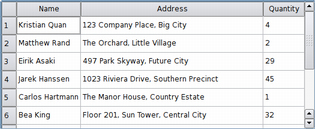
|
By default, the cells in a table do not expand to fill the
available space.
You can make the cells fill the available space by stretching the last header section. Access the relevant header using horizontalHeader () 或 verticalHeader () 和 set the header's stretchLastSection 特性。 To distribute the available space according to the space requirement of each column or row, call the view's resizeColumnsToContents () or resizeRowsToContents () 函数。 |
For some specialized forms of tables it is useful to be able to convert between row and column indexes and widget coordinates. The rowAt () function provides the y-coordinate within the view of the specified row; the row index can be used to obtain a corresponding y-coordinate with rowViewportPosition (). columnAt () 和 columnViewportPosition () functions provide the equivalent conversion operations between x-coordinates and column indexes.
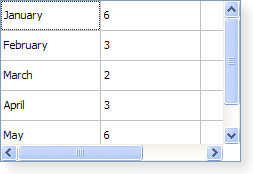
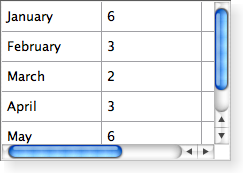
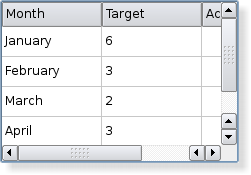
QTableView is styled appropriately for each platform. The following images show how it looks on three different platforms. Go 到 Qt Widget 画廊 to see its appearance in other styles.
|
|
|
| A Windows XP style table view. | A Macintosh style table view. | A Plastique style table view. |
parent argument, if not None, causes self to be owned by Qt instead of PyQt.
Constructs a table view with a parent to represent the data.
另请参阅 QAbstractItemModel .
Removes all row and column spans in the table view.
该函数在 Qt 4.4 引入。
另请参阅 setSpan ().
Returns the column in which the given x-coordinate, x , in contents coordinates is located.
注意: This function returns -1 if the given coordinate is not valid (has no column).
另请参阅 rowAt ().
This method is also a Qt slot with the C++ signature void columnCountChanged(int,int) .
This slot is called whenever columns are added or deleted. The previous number of columns is specified by oldCount ,和 new number of columns is specified by newCount .
This method is also a Qt slot with the C++ signature void columnMoved(int,int,int) .
This slot is called to change the index of the given column in the table view. The old index is specified by oldIndex , and the new index by newIndex .
另请参阅 rowMoved ().
This method is also a Qt slot with the C++ signature void columnResized(int,int,int) .
调用此槽改变宽度为给定 column 。旧宽度的指定通过 oldWidth ,和 the new width by newWidth .
另请参阅 rowResized ().
Returns the column span of the table element at ( row , column )。默认为 1。
该函数在 Qt 4.2 引入。
另请参阅 setSpan () and rowSpan ().
Returns the x-coordinate in contents coordinates of the given column .
Returns the width of the given column .
另请参阅 setColumnWidth (), resizeColumnToContents (), and rowHeight ().
重实现自 QAbstractItemView.currentChanged ().
This method is also a Qt slot with the C++ signature void hideColumn(int) .
隐藏给定 column .
另请参阅 showColumn () 和 hideRow ().
This method is also a Qt slot with the C++ signature void hideRow(int) .
隐藏给定 row .
另请参阅 showRow () and hideColumn ().
返回表格视图的水平 Header 头。
另请参阅 setHorizontalHeader (), verticalHeader (),和 QAbstractItemModel.headerData ().
重实现自 QAbstractItemView.horizontalOffset ().
Returns the horizontal offset of the items in the table view.
Note that the table view uses the horizontal header section positions to determine the positions of columns in the view.
另请参阅 verticalOffset ().
重实现自 QAbstractItemView.indexAt ().
Returns the index position of the model item corresponding to the table item at position pos in contents coordinates.
Returns true if the given column is hidden; otherwise returns false.
另请参阅 isRowHidden ().
重实现自 QAbstractItemView.isIndexHidden ().
Returns true if the given row is hidden; otherwise returns false.
另请参阅 isColumnHidden ().
重实现自 QAbstractItemView.moveCursor ().
Moves the cursor in accordance with the given cursorAction , using the information provided by the modifiers .
另请参阅 QAbstractItemView.CursorAction .
重实现自 QWidget.paintEvent ().
描绘表格当收到给定描绘事件 event .
This method is also a Qt slot with the C++ signature void resizeColumnsToContents() .
Resizes all columns based on the size hints of the delegate used to render each item in the columns.
This method is also a Qt slot with the C++ signature void resizeColumnToContents(int) .
Resizes the given column based on the size hints of the delegate used to render each item in the column.
注意: Only visible columns will be resized. Reimplement sizeHintForColumn () to resize hidden columns as well.
This method is also a Qt slot with the C++ signature void resizeRowsToContents() .
Resizes all rows based on the size hints of the delegate used to render each item in the rows.
This method is also a Qt slot with the C++ signature void resizeRowToContents(int) .
Resizes the given row based on the size hints of the delegate used to render each item in the row.
返回行在给定 y 坐标 y , in contents coordinates is located.
注意: This function returns -1 if the given coordinate is not valid (has no row).
另请参阅 columnAt ().
This method is also a Qt slot with the C++ signature void rowCountChanged(int,int) .
This slot is called whenever rows are added or deleted. The previous number of rows is specified by oldCount ,和 new number of rows is specified by newCount .
返回高度为给定 row .
另请参阅 setRowHeight (), resizeRowToContents (), and columnWidth ().
This method is also a Qt slot with the C++ signature void rowMoved(int,int,int) .
This slot is called to change the index of the given row in the table view. The old index is specified by oldIndex , and the new index by newIndex .
另请参阅 columnMoved ().
This method is also a Qt slot with the C++ signature void rowResized(int,int,int) .
This slot is called to change the height of the given row . The old height is specified by oldHeight ,和 the new height by newHeight .
另请参阅 columnResized ().
Returns the row span of the table element at ( row , column )。默认为 1。
该函数在 Qt 4.2 引入。
另请参阅 setSpan () and columnSpan ().
Returns the y-coordinate in contents coordinates of the given row .
This method is also a Qt slot with the C++ signature void selectColumn(int) .
选择给定 column in the table view if the current SelectionMode and SelectionBehavior allows columns to be selected.
另请参阅 selectRow ().
重实现自 QAbstractItemView.selectedIndexes ().
重实现自 QAbstractItemView.selectionChanged ().
This method is also a Qt slot with the C++ signature void selectRow(int) .
选择给定 row in the table view if the current SelectionMode and SelectionBehavior allows rows to be selected.
另请参阅 selectColumn ().
若 hide is true the given column will be hidden; otherwise it will be shown.
另请参阅 isColumnHidden () 和 setRowHidden ().
设置宽度为给定 column to be width .
该函数在 Qt 4.1 引入。
另请参阅 columnWidth ().
header argument has it's ownership transferred to Qt.
Sets the widget to use for the horizontal header to header .
另请参阅 horizontalHeader () 和 setVerticalHeader ().
重实现自 QAbstractItemView.setModel ().
重实现自 QAbstractItemView.setRootIndex ().
Sets the height of the given row to be height .
该函数在 Qt 4.1 引入。
另请参阅 rowHeight ().
若 hide is true row will be hidden, otherwise it will be shown.
另请参阅 isRowHidden () 和 setColumnHidden ().
重实现自 QAbstractItemView.setSelection ().
Selects the items within the given rect and in accordance with the specified selection flags .
重实现自 QAbstractItemView.setSelectionModel ().
Sets the span of the table element at ( row , column ) to the number of rows and columns specified by ( rowSpanCount , columnSpanCount ).
该函数在 Qt 4.2 引入。
另请参阅 rowSpan () and columnSpan ().
header argument has it's ownership transferred to Qt.
Sets the widget to use for the vertical header to header .
另请参阅 verticalHeader () 和 setHorizontalHeader ().
This method is also a Qt slot with the C++ signature void showColumn(int) .
Show the given column .
另请参阅 hideColumn () 和 showRow ().
This method is also a Qt slot with the C++ signature void showRow(int) .
Show the given row .
另请参阅 hideRow () and showColumn ().
重实现自 QAbstractItemView.sizeHintForColumn ().
Returns the size hint for the given column 's width or -1 if there is no model.
If you need to set the width of a given column to a fixed value, call QHeaderView.resizeSection () on the table's horizontal header.
If you reimplement this function in a subclass, note that the value you return will be used when resizeColumnToContents () or QHeaderView.resizeSections () is called. If a larger column width is required by either the horizontal header or the item delegate, the larger width will be used instead.
另请参阅 QWidget.sizeHint and horizontalHeader ().
重实现自 QAbstractItemView.sizeHintForRow ().
Returns the size hint for the given row 's height or -1 if there is no model.
If you need to set the height of a given row to a fixed value, call QHeaderView.resizeSection () on the table's vertical header.
If you reimplement this function in a subclass, note that the value you return is only used when resizeRowToContents () 是 called. In that case, if a larger row height is required by either the vertical header or the item delegate, that width will be used 代替。
另请参阅 QWidget.sizeHint and verticalHeader ().
This method is also a Qt slot with the C++ signature void sortByColumn(int) .
Sorts the model by the values in the given column 在 given order .
该函数在 Qt 4.2 引入。
另请参阅 sortingEnabled .
重实现自 QObject.timerEvent ().
重实现自 QAbstractItemView.updateGeometries ().
Returns the table view's vertical header.
另请参阅 setVerticalHeader (), horizontalHeader (), and QAbstractItemModel.headerData ().
重实现自 QAbstractItemView.verticalOffset ().
Returns the vertical offset of the items in the table view.
Note that the table view uses the vertical header section positions to determine the positions of rows in the view.
另请参阅 horizontalOffset ().
重实现自 QAbstractItemView.viewOptions ().
