The QTreeWidget class provides a tree view that uses a predefined tree model. 更多...
继承 QTreeView .
The QTreeWidget class provides a tree view that uses a predefined tree model.
The QTreeWidget class is a convenience class that provides a standard tree widget with a classic item-based interface similar to that used by the QListView class in Qt 3. This class is based on Qt's Model/View architecture and uses a default model to hold items, each of which is a QTreeWidgetItem .
Developers who do not need the flexibility of the Model/View framework can use this class to create simple hierarchical lists very easily. A more flexible approach involves combining a QTreeView with a standard item model. This allows the storage of data to be separated from its representation.
In its simplest form, a tree widget can be constructed in the following way:
 QTreeWidget *treeWidget = new QTreeWidget();
 treeWidget->setColumnCount(1);
 QList<QTreeWidgetItem *> items;
 for (int i = 0; i < 10; ++i)
     items.append(new QTreeWidgetItem((QTreeWidget*)0, QStringList(QString("item: %1").arg(i))));
 treeWidget->insertTopLevelItems(0, items);
Before items can be added to the tree widget, the number of columns must be set with setColumnCount (). This allows each item to have one or more labels or other decorations. The number of columns in use can be found with the columnCount () 函数。
The tree can have a header that contains a section for each column in the widget. It is easiest to set up the labels for each section by supplying a list of strings with setHeaderLabels (), but a custom header can be constructed with a QTreeWidgetItem and inserted into the tree with the setHeaderItem () 函数。
The items in the tree can be sorted by column according to a predefined sort order. If sorting is enabled, the user can sort the items by clicking on a column header. Sorting can be enabled or disabled by calling setSortingEnabled() 。 isSortingEnabled() 函数指示是否启用排序。
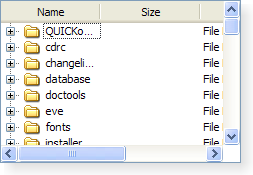
|
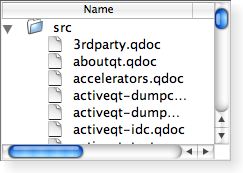
|
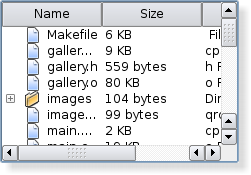
|
| A Windows XP style tree 小部件。 | A Macintosh style tree 小部件。 | A Plastique style tree 小部件。 |
parent argument, if not None, causes self to be owned by Qt instead of PyQt.
构造树 Widget 采用给定 parent .
item argument has it's ownership transferred to Qt.
追加 item 作为 Widget 顶层项。
该函数在 Qt 4.1 引入。
另请参阅 insertTopLevelItem ().
items argument has it's ownership transferred to Qt.
追加列表 items as a top-level items in the 小部件。
另请参阅 insertTopLevelItems ().
This method is also a Qt slot with the C++ signature void clear() .
Clears the tree widget by removing all of its items and selections.
注意: Since each item is removed from the tree widget before being deleted, the return value of QTreeWidgetItem.treeWidget () will be invalid when called from an item's destructor.
另请参阅 takeTopLevelItem (), topLevelItemCount (), and columnCount ().
关闭持久编辑器为 item 以给定 column .
This function has no effect if no persistent editor is open for this combination of item and column.
另请参阅 openPersistentEditor ().
This method is also a Qt slot with the C++ signature void collapseItem(const QTreeWidgetItem*) .
关闭 item . This causes the tree containing the item's children to be collapsed.
另请参阅 expandItem (), currentItem (), itemAt (),和 topLevelItem ().
返回树 Widget 当前列。
该函数在 Qt 4.1 引入。
另请参阅 setCurrentItem () 和 columnCount ().
返回树 Widget 中的当前项。
另请参阅 setCurrentItem () 和 currentItemChanged ().
重实现自 QWidget.dropEvent ().
处理 data supplied by a drag and drop operation that ended with the given action 在 index 在 given parent 项。
The default implementation returns true if the drop was successfully handled by decoding the mime data and inserting it into the model; otherwise it returns false.
另请参阅 supportedDropActions ().
开始编辑 item 以给定 column 若它 是可编辑的。
重实现自 QObject.event ().
This method is also a Qt slot with the C++ signature void expandItem(const QTreeWidgetItem*) .
展开 item . This causes the tree containing the item's children to be expanded.
另请参阅 collapseItem (), currentItem (), itemAt (), topLevelItem (),和 itemExpanded ().
返回的项列表匹配给定 text ,使用 the given flags ,在给定 column .
返回用于树小部件 Header 头的项。
另请参阅 setHeaderItem ().
返回 QModelIndex assocated with the given item 以给定 column .
另请参阅 itemFromIndex () 和 topLevelItem ().
返回索引为给定顶层 item , or -1 if the item cannot be found.
另请参阅 sortItems () 和 topLevelItemCount ().
item argument has it's ownership transferred to Qt.
插入 item at index in the top level in the view.
If the item has already been inserted somewhere else it wont be inserted.
另请参阅 addTopLevelItem () 和 columnCount ().
items argument has it's ownership transferred to Qt.
插入列表 items at index in the top level in the view.
Items that have already been inserted somewhere else wont be inserted.
该函数在 Qt 4.1 引入。
另请参阅 addTopLevelItems ().
返回树 Widget 的不可见根项。
The invisible root item provides access to the tree widget's top-level items through the QTreeWidgetItem API, making it possible to write functions that can treat top-level items and their children in a uniform way; for example, recursive functions.
该函数在 Qt 4.2 引入。
Returns true if the given item is set to show only one section over all columns; otherwise returns false.
该函数在 Qt 4.3 引入。
另请参阅 setFirstItemColumnSpanned ().
返回上方项为给定 item .
该函数在 Qt 4.3 引入。
返回指针指向项在坐标 p 。 coordinates are relative to the tree widget's viewport() .
另请参阅 visualItemRect ().
这是重载函数。
返回指针指向项在坐标 ( x , y )。坐标相对于树 Widget 的 viewport() .
返回下方可见项为给定 item .
该函数在 Qt 4.3 引入。
返回指针指向 QTreeWidgetItem assocated with the given index .
另请参阅 indexFromItem ().
返回单元格显示 Widget 指定通过 item 和给定 column .
注意: 树拥有 Widget 的所有权。
该函数在 Qt 4.1 引入。
另请参阅 setItemWidget ().
QMimeData result
Returns an object that contains a serialized description of the specified items . The format used to describe the items is obtained from the mimeTypes () 函数。
If the list of items is empty, 0 is returned rather than a serialized empty list.
Returns a list of MIME types that can be used to describe a list of treewidget items.
另请参阅 mimeData ().
打开持久编辑器为 item 以给定 column .
另请参阅 closePersistentEditor ().
删除设置 Widget 在给定 item 以给定 column .
该函数在 Qt 4.3 引入。
This method is also a Qt slot with the C++ signature void scrollToItem(const QTreeWidgetItem*,QAbstractItemView::ScrollHint = QAbstractItemView.EnsureVisible) .
确保 item is visible, scrolling the view if necessary using the specified hint .
另请参阅 currentItem (), itemAt (),和 topLevelItem ().
返回所有选定的非隐藏项的列表。
另请参阅 itemSelectionChanged ().
设置当前 item 在树 Widget。
除非选定模式为 NoSelection , item is also be selected.
另请参阅 currentItem () 和 currentItemChanged ().
设置当前 item in the tree widget and the current column to column .
该函数在 Qt 4.1 引入。
另请参阅 currentItem ().
设置当前 item in the tree widget and the current column to column ,使用给定 command .
该函数在 Qt 4.4 引入。
另请参阅 currentItem ().
设置给定 item to only show one section for all columns if span is true; otherwise the item will show one section per column.
该函数在 Qt 4.3 引入。
另请参阅 isFirstItemColumnSpanned ().
item argument has it's ownership transferred to Qt.
设置 Header 头 item for the tree widget. The label for each column in the header is supplied by the corresponding label in the item.
树 Widget 拥有项的所有权。
另请参阅 headerItem () 和 setHeaderLabels ().
Same as setHeaderLabels( QStringList ( label )).
该函数在 Qt 4.2 引入。
为每项添加 Header 头部列按 labels 列表, 并为每列设置标签。
注意:setHeaderLabels() 不会移除现有列。
另请参阅 setHeaderItem () 和 setHeaderLabel ().
widget argument has it's ownership transferred to Qt.
设置给定 widget to be displayed in the cell specified by the given item and column .
给定 widget 's autoFillBackground property must be set to true, otherwise the widget's background will be transparent, showing both the model data and the tree widget item.
This function should only be used to display static content in the place of a tree widget item. If you want to display custom dynamic content or implement a custom editor widget, use QTreeView 和子类 QItemDelegate 代替。
This function cannot be called before the item hierarchy has been set up, i.e., the QTreeWidgetItem 将保持 widget 必须被添加到视图之后 widget 被设置。
注意: 树拥有 Widget 的所有权。
该函数在 Qt 4.1 引入。
另请参阅 itemWidget () 和 Delegate 类 .
重实现自 QAbstractItemView.setSelectionModel ().
返回用于排序 Widget 内容的列。
该函数在 Qt 4.1 引入。
另请参阅 sortItems ().
排序 Widget 项按指定 order by the values in the given column .
另请参阅 sortColumn ().
返回由此视图所支持的掉落动作。
另请参阅 Qt.DropActions .
QTreeWidgetItem result
移除顶层项位于给定 index in the tree and returns it, otherwise returns 0;
另请参阅 insertTopLevelItem (), topLevelItem (),和 topLevelItemCount ().
返回顶层项位于给定 index , or 0 if the item does not exist.
另请参阅 topLevelItemCount () and insertTopLevelItem ().
返回项所占据的视口矩形在 item .
另请参阅 itemAt ().
This is the default overload of this signal.
This signal is emitted when the current item changes. The current item is specified by current ,且这替换 上一 当前项。
另请参阅 setCurrentItem ().
This is the default overload of this signal.
This signal is emitted when the user activates an item by single- or double-clicking (depending on the platform, i.e. on the QStyle.SH_ItemView_ActivateItemOnSingleClick 样式提示) 或按下特殊键 (如: Enter ).
指定 item is the item that was clicked, or 0 if no item was clicked. The column is the item's column that was clicked, or -1 if no item was clicked.
This is the default overload of this signal.
此信号被发射当内容在 column in the specified item 改变。
This is the default overload of this signal.
This signal is emitted when the user clicks inside the 小部件。
指定 item 是被点击项。 column is the item's column that was clicked. If no item was clicked, no signal will be emitted.
This is the default overload of this signal.
此信号被发射当指定 item is collapsed so that none of its children are displayed.
注意: This signal will not be emitted if an item changes its state when collapseAll () 被援引。
另请参阅 QTreeWidgetItem.isExpanded (), itemExpanded (),和 collapseItem ().
This is the default overload of this signal.
This signal is emitted when the user double clicks inside the 小部件。
指定 item is the item that was clicked, or 0 if no item was clicked. The column is the item's column that was clicked. If no item was double clicked, no signal will be emitted.
This is the default overload of this signal.
此信号被发射当鼠标光标进入 item 覆盖指定 column . QTreeWidget mouse tracking needs to be enabled for this feature to work.
This is the default overload of this signal.
此信号被发射当指定 item is expanded so that all of its children are displayed.
注意: This signal will not be emitted if an item changes its state when expandAll () is invoked.
另请参阅 setItemExpanded (), QTreeWidgetItem.isExpanded (), itemCollapsed (),和 expandItem ().
This is the default overload of this signal.
This signal is emitted when the user presses a mouse button 在 Widget 内。
指定 item is the item that was clicked, or 0 if no item was clicked. The column is the item's column that was clicked, or -1 if no item was clicked.
This is the default overload of this signal.
This signal is emitted when the selection changes in the tree widget. The current selection can be found with selectedItems ().
