The QFrame class is the base class of widgets that can have a frame. 更多...
继承 QWidget .
Inherited by QAbstractScrollArea , QLabel , QLCDNumber , QSplitter , QStackedWidget and QToolBox .
The QFrame class is the base class of widgets that can have a frame.
QMenu uses this to "raise" the menu above the surrounding screen. QProgressBar 拥有 Sunken (凹陷) 外观。 QLabel has a flat look. The frames of widgets like these can be changed.
 QLabel label(...);
 label.setFrameStyle(QFrame.Panel | QFrame.Raised);
 label.setLineWidth(2);
 QProgressBar pbar(...);
 label.setFrameStyle(QFrame.NoFrame);
The QFrame class can also be used directly for creating simple placeholder frames without any contents.
框架样式的指定通过 框架形状 和 阴影样式 that is used to visually separate the frame from surrounding widgets. These properties can be set together using the setFrameStyle () function and read with frameStyle ().
框架形状包括 NoFrame , Box , Panel , StyledPanel , HLine and VLine ;阴影样式包括 Plain , Raised and Sunken .
A frame widget has three attributes that describe the thickness of the border: lineWidth , midLineWidth ,和 frameWidth .
The margin between the frame and the contents of the frame can be customized with the QWidget.setContentsMargins () 函数。
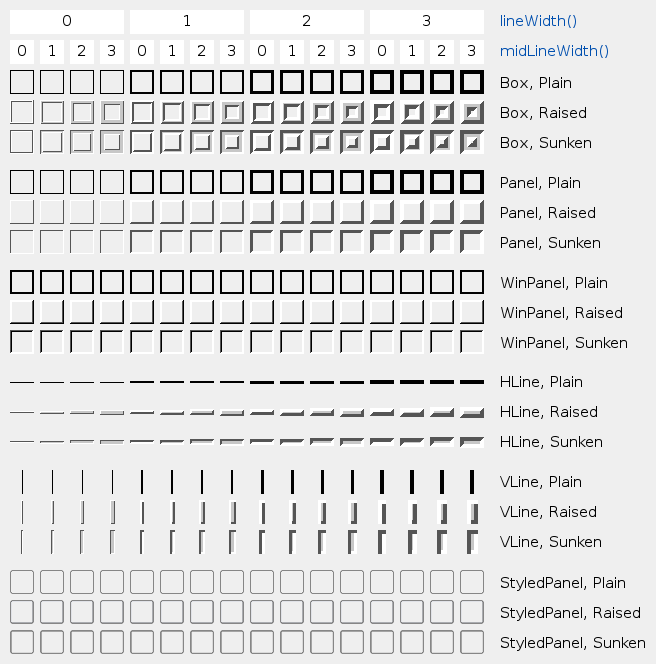
This table shows some of the combinations of styles and line widths:
This enum type defines the types of shadow that are used to give a 3D effect to frames.
| 常量 | 值 | 描述 |
|---|---|---|
| QFrame.Plain | 0x0010 | the frame and contents appear level with the surroundings; draws using the palette QPalette.WindowText color (without any 3D effect) |
| QFrame.Raised | 0x0020 | the frame and contents appear raised; draws a 3D raised line using the light and dark colors of the current color group |
| QFrame.Sunken | 0x0030 | the frame and contents appear sunken; draws a 3D sunken line using the light and dark colors of the current color group |
阴影交互影响 QFrame.Shape , lineWidth () 和 midLineWidth (). See the picture of the frames in the main class documentation.
另请参阅 QFrame.Shape , lineWidth (),和 midLineWidth ().
此枚举类型定义框架可用形状。
| 常量 | 值 | 描述 |
|---|---|---|
| QFrame.NoFrame | 0 | QFrame draws nothing |
| QFrame.Box | 0x0001 | QFrame draws a box around its contents |
| QFrame.Panel | 0x0002 | QFrame draws a panel to make the contents appear raised or sunken |
| QFrame.StyledPanel | 0x0006 | draws a rectangular panel with a look that depends on the current GUI style. It can be raised or sunken. |
| QFrame.HLine | 0x0004 | QFrame draws a horizontal line that frames nothing (useful as separator) |
| QFrame.VLine | 0x0005 | QFrame draws a vertical line that frames nothing (useful as separator) |
| QFrame.WinPanel | 0x0003 | draws a rectangular panel that can be raised or sunken like those in Windows 2000. Specifying this shape sets the line width to 2 pixels. WinPanel is provided for compatibility. For GUI style independence we recommend using StyledPanel 代替。 |
当不调用 QStyle , Shape interacts with QFrame.Shadow , lineWidth () 和 midLineWidth () to create the total result. See the picture of the frames in the main class 文档编制。
另请参阅 QFrame.Shadow , QFrame.style (),和 QStyle.drawPrimitive ().
This enum defines two constants that can be used to extract the two components of frameStyle ():
| 常量 | 值 | 描述 |
|---|---|---|
| QFrame.Shadow_Mask | 0x00f0 | Shadow 部分在 frameStyle () |
| QFrame.Shape_Mask | 0x000f | 形状 部分在 frameStyle () |
通常,不需要使用这些,由于 frameShadow () 和 frameShape () 已提取 Shadow 和 形状 部分在 frameStyle ().
另请参阅 frameStyle () 和 setFrameStyle ().
parent argument, if not None, causes self to be owned by Qt instead of PyQt.
构造框架 Widget 采用框架样式 NoFrame 和 1 像素框架宽度。
parent and f 自变量被传递给 QWidget 构造函数。
重实现自 QWidget.changeEvent ().
重实现自 QObject.event ().
返回框架样式。
默认值为 QFrame.Plain .
另请参阅 setFrameStyle (), frameShape (),和 frameShadow ().
重实现自 QWidget.paintEvent ().
将框架样式设为 style .
style is the bitwise OR between a frame shape and a frame shadow style. See the picture of the frames in the main class 文档编制。
The frame shapes are given in QFrame.Shape and the shadow styles in QFrame.Shadow .
If a mid-line width greater than 0 is specified, an additional line is drawn for Raised or Sunken Box , HLine ,和 VLine frames. The mid-color of the current color group is used for drawing middle lines.
另请参阅 frameStyle ().
重实现自 QWidget.sizeHint ().
