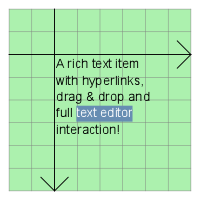
The QGraphicsTextItem class provides a text item that you can add to a QGraphicsScene to display formatted text. 更多...
继承 QGraphicsObject .
The QGraphicsTextItem class provides a text item that you can add to a QGraphicsScene to display formatted text.
若只需要在项中展示纯文本,请考虑使用 QGraphicsSimpleTextItem 代替。
To set the item's text, pass a QString to QGraphicsTextItem's constructor, or call setHtml ()/ setPlainText ().
QGraphicsTextItem uses the text's formatted size and the associated font to provide a reasonable implementation of boundingRect (), shape (),和 contains (). You can set the font by calling setFont ().
It is possible to make the item editable by setting the Qt.TextEditorInteraction flag using setTextInteractionFlags ().
The item's preferred text width can be set using setTextWidth () 和 obtained using textWidth ().
注意: In order to align HTML text in the center, the item's text width must be set.
注意: QGraphicsTextItem accepts hover events 在默认情况下。 You can change this with setAcceptHoverEvents() .
parent argument, if not None, causes self to be owned by Qt instead of PyQt.
scene argument, if not None, causes self to be owned by Qt instead of PyQt.
构造 QGraphicsTextItem . parent is passed to QGraphicsItem 's 构造函数。
另请参阅 QGraphicsScene.addItem ().
parent argument, if not None, causes self to be owned by Qt instead of PyQt.
scene argument, if not None, causes self to be owned by Qt instead of PyQt.
构造 QGraphicsTextItem ,使用 text 作为默认纯文本。 parent 会被传递给 QGraphicsItem 的构造函数。
另请参阅 QGraphicsScene.addItem ().
Adjusts the text item to a reasonable size.
重实现自 QGraphicsItem.boundingRect ().
重实现自 QGraphicsItem.contains ().
重实现自 QGraphicsItem.contextMenuEvent ().
Returns the default text color that is used to for unformatted text.
另请参阅 setDefaultTextColor ().
返回项的文本文档。
另请参阅 setDocument ().
重实现自 QGraphicsItem.dragEnterEvent ().
重实现自 QGraphicsItem.dragLeaveEvent ().
重实现自 QGraphicsItem.dragMoveEvent ().
重实现自 QGraphicsItem.dropEvent ().
重实现自 QGraphicsItem.focusInEvent ().
重实现自 QGraphicsItem.focusOutEvent ().
Returns the item's font, which is used to render the text.
另请参阅 setFont ().
重实现自 QGraphicsItem.hoverEnterEvent ().
重实现自 QGraphicsItem.hoverLeaveEvent ().
重实现自 QGraphicsItem.hoverMoveEvent ().
重实现自 QGraphicsItem.inputMethodEvent ().
重实现自 QGraphicsItem.inputMethodQuery ().
重实现自 QGraphicsItem.isObscuredBy ().
重实现自 QGraphicsItem.keyPressEvent ().
重实现自 QGraphicsItem.keyReleaseEvent ().
重实现自 QGraphicsItem.mouseDoubleClickEvent ().
重实现自 QGraphicsItem.mouseMoveEvent ().
重实现自 QGraphicsItem.mousePressEvent ().
重实现自 QGraphicsItem.mouseReleaseEvent ().
重实现自 QGraphicsItem.opaqueArea ().
重实现自 QGraphicsItem.paint ().
重实现自 QGraphicsItem.sceneEvent ().
Sets the color for unformatted text to col .
另请参阅 defaultTextColor ().
Sets the text document document on the item.
另请参阅 document ().
Sets the font used to render the text item to font .
另请参阅 font ().
Sets the item's text to text , assuming that text is HTML formatted. If the item has keyboard input focus, this function will also call ensureVisible () to ensure that the text is visible in all viewports.
另请参阅 toHtml (), hasFocus (),和 QGraphicsSimpleTextItem .
Sets the item's text to text . If the item has keyboard input focus, this function will also call ensureVisible () to ensure that the text is visible in all viewports.
若 b is true, the Tab key will cause the widget to change focus; otherwise, the tab key will insert a tab into the 文档。
In some occasions text edits should not allow the user to input tabulators or change indentation using the Tab key, as this breaks the focus chain. The default is false.
该函数在 Qt 4.5 引入。
另请参阅 tabChangesFocus (), ItemIsFocusable ,和 textInteractionFlags ().
Sets the flags flags to specify how the text item should react to user input.
The default for a QGraphicsTextItem is Qt.NoTextInteraction . This function also affects the ItemIsFocusable QGraphicsItem flag by setting it if flags is different from Qt.NoTextInteraction and clearing it otherwise.
By default, the text is read-only. To transform the item into an editor, set the Qt.TextEditable 标志。
另请参阅 textInteractionFlags ().
Sets the preferred width for the item's text. If the actual text is wider than the specified width then it will be broken into multiple lines.
若 width is set to -1 then the text will not be broken into multiple lines unless it is enforced through an explicit line break or a new paragraph.
默认值为 -1。
注意: QGraphicsTextItem keeps a QTextDocument internally, which is used to calculate the text width.
另请参阅 textWidth () 和 QTextDocument.setTextWidth ().
重实现自 QGraphicsItem.shape ().
返回 true 若 Tab key will cause the widget to change focus; otherwise, false is returned.
By default, this behavior is disabled, and this function will return false.
该函数在 Qt 4.5 引入。
另请参阅 setTabChangesFocus ().
Returns the current text interaction flags.
另请参阅 setTextInteractionFlags ().
Returns the text width.
The width is calculated with the QTextDocument that QGraphicsTextItem keeps internally.
另请参阅 setTextWidth () 和 QTextDocument.textWidth ().
Returns the item's text converted to HTML, or an empty QString if no text has been set.
另请参阅 setHtml ().
Returns the item's text converted to plain text, or an empty QString if no text has been set.
另请参阅 setPlainText ().
重实现自 QGraphicsItem.type ().
This is the default overload of this signal.
This signal is emitted when the user clicks on a link on a text item that enables Qt.LinksAccessibleByMouse or Qt.LinksAccessibleByKeyboard . link is the link that was clicked.
另请参阅 setTextInteractionFlags ().
This is the default overload of this signal.
This signal is emitted when the user hovers over a link on a text item that enables Qt.LinksAccessibleByMouse . link is the link that was hovered over.
另请参阅 setTextInteractionFlags ().
