The QGroupBox widget provides a group box frame with a title. 更多...
继承 QWidget .
The QGroupBox widget provides a group box frame with a title.
A group box provides a frame, a title and a keyboard shortcut, and displays various other widgets inside itself. The title is on top, the keyboard shortcut moves keyboard focus to one of the group box's child widgets.
QGroupBox also lets you set the title (normally set in the constructor) and the title's alignment . Group boxes can be checkable ; child widgets in checkable group boxes are enabled or disabled depending on whether or not the group box is checked .
You can minimize the space consumption of a group box by enabling the flat 特性。 In most styles , enabling this property results in the removal of the left, right and bottom edges of the frame.
QGroupBox doesn't automatically lay out the child widgets (which are often QCheckBox es or QRadioButton s but can be any widgets). The following example shows how we can set up a QGroupBox with a layout:
     QGroupBox *groupBox = new QGroupBox(tr("Exclusive Radio Buttons"));
     QRadioButton *radio1 = new QRadioButton(tr("&Radio button 1"));
     QRadioButton *radio2 = new QRadioButton(tr("R&adio button 2"));
     QRadioButton *radio3 = new QRadioButton(tr("Ra&dio button 3"));
     radio1->setChecked(true);
     QVBoxLayout *vbox = new QVBoxLayout;
     vbox->addWidget(radio1);
     vbox->addWidget(radio2);
     vbox->addWidget(radio3);
     vbox->addStretch(1);
     groupBox->setLayout(vbox);
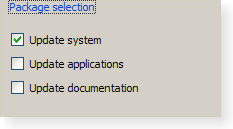
|
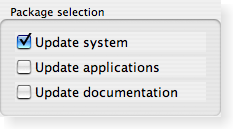
|
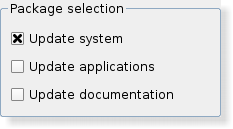
|
| A Windows XP style group box. | A Macintosh style group box. | A Plastique style group box. |
parent argument, if not None, causes self to be owned by Qt instead of PyQt.
Constructs a group box widget with the given parent but with no title.
parent argument, if not None, causes self to be owned by Qt instead of PyQt.
Constructs a group box with the given title and parent .
重实现自 QWidget.changeEvent ().
重实现自 QObject.childEvent ().
重实现自 QObject.event ().
重实现自 QWidget.focusInEvent ().
初始化 option 采用值来自此 QGroupBox . This method is useful for subclasses when they need a QStyleOptionGroupBox , but don't want to fill in all the information themselves.
另请参阅 QStyleOption.initFrom ().
重实现自 QWidget.minimumSizeHint ().
重实现自 QWidget.mouseMoveEvent ().
重实现自 QWidget.mousePressEvent ().
重实现自 QWidget.mouseReleaseEvent ().
重实现自 QWidget.paintEvent ().
重实现自 QWidget.resizeEvent ().
This method is also a Qt slot with the C++ signature void setChecked(bool) .
This is the default overload of this signal.
This signal is emitted when the check box is activated (i.e. pressed down then released while the mouse cursor is inside the button), or when the shortcut key is typed, Notably, this signal is not 被发射若调用 setChecked ().
If the check box is checked checked is true; it is false if the check box is unchecked.
该函数在 Qt 4.2 引入。
另请参阅 checkable , toggled (),和 checked .
This is the default overload of this signal.
If the group box is checkable, this signal is emitted when the check box is toggled. on is true if the check box is checked; otherwise it is false.
另请参阅 checkable .
