QVBoxLayout 类垂直排列 Widget。 更多...
继承 QBoxLayout .
QVBoxLayout 类垂直排列 Widget。
此类被用于构造垂直框布局对象。见 QBoxLayout 了解细节。
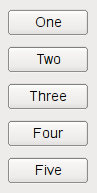
最简单的类用法,像这样:
     QWidget *window = new QWidget;
     QPushButton *button1 = new QPushButton("One");
     QPushButton *button2 = new QPushButton("Two");
     QPushButton *button3 = new QPushButton("Three");
     QPushButton *button4 = new QPushButton("Four");
     QPushButton *button5 = new QPushButton("Five");
     QVBoxLayout *layout = new QVBoxLayout;
     layout->addWidget(button1);
     layout->addWidget(button2);
     layout->addWidget(button3);
     layout->addWidget(button4);
     layout->addWidget(button5);
     window->setLayout(layout);
     window->show();
First, we create the widgets we want in the layout. Then, we create the QVBoxLayout object and add the widgets into the layout. 最后,调用 QWidget.setLayout () to install the QVBoxLayout object onto the widget. At that point, the widgets in the layout are reparented to have window as their parent.
Constructs a new vertical box. You must add it to another layout.
parent argument, if not None, causes self to be owned by Qt instead of PyQt.
Constructs a new top-level vertical box with parent parent .
