The QInputDialog class provides a simple convenience dialog to get a single value from the user. 更多...
继承 QDialog .
The QInputDialog class provides a simple convenience dialog to get a single value from the user.
The input value can be a string, a number or an item from a list. A label must be set to tell the user what they should enter.
Four static convenience functions are provided: getText (), getInt (), getDouble (),和 getItem (). All the functions can be used in a similar way, for example:
     bool ok;
     QString text = QInputDialog.getText(this, tr("QInputDialog.getText()"),
                                          tr("User name:"), QLineEdit.Normal,
                                          QDir.home().dirName(), &ok);
     if (ok && !text.isEmpty())
         textLabel->setText(text);
ok variable is set to true if the user clicks OK ; otherwise it is set to false.
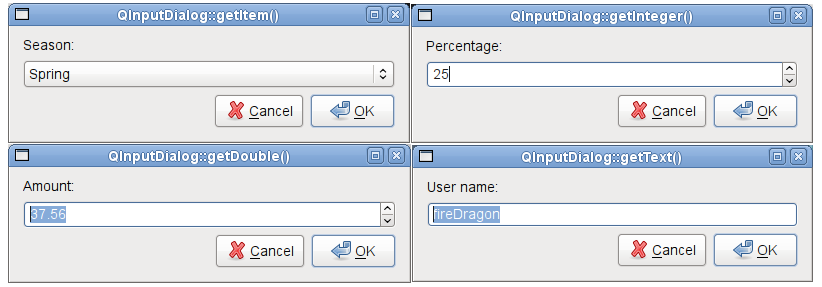
标准对话框 example shows how to use QInputDialog as well as other built-in Qt dialogs.
This enum specifies various options that affect the look and feel of an input dialog.
| 常量 | 值 | 描述 |
|---|---|---|
| QInputDialog.NoButtons | 0x00000001 | Don't display OK and Cancel buttons. (Useful for "live dialogs".) |
| QInputDialog.UseListViewForComboBoxItems | 0x00000002 | Use a QListView rather than a non-editable QComboBox for displaying the items set with setComboBoxItems (). |
该枚举在 Qt 4.5 引入或被修改。
The InputDialogOptions type is a typedef for QFlags <InputDialogOption>. It stores an OR combination of InputDialogOption values.
另请参阅 options , setOption (),和 testOption ().
This enum describes the different modes of input that can be selected for the dialog.
| 常量 | 值 | 描述 |
|---|---|---|
| QInputDialog.TextInput | 0 | Used to input text strings. |
| QInputDialog.IntInput | 1 | Used to input integers. |
| QInputDialog.DoubleInput | 2 | Used to input floating point numbers with double precision accuracy. |
该枚举在 Qt 4.5 引入或被修改。
另请参阅 inputMode .
parent argument, if not None, causes self to be owned by Qt instead of PyQt.
Constructs a new input dialog with the given parent and window flags .
该函数在 Qt 4.5 引入。
重实现自 QDialog.done ().
关闭对话框并将其结果代码设为 result 。若 this dialog is shown with exec_ (), done() causes the local event loop to finish, and exec_ () to return result .
另请参阅 QDialog.done ().
Static convenience function to get a floating point number from the user.
title is the text which is displayed in the title bar of the dialog. label is the text which is shown to the user (it should say what should be entered). value is the default floating point number that the line edit will be set to. min and max are the minimum and maximum values the user may choose. decimals is the maximum number of decimal places the number may have.
若 ok is nonnull, * ok will be set to true if the user pressed OK and to false if the user pressed Cancel . The dialog's parent is parent . The dialog will be modal and uses the widget flags .
This function returns the floating point number which has been entered by the user.
Use this static function like this:
     bool ok;
     double d = QInputDialog.getDouble(this, tr("QInputDialog.getDouble()"),
                                        tr("Amount:"), 37.56, -10000, 10000, 2, &ok);
     if (ok)
         doubleLabel->setText(QString("$%1").arg(d));
警告: Do not delete parent during the execution of the dialog. If you want to do this, you should create the dialog yourself using one of the QInputDialog 构造函数。
另请参阅 getText (), getInt (),和 getItem ().
Static convenience function to get an integer input from the user.
title is the text which is displayed in the title bar of the dialog. label is the text which is shown to the user (it should say what should be entered). value is the default integer which the spinbox will be set to. min and max are the minimum and maximum values the user may choose. step is the amount by which the values change as the user presses the arrow buttons to increment or decrement the value.
若 ok is nonnull * ok will be set to true if the user pressed OK and to false if the user pressed Cancel . The dialog's parent is parent . The dialog will be modal and uses the widget flags .
On success, this function returns the integer which has been entered by the user; on failure, it returns the initial value .
Use this static function like this:
     bool ok;
     int i = QInputDialog.getInt(this, tr("QInputDialog.getInteger()"),
                                  tr("Percentage:"), 25, 0, 100, 1, &ok);
     if (ok)
         integerLabel->setText(tr("%1%").arg(i));
警告: Do not delete parent during the execution of the dialog. If you want to do this, you should create the dialog yourself using one of the QInputDialog 构造函数。
该函数在 Qt 4.5 引入。
另请参阅 getText (), getDouble (),和 getItem ().
Static convenience function to let the user select an item from a string list.
title is the text which is displayed in the title bar of the dialog. label is the text which is shown to the user (it should say what should be entered). items is the string list which is inserted into the combobox. current is the number of the item which should be the current item. inputMethodHints is the input method hints that will be used if the combobox is editable and an input method is active.
若 editable is true the user can enter their own text; otherwise the user may only select one of the existing items.
若 ok is nonnull *a ok will be set to true if the user pressed OK and to false if the user pressed Cancel . The dialog's parent is parent . The dialog will be modal and uses the widget flags .
This function returns the text of the current item, or if editable is true, the current text of the combobox.
Use this static function like this:
     QStringList items;
     items << tr("Spring") << tr("Summer") << tr("Fall") << tr("Winter");
     bool ok;
     QString item = QInputDialog.getItem(this, tr("QInputDialog.getItem()"),
                                          tr("Season:"), items, 0, false, &ok);
     if (ok && !item.isEmpty())
         itemLabel->setText(item);
警告: Do not delete parent during the execution of the dialog. If you want to do this, you should create the dialog yourself using one of the QInputDialog 构造函数。
另请参阅 getText (), getInt (),和 getDouble ().
Static convenience function to get a string from the user.
title is the text which is displayed in the title bar of the dialog. label is the text which is shown to the user (it should say what should be entered). text is the default text which is placed in the line edit. mode is the echo mode the line edit will use. inputMethodHints is the input method hints that will be used in the edit widget if an input method is active.
若 ok is nonnull *a ok will be set to true if the user pressed OK and to false if the user pressed Cancel . The dialog's parent is parent . The dialog will be modal and uses the specified widget flags .
If the dialog is accepted, this function returns the text in the dialog's line edit. If the dialog is rejected, a null QString 被返回。
Use this static function like this:
     bool ok;
     QString text = QInputDialog.getText(this, tr("QInputDialog.getText()"),
                                          tr("User name:"), QLineEdit.Normal,
                                          QDir.home().dirName(), &ok);
     if (ok && !text.isEmpty())
         textLabel->setText(text);
警告: Do not delete parent during the execution of the dialog. If you want to do this, you should create the dialog yourself using one of the QInputDialog 构造函数。
另请参阅 getInt (), getDouble (),和 getItem ().
重实现自 QWidget.minimumSizeHint ().
这是重载函数。
This function connects one of its signals to the slot specified by receiver and member . The specific signal depends on the arguments that are specified in member . These 是:
The signal will be disconnected from the slot when the dialog is closed.
该函数在 Qt 4.5 引入。
Sets the range of double precision floating point values accepted by the dialog when used in DoubleInput mode, with minimum and maximum values specified by min and max 分别。
Sets the range of integer values accepted by the dialog when used in IntInput mode, with minimum and maximum values specified by min and max 分别。
设置给定 option to be enabled if on is true; otherwise, clears the given option .
另请参阅 options and testOption ().
重实现自 QWidget.setVisible ().
重实现自 QWidget.sizeHint ().
Returns true if the given option is enabled; otherwise, returns false.
另请参阅 options and setOption ().
This is the default overload of this signal.
This signal is emitted whenever the double value changes in the dialog. The current value is specified by value .
This signal is only relevant when the input dialog is used in DoubleInput 模式。
This is the default overload of this signal.
This signal is emitted whenever the user selects a double value by accepting the dialog; for example, by clicking the OK button. The selected value is specified by value .
This signal is only relevant when the input dialog is used in DoubleInput 模式。
This is the default overload of this signal.
This signal is emitted whenever the integer value changes in the dialog. The current value is specified by value .
This signal is only relevant when the input dialog is used in IntInput 模式。
This is the default overload of this signal.
This signal is emitted whenever the user selects a integer value by accepting the dialog; for example, by clicking the OK button. The selected value is specified by value .
This signal is only relevant when the input dialog is used in IntInput 模式。
This is the default overload of this signal.
This signal is emitted whenever the text string changes in the dialog. The current string is specified by text .
This signal is only relevant when the input dialog is used in TextInput 模式。
This is the default overload of this signal.
This signal is emitted whenever the user selects a text string by accepting the dialog; for example, by clicking the OK button. The selected string is specified by text .
This signal is only relevant when the input dialog is used in TextInput 模式。
