QTabWidget 类提供选项卡式 Widget 的堆栈。 更多...
继承 QWidget .
QTabWidget 类提供选项卡式 Widget 的堆栈。
选项卡小部件提供选项卡栏 (见 QTabBar ) and a "page area" that is used to display pages related to each tab. By default, the tab bar is shown above the page area, but different configurations are available (见 TabPosition ). Each tab is associated with a different widget (called a page). Only the current page is shown in the page area; all the other pages are hidden. The user can show a different page by clicking on its tab or by pressing its Alt+ letter shortcut if it has one.
通常,使用 QTabWidget 的方式是履行以下:
选项卡位置的定义通过 tabPosition ,它们的形状通过 tabShape .
信号 currentChanged () is emitted when the user selects a page.
当前页面索引可用作 currentIndex (), the current page widget with currentWidget (). You can retrieve a pointer to a page widget with a given index using widget (), and can find the index position of a widget with indexOf ()。使用 setCurrentWidget () 或 setCurrentIndex () to show a particular page.
可以更改选项卡的文本和图标使用 setTabText () 或 setTabIcon (). A tab and its associated page can be removed with removeTab ().
可以随时启用或禁用每选项卡 (见 setTabEnabled ()). If a tab is enabled, the tab text is drawn normally and the user can select that tab. If it is disabled, the tab is drawn in a different way and the user cannot select that tab. Note that even if a tab is disabled, the page can still be visible, for example if all of the tabs happen to be disabled.
Tab widgets can be a very good way to split up a complex dialog. An alternative is to use a QStackedWidget for which you provide some means of navigating between pages, for example, a QToolBar 或 QListWidget .
大多数 QTabWidget 功能的提供通过 QTabBar (at the top, providing the tabs) 和 QStackedWidget (most of the area, organizing the individual pages).
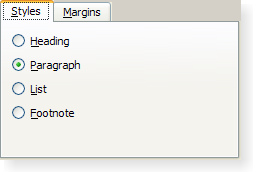
|
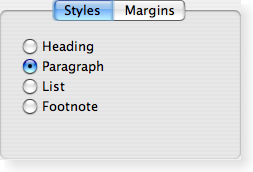
|
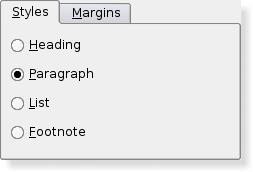
|
| A Windows XP style tab widget. | A Macintosh style tab widget. | A Plastique style tab widget. |
此枚举类型定义在哪里 QTabWidget 绘制选项卡行:
| 常量 | 值 | 描述 |
|---|---|---|
| QTabWidget.North | 0 | 选项卡绘制在页面上方。 |
| QTabWidget.South | 1 | 选项卡绘制在页面下方。 |
| QTabWidget.West | 2 | The tabs are drawn to the left of the 页面。 |
| QTabWidget.East | 3 | The tabs are drawn to the right of the 页面。 |
此枚举类型定义选项卡的形状:
| 常量 | 值 | 描述 |
|---|---|---|
| QTabWidget.Rounded | 0 | The tabs are drawn with a rounded look. This is the default shape. |
| QTabWidget.Triangular | 1 | The tabs are drawn with a triangular look. |
parent argument, if not None, causes self to be owned by Qt instead of PyQt.
构造选项卡式 Widget 采用父级 parent .
widget argument has it's ownership transferred to Qt.
添加选项卡采用给定 page and label 到 tab widget, and returns the index of the tab in the tab bar.
若选项卡的 label contains an ampersand, the letter following the ampersand is used as a shortcut for the tab, e.g. if the label is "Bro&wse" then Alt+W becomes a shortcut which will move the focus to this tab.
注意: 若调用 addTab() 后于 show (), the layout system will try to adjust to the changes in its widgets hierarchy and may cause flicker. To prevent this, you can set the QWidget.updatesEnabled property to false prior to changes; remember to set the property to true when the changes are done, making the widget receive paint events again.
另请参阅 insertTab ().
widget argument has it's ownership transferred to Qt.
这是重载函数。
添加选项卡采用给定 page , icon ,和 label to the tab widget, and returns the index of the tab in the tab bar.
This function is the same as addTab (), but with an additional icon .
重实现自 QWidget.changeEvent ().
Removes all the pages, but does not delete them. Calling this function is equivalent to calling removeTab () until the tab widget is empty.
返回的 Widget 展示在 corner of the tab widget or 0.
另请参阅 setCornerWidget ().
Returns a pointer to the page currently being displayed by the tab dialog. The tab dialog does its best to make sure that this value is never 0 (but if you try hard enough, it can be).
另请参阅 currentIndex () 和 setCurrentWidget ().
重实现自 QObject.event ().
重实现自 QWidget.heightForWidth ().
该函数在 Qt 4.8 引入。
返回页面占据的索引位置由 Widget w ,或 -1 若找不到 Widget。
初始化 option 采用值来自此 QTabWidget . This method is useful for subclasses when they need a QStyleOptionTabWidgetFrame , but don't want to fill in all the information themselves.
另请参阅 QStyleOption.initFrom () 和 QTabBar.initStyleOption ().
widget argument has it's ownership transferred to Qt.
插入选项卡采用给定 label and page into the tab widget at the specified index , and returns the index of the inserted tab in the tab bar.
The label is displayed in the tab and may vary in appearance depending on the configuration of the tab widget.
若选项卡的 label contains an ampersand, the letter following the ampersand is used as a shortcut for the tab, e.g. if the label is "Bro&wse" then Alt+W becomes a shortcut which will move the focus to this tab.
若 index is out of range, the tab is simply appended. Otherwise it is inserted at the specified position.
若 QTabWidget was empty before this function is called, the new page becomes the current page. Inserting a new tab at an index less than or equal to the current index will increment the current index, but keep the current 页面。
注意: 若之后调用 insertTab() 在 show (), the layout system will try to adjust to the changes in its widgets hierarchy and may cause flicker. To prevent this, you can set the QWidget.updatesEnabled property to false prior to changes; remember to set the property to true when the changes are done, making the widget receive paint events again.
另请参阅 addTab ().
widget argument has it's ownership transferred to Qt.
返回 true 若页面在位置 index is enabled; otherwise returns false.
另请参阅 setTabEnabled () 和 QWidget.isEnabled ().
重实现自 QWidget.keyPressEvent ().
重实现自 QWidget.minimumSizeHint ().
返回选项卡 Widget 的适用最小尺寸。
重实现自 QWidget.paintEvent ().
描绘选项卡 Widget 的选项卡栏为响应描绘 event .
移除选项卡,在位置 index from this stack of widgets. The page widget itself is not deleted.
另请参阅 addTab () and insertTab ().
重实现自 QWidget.resizeEvent ().
widget argument has it's ownership transferred to Qt.
设置给定 widget 以展示在指定 corner of the tab widget. The geometry of the widget is determined based on the widget's sizeHint () 和 style ().
仅水平元素的 corner 将是 used.
Passing 0 shows no widget in the corner.
任何先前设置的角落 Widget 均被隐藏。
All widgets set here will be deleted by the tab widget when it is destroyed unless you separately reparent the widget after setting some other corner widget (or 0).
注意:角落小部件被设计为 North and South tab positions; other orientations are known to not work properly.
另请参阅 cornerWidget () 和 setTabPosition ().
This method is also a Qt slot with the C++ signature void setCurrentIndex(int) .
This method is also a Qt slot with the C++ signature void setCurrentWidget(QWidget*) .
Makes widget 当前小部件。 widget used must be a page in this tab widget.
另请参阅 addTab (), setCurrentIndex (), and currentWidget ().
QTabBar argument has it's ownership transferred to Qt.
替换对话框的 QTabBar heading with the tab bar tb 。注意,这必须被调用 before any tabs have been added, or the behavior is undefined.
另请参阅 tabBar ().
若 enable 为 true,页面在位置 index is enabled; otherwise the page at position index 是禁用的。 The page's tab is redrawn appropriately.
QTabWidget 使用 QWidget.setEnabled () internally, rather than keeping a separate flag.
Note that even a disabled tab/page may be visible. If the page is visible already, QTabWidget will not hide it; if all the pages are disabled, QTabWidget 将展示它们之一。
另请参阅 isTabEnabled () 和 QWidget.setEnabled ().
这是重载函数。
设置 icon 为选项卡在位置 index .
另请参阅 tabIcon ().
定义新 label 为页面,在位置 index 的选项卡。
If the provided text contains an ampersand character ('&'), a shortcut is automatically created for it. The character that follows the '&' will be used as the shortcut key. Any previous shortcut will be overwritten, or cleared if no shortcut is defined by the text. See the QShortcut documentation for details (to display an actual ampersand, use '&&').
另请参阅 tabText ().
设置选项卡工具提示为页面,在位置 index to tip .
另请参阅 tabToolTip ().
设置 What's This 帮助文本为页面,在位置 index to text .
该函数在 Qt 4.1 引入。
另请参阅 tabWhatsThis ().
重实现自 QWidget.showEvent ().
重实现自 QWidget.sizeHint ().
返回当前 QTabBar .
另请参阅 setTabBar ().
返回页面选项卡图标,在位置 index .
另请参阅 setTabIcon ().
This virtual handler is called after a new tab was added or inserted at position index .
另请参阅 tabRemoved ().
This virtual handler is called after a tab was removed from position index .
另请参阅 tabInserted ().
返回页面选项卡标签文本,在位置 index .
另请参阅 setTabText ().
返回页面选项卡工具提示,在位置 index 或空字符串若未设置工具提示。
另请参阅 setTabToolTip ().
返回页面 What's This 帮助文本,在位置 index ,或空字符串若未设置帮助文本。
该函数在 Qt 4.1 引入。
另请参阅 setTabWhatsThis ().
返回选项卡页面,在索引位置 index or 0 if the index 超出范围。
This is the default overload of this signal.
This signal is emitted whenever the current page index changes. The parameter is the new current page index position, or -1 if there isn't a new one (for example, if there are no widgets in the QTabWidget )
另请参阅 currentWidget () 和 currentIndex .
This is the default overload of this signal.
This signal is emitted when the close button on a tab is clicked. The index 是应被移除的索引。
该函数在 Qt 4.5 引入。
另请参阅 setTabsClosable ().
