The QSqlRelationalTableModel class provides an editable data model for a single database table, with foreign key support. 更多...
继承 QSqlTableModel .
The QSqlRelationalTableModel class provides an editable data model for a single database table, with foreign key support.
QSqlRelationalTableModel acts like QSqlTableModel , but allows columns to be set as foreign keys into other database tables.
|
|
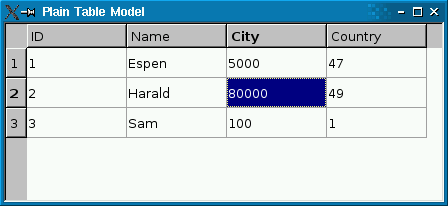
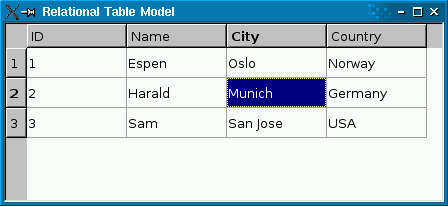
The screenshot on the left shows a plain QSqlTableModel 在 QTableView . Foreign keys ( city and country ) aren't resolved to human-readable values. The screenshot on the right shows a QSqlRelationalTableModel, with foreign keys resolved into human-readable text strings.
The following code snippet shows how the QSqlRelationalTableModel was set up:
     model->setTable("employee");
     model->setRelation(2, QSqlRelation("city", "id", "name"));
     model->setRelation(3, QSqlRelation("country", "id", "name"));
setRelation () function calls establish a relationship between two tables. The first call specifies that column 2 in table employee 是 foreign key that maps with field id of table city , and that the view should present the city 's name field to the user. The second call does something similar with column 3.
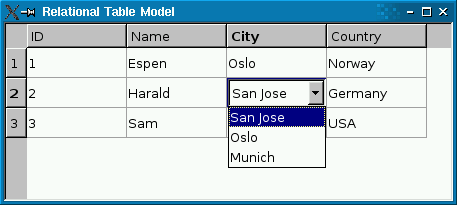
If you use a read-write QSqlRelationalTableModel, you probably want to use QSqlRelationalDelegate 在 view. Unlike the default delegate, QSqlRelationalDelegate 提供 combobox for fields that are foreign keys into other tables. To use the class, simply call QAbstractItemView.setItemDelegate () on the view with an instance of QSqlRelationalDelegate :
     QTableView *view = new QTableView;
     view->setModel(model);
     view->setItemDelegate(new QSqlRelationalDelegate(view));
sql/relationaltablemodel example illustrates how to use QSqlRelationalTableModel in conjunction with QSqlRelationalDelegate to provide tables with foreign key support.
注意事项:
This enum specifies the type of mode to use when joining two tables.
| 常量 | 值 | 描述 |
|---|---|---|
| QSqlRelationalTableModel.InnerJoin | 0 | Inner join mode, return rows when there is at least one match in both tables. |
| QSqlRelationalTableModel.LeftJoin | 1 | Left join mode, returns all rows from the left table (table_name1), even if there are no matches in the right table (table_name2). |
该枚举在 Qt 4.8 引入或被修改。
另请参阅 QSqlRelationalTableModel.setJoinMode ().
parent argument, if not None, causes self to be owned by Qt instead of PyQt.
Creates an empty QSqlRelationalTableModel and sets the parent to parent and the database connection to db 。若 db is not valid, the default database connection will be used.
重实现自 QSqlQueryModel.clear ().
重实现自 QAbstractItemModel.data ().
另请参阅 setData ().
重实现自 QSqlTableModel.insertRowIntoTable ().
重实现自 QSqlTableModel.orderByClause ().
Returns the relation for the column column , or an invalid relation if no relation is set.
另请参阅 setRelation () 和 QSqlRelation.isValid ().
返回 QSqlTableModel object for accessing the table for which column is a foreign key, or 0 if there is no relation for the given column .
The returned object is owned by the QSqlRelationalTableModel .
另请参阅 setRelation () 和 relation ().
重实现自 QAbstractItemModel.removeColumns ().
重实现自 QSqlTableModel.revertRow ().
重实现自 QSqlTableModel.select ().
重实现自 QSqlTableModel.selectStatement ().
重实现自 QAbstractItemModel.setData ().
Sets the data for the role in the item with the specified index 到 value given. Depending on the edit strategy, the value might be applied to the database at once, or it may be cached in the model.
Returns true if the value could be set, or false on error (for example, if index is out of bounds).
For relational columns, value must be the index, not the display value. The index must also exist in the referenced table, otherwise the function returns false.
另请参阅 editStrategy (), data (), submit (),和 revertRow ().
Sets the SQL join mode to the value given by joinMode to show or hide rows with NULL foreign keys.
在 InnerJoin mode (the default) these rows will not be shown; use the LeftJoin mode if you want to show them.
该函数在 Qt 4.8 引入。
另请参阅 QSqlRelationalTableModel.JoinMode .
Lets the specified column be a foreign index specified by relation .
范例:
     model->setTable("employee");
     model->setRelation(2, QSqlRelation("city", "id", "name"));
The setRelation() call specifies that column 2 in table employee is a foreign key that maps with field id of table city , and that the view should present the city 's name field to the user.
Note: The table's primary key may not contain a relation to another table.
另请参阅 relation ().
重实现自 QSqlTableModel.setTable ().
重实现自 QSqlTableModel.updateRowInTable ().
